




01. Edit your form online
Type text, add images, blackout confidential details, add comments, highlights and more.

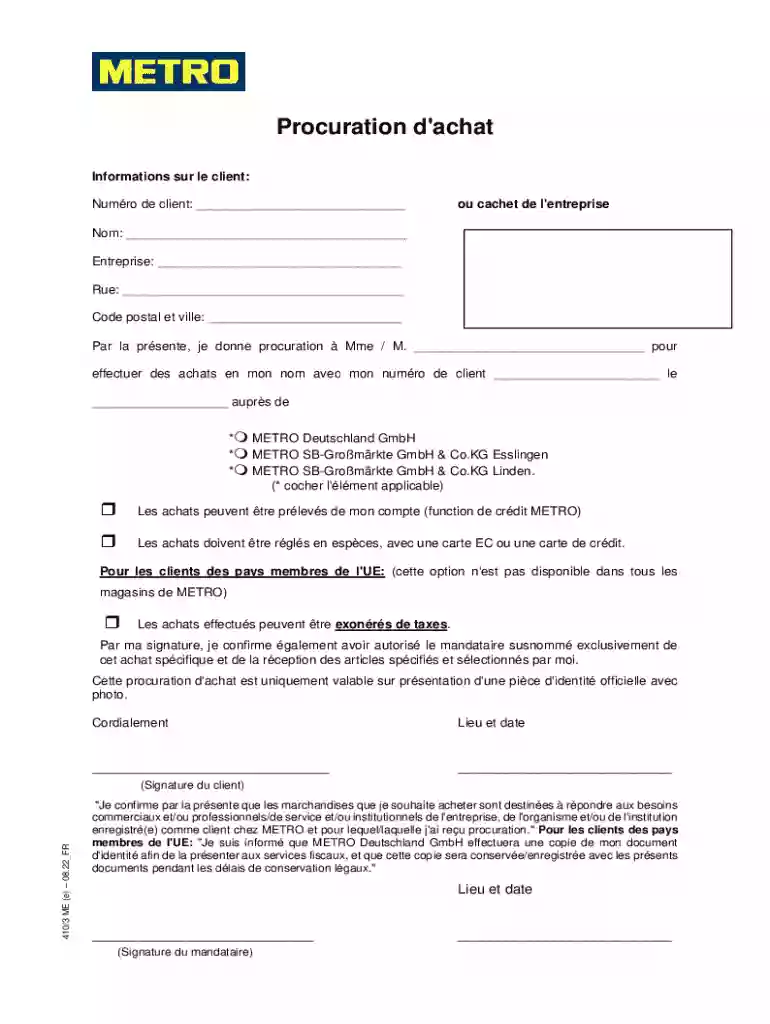
Type text, add images, blackout confidential details, add comments, highlights and more.

Draw your signature, type it, upload its image, or use your mobile device as a signature pad.

Send it via email, link, or fax. You can also download it, export it or print it out.
A purchasing authorization is a formal document used to grant an individual the authority to make purchases on behalf of a business or organization. It serves as a crucial control measure to ensure that purchasing activities are conducted within established guidelines and with the proper oversight. The document typically includes details such as the authorized individual's name, the scope of their purchasing abilities, any budgetary limits, and the duration of the authorization. This ensures that purchases are made in alignment with organizational standards and financial policies.
Understanding how to correctly use a purchasing authorization is vital for ensuring seamless transactions. Firstly, the authorized individual must present the document to vendors at METRO stores, informing them of their capacity to make business-related purchases. It's important to adhere to any specified purchase limits or conditions stated in the authorization. In practice, this might mean purchasing supplies or equipment required for business operations, ensuring each transaction falls within the defined scope and budget. Monitoring and tracking each purchase using documentation or digital records can help maintain financial transparency and accountability.
Completing a purchasing authorization involves several structured steps to ensure accuracy and compliance.
The purchasing authorization form comprises several essential components designed to establish clear purchasing protocols and responsibilities.
Utilizing a purchasing authorization ensures that all purchasing activities within a business are conducted with transparency and control. This proactive approach minimizes the risk of unauthorized or inappropriate spending, aligns purchases with budget allocations, and provides a clear audit trail for financial transactions. By monitoring who is allowed to make purchases and under what conditions, organizations can guard against fraudulent activities and ensure that purchases serve business or institutional needs.
A purchasing authorization has a significant legal aspect, as it imparts legitimate power to the authorized individual to make business-related purchases. This document must be compliant with relevant regulations, such as those outlined in the ESIGN Act, ensuring that electronic forms and signatures maintain the same legal standing as paper versions. Legal compliance is essential for protecting both the business and the authorized purchaser from potential disputes or liability issues. Proper documentation and adherence to applicable laws not only facilitate smoother transactions but also build trust between the business, clients, and vendors.
Purchasing authorizations are commonly utilized by businesses and institutions where specific members are designated to procure goods and services. This includes:


Real-world scenarios demonstrate the practical application of a purchasing authorization. For instance, a business executive may use the authorization during a large-scale office supply purchase for a new branch, ensuring that all items procured align with the company’s operational needs and financial constraints. In another scenario, a school administrator could leverage the authorization to acquire new computer equipment for a computer lab, operating within the educational institution's budget and technological requirements. Clear documentation of each transaction helps maintain transparency, accountability, and compliance with organizational policies.
We've got more versions of the Purchasing authorization form. Select the right Purchasing authorization version from the list and start editing it straight away!
At DocHub, your data security is our priority. We follow HIPAA, SOC2, GDPR, and other standards, so you can work on your documents with confidence.
A Purchase Authorization can be bid for a contract term not to exceed five years and may contain provisions for price adjustments if provided for in theRead more
This request is generated when a department is requesting goods or services that require a signature for terms and conditions, exceeds $5000,
The Purchase Order (PO) Verification screen allows the authorised person (Signatory 1) to verify the Purchase Order (PO) for purchasing the items.


