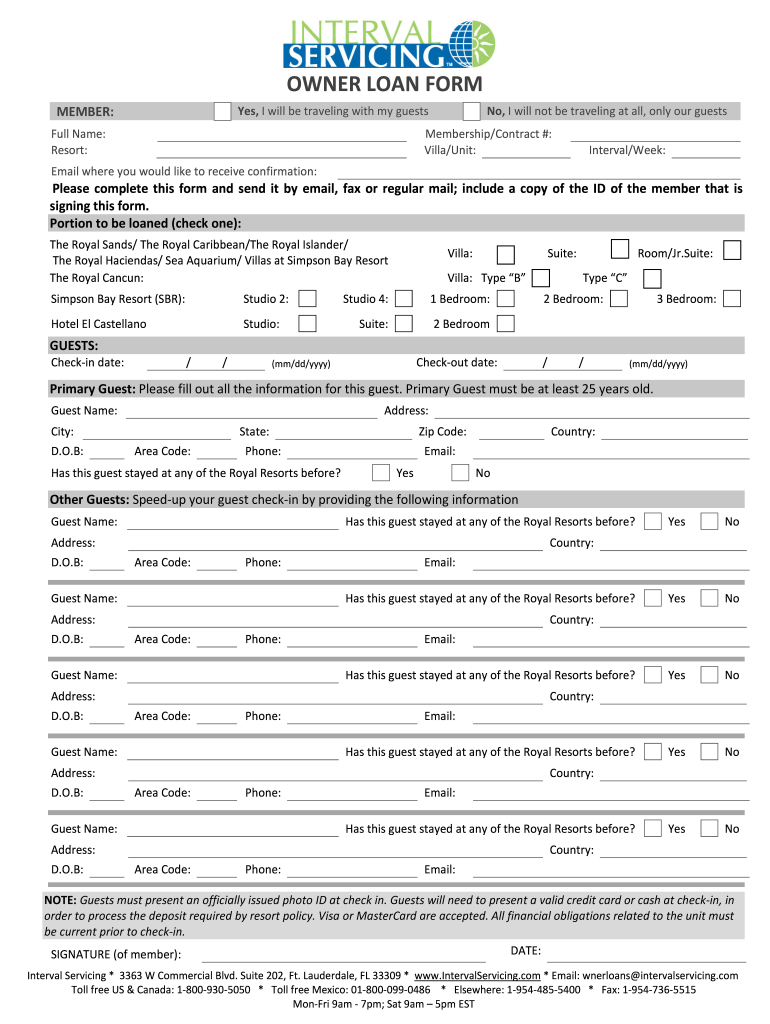
01. Edit your interval servicing owner loan form online
Type text, add images, blackout confidential details, add comments, highlights and more.
02. Sign it in a few clicks
Draw your signature, type it, upload its image, or use your mobile device as a signature pad.
03. Share your form with others
Send owner loan form via email, link, or fax. You can also download it, export it or print it out.
How to use or fill out owner loan form with our platform
Ease of Setup
DocHub User Ratings on G2
Ease of Use
DocHub User Ratings on G2
Click ‘Get Form’ to open the owner loan form in the editor.
Begin by filling in your full name and membership/contract number. Specify whether you will be traveling with guests or not.
Indicate the portion of the property you wish to loan by checking the appropriate box for your selected resort.
Provide your email address where you would like to receive confirmation of this transaction.
For each guest, fill out their details including name, address, date of birth, and contact information. Ensure that the primary guest is at least 25 years old.
Complete any additional guest information as needed, noting if they have stayed at any Royal Resorts before.
Finally, sign and date the form to confirm your submission. Make sure to include a copy of your ID when sending it off via email or fax.
Start using our platform today for free and streamline your document editing experience!
Mar 31, 2025 The purpose of this form is to collect information about the Small Business Applicant (Applicant) and its owners, the loan request, existingRead more
Jul 11, 2017 We are making sample materials available for public service and educational purposes on the basis set out on the site including its Terms of Use.Read more
List of loan request applications ; wmid, Signers WMID ; tid, loan application number, an integer; if 0, the result is a list of all request loan applications;Read more
Cookie consent notice
This site uses cookies to enhance site navigation and personalize your experience.
By using this site you agree to our use of cookies as described in our Privacy Notice.
You can modify your selections by visiting our Cookie and Advertising Notice.