
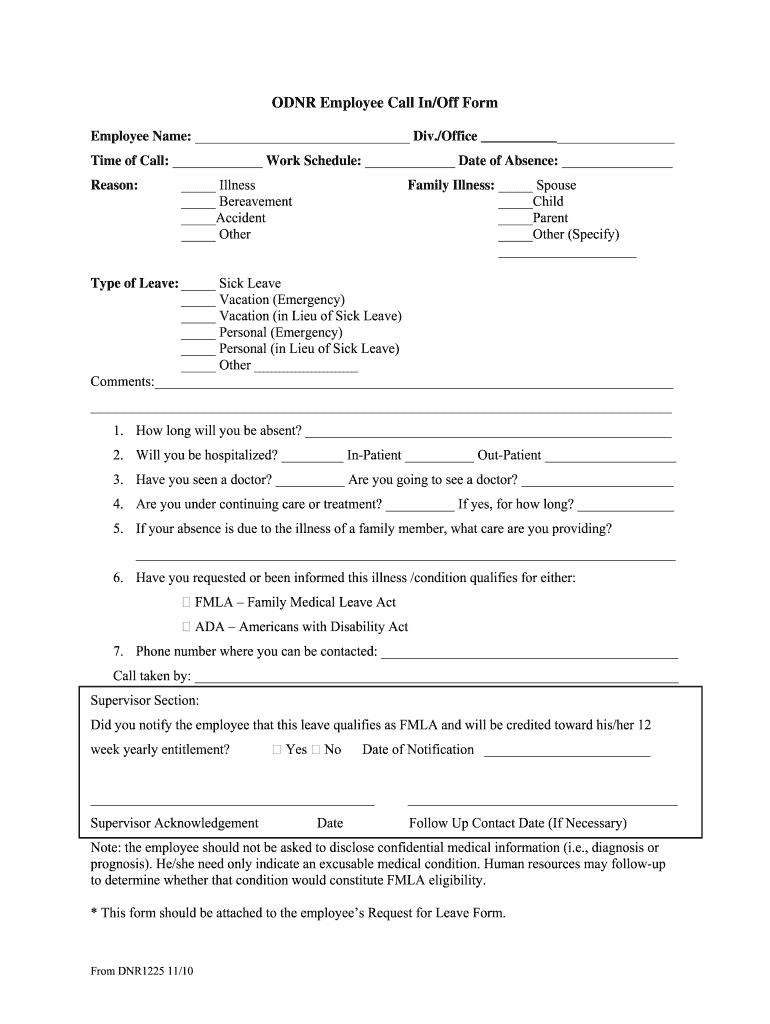







Definition & Meaning of the Employee Call Form
The employee call form, often known as the employee call-in or call-out form, is a crucial document used by employees to formally communicate their inability to work due to various reasons, such as illness or personal emergencies. This standardized form is essential for maintaining clear communication between employees and their employers regarding unscheduled absences.
Key Features:
- Captures employee information, including name and department.
- Records specific details about the absence, such as the date and time of the call and reason for leave.
- May include space for additional comments or requests related to the absence.
The call form helps streamline the process of notification and assists HR departments in tracking absences to ensure proper documentation and compliance with organizational policies.
Steps to Complete the Employee Call Form
Completing the employee call form requires a few straightforward steps that ensure all necessary information is captured accurately.
- Gather Information: Collect personal details such as your name, employee ID, and department.
- Specify Absence Details: Clearly state the date and time you are calling in or out. Make sure to specify the reason for your absence whether it be personal, medical, or otherwise.
- Provide Additional Comments: Use this section to elaborate on your situation if necessary, or to inform your employer about any tasks that need immediate attention due to your absence.
- Review for Accuracy: Ensure all information is accurate and complete to avoid follow-up questions.
- Submit the Form: Return it as directed, whether it is through email, in person, or via an HR portal.
Completing the form accurately is vital for ensuring that your employer has all necessary documentation regarding your absence.
Important Terms Related to Employee Call Forms
Understanding key terms associated with the employee call form can enhance your ability to fill out the document correctly and interact with your employer regarding absences.
- FMLA (Family and Medical Leave Act): A U.S. federal law that allows eligible employees to take unpaid leave for specified family and health reasons.
- Sick Leave: A benefit provided by an employer allowing employees to take time off for illness without losing pay.
- Call in/Call out Policy: Guidelines established by an employer relating to how and when employees should notify them of absences.
Familiarity with these terms enables employees to navigate their obligations and rights effectively.
Who Typically Uses the Employee Call Form
The employee call form is utilized by a wide range of individuals in various job sectors. It is particularly common in environments where shifts must be filled or schedules managed closely.
- Corporate Employees: Often in office settings, where formal notification processes are essential for HR management.
- Healthcare Workers: Crucial for nurses or physicians who may need to alert their employer of sudden inability to work, impacting patient care.
- Retail Staff: Employees in retail settings frequently use this form due to the high turnover and scheduling demands in the industry.
- Manufacturing Workers: Essential for maintaining workflow and safety standards, as absences can affect production lines.
Understanding the diverse user base illustrates the importance of this form across various business sectors.


Legal Use of the Employee Call Form
The legal implications of using an employee call form are significant. This document serves as a formal record, which can protect both the employee and employer in case of disputes regarding absences.
- Documentation for Absences: Provides a formalized way to record time off, which is especially critical for compliance with labor laws.
- Evidence in Disputes: Should any conflict arise regarding attendance, having documented proof can help to clarify the situation and provide legal protection.
Employers should ensure that the use of the call form aligns with company policies and federal regulations while employees must be aware of their rights and responsibilities concerning their usage.
Examples of Using the Employee Call Form
Utilizing the employee call form effectively can vary based on individual circumstances. Below are practical examples of how different employees might fill out the form:
- Sick Leave for a Cold: An employee informs their supervisor they cannot come in due to a cold, stating their name, the date, and under "Reason for Leave," they write "illness."
- Bereavement Leave: An employee uses the form to request time off due to a family member's passing, including additional notes about expected return dates.
- Extended Health Issues: An employee dealing with a chronic health issue submits the form alongside medical documentation to apply for longer-term leave, making sure to specify the requested type of leave in the relevant section.
These examples illustrate how the form serves as a versatile tool, accommodating various scenarios and needs across different workplaces.




