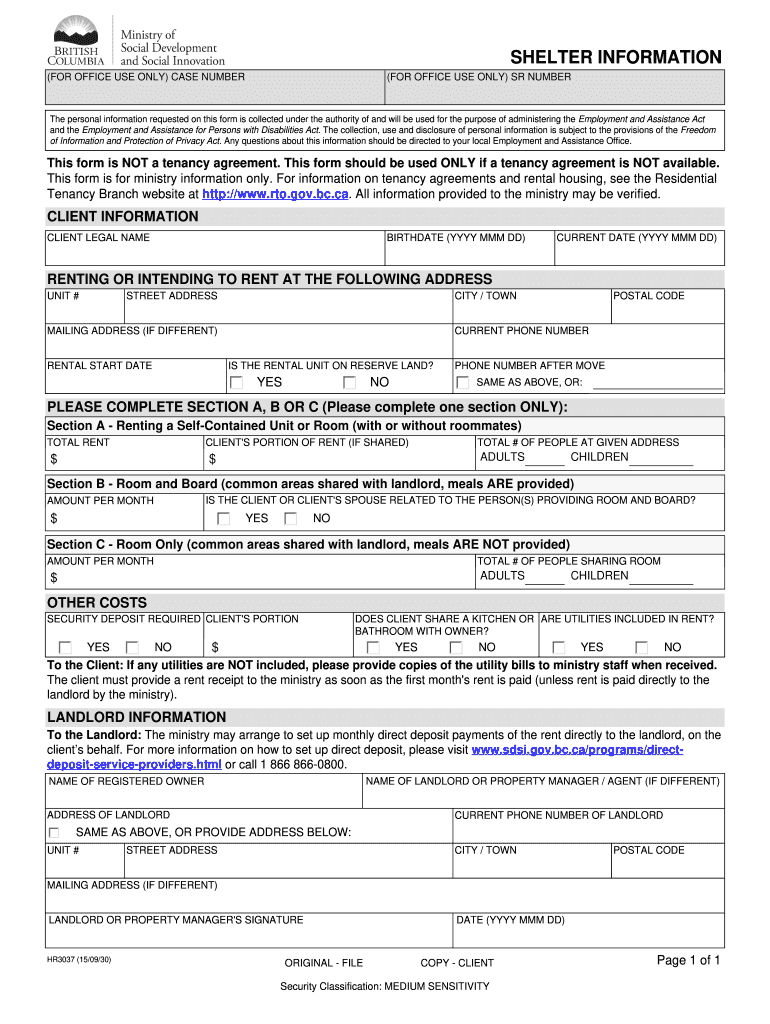







Definition and Purpose of the HR3037 Form
The HR3037 form, also referred to as the shelter information form, is specifically designed to assist individuals seeking housing assistance under the Employment and Assistance Act. Its primary purpose is to gather essential personal and housing information from clients who do not possess a tenancy agreement. This form facilitates the verification of living arrangements, ensuring that all relevant details are documented for consideration by the Ministry of Social Development.
Key Components of the HR3037 Form
- Client Information: This section requires personal details such as the client’s name, address, and contact information.
- Landlord Details: If applicable, clients must provide the landlord’s information, including name and contact numbers.
- Rental Information: Specifics regarding the rental agreement, like monthly rent, payment methods, and any relevant terms, are collected here.
- Verification of Living Arrangements: The form includes fields to verify residency status and living conditions.
The HR3037 form's role is critical in the housing assistance application process, as it ensures that clients’ details are accurately represented and can be reviewed expediently by social services.
Completing the HR3037 Form: Step-by-Step Instructions
Filling out the HR3037 form correctly is vital for a successful application. Following these steps can help ensure that all required information is provided accurately.
-
Gather Necessary Information: Before starting, collect all relevant documents like identification, proof of rental payments, and landlord contacts.
-
Fill in Client Information: Provide your full name, current address, and contact numbers. Ensure that all details are accurate to prevent any delays.
-
Provide Landlord Information: If applicable, list the landlord's name and contact details. If you are renting from a property management company, include its information as well.
-
Detail Rental Information: Clearly state the amount of rent you pay each month, the payment schedule, and modes of payment (e.g., cash, check, e-transfer).
-
Verify Living Arrangements: Confirm your current residency situation, including how long you have lived at the address and any pertinent conditions that affect your housing stability.
-
Review the Form: Before submission, double-check all entered information for accuracy and completeness to prevent processing delays.
The completion of the HR3037 form with attentive detail will significantly improve the prospects of obtaining necessary housing assistance.
Common Scenarios for Using the HR3037 Form
The HR3037 form serves various scenarios where individuals or families may need financial support for housing. Understanding these scenarios can help clarify when to use this form.
-
Individuals without a Formal Lease: Clients who are living in shared accommodations or renting month-to-month can utilize the HR3037 form to document their current housing status when applying for assistance.
-
Transitional Housing Applicants: Those in the process of securing stable housing while temporarily residing with friends or family benefit from filling out this form to illustrate their living situation.
-
Clients Seeking Reinstatement of Benefits: Individuals who previously received housing assistance but have experienced changes in their living circumstances may need to resubmit their information using the HR3037 form.
These scenarios underscore the importance of the HR3037 form in various housing situations, aiding clients in seeking crucial support.
Important Legal Considerations Related to the HR3037 Form
Understanding the legal context surrounding the HR3037 form is vital for applicants. This form must be completed and used in compliance with several regulations to ensure it serves its intended purpose effectively.
-
Protection of Personal Information: The HR3037 form collects sensitive personal data. It is essential for users to ensure that this information is shared only with authorized personnel for housing assistance purposes.
-
Compliance with the Employment and Assistance Act: Submissions of the HR3037 must align with the requirements set out in the Employment and Assistance Act. Non-compliance can result in delays or denial of assistance.
-
Record Keeping: Clients should retain a copy of their completed HR3037 form and any communications with the Ministry of Social Development. This documentation is crucial for future reference and maintaining a transparent application process.
Recognizing these legal factors can help applicants navigate the complexities of housing assistance applications with greater assurance and clarity.
Variations and Alternatives to the HR3037 Form
While the HR3037 form is tailored for specific housing assistance applications under the Employment and Assistance Act, there are variations designed for different contexts within housing support systems.
-
Ministry Shelter Information Form: This version may be specific to certain regions or programs under the social services umbrella, often focusing on shelter placements and accommodations.
-
Shelter Verification Form: Sometimes required in conjunction with the HR3037 for clients living in shelters, this form helps confirm a person’s residency within a specific shelter facility.
-
BC Shelter Update Form: This variant is necessary for clients who need to update their housing situation or financial status while receiving assistance.
These forms serve similar functions but cater to the unique aspects of different housing programs, ensuring that clients receive the appropriate support.
Practical Examples of Using the HR3037 Form in Real Life
Considering practical applications of the HR3037 form aids potential users in understanding how it functions in various scenarios. Here are several examples that illustrate real-life use cases:
-
Case Study 1: A single parent living in a shared household without a formal rental agreement fills out the HR3037 form to apply for child support assistance, demonstrating their need for stable housing.
-
Case Study 2: A young adult transitioning from foster care fills out the HR3037 after finding temporary accommodation with friends. This form aids them in securing benefits to assist in future housing.
-
Case Study 3: An elderly couple who recently lost their lease uses the HR3037 form to present their current living situation to the Ministry of Social Development while seeking urgent financial assistance.
These examples highlight diverse circumstances where individuals might leverage the HR3037 form effectively, showcasing its significance in promoting housing stability.