Type text, add images, blackout confidential details, add comments, highlights and more.
02. Sign it in a few clicks
Draw your signature, type it, upload its image, or use your mobile device as a signature pad.
03. Share your form with others
Send dr 0137 via email, link, or fax. You can also download it, export it or print it out.
How to use or fill out dr 0137 with our platform
Ease of Setup
DocHub User Ratings on G2
Ease of Use
DocHub User Ratings on G2
Click ‘Get Form’ to open the dr 0137 in the editor.
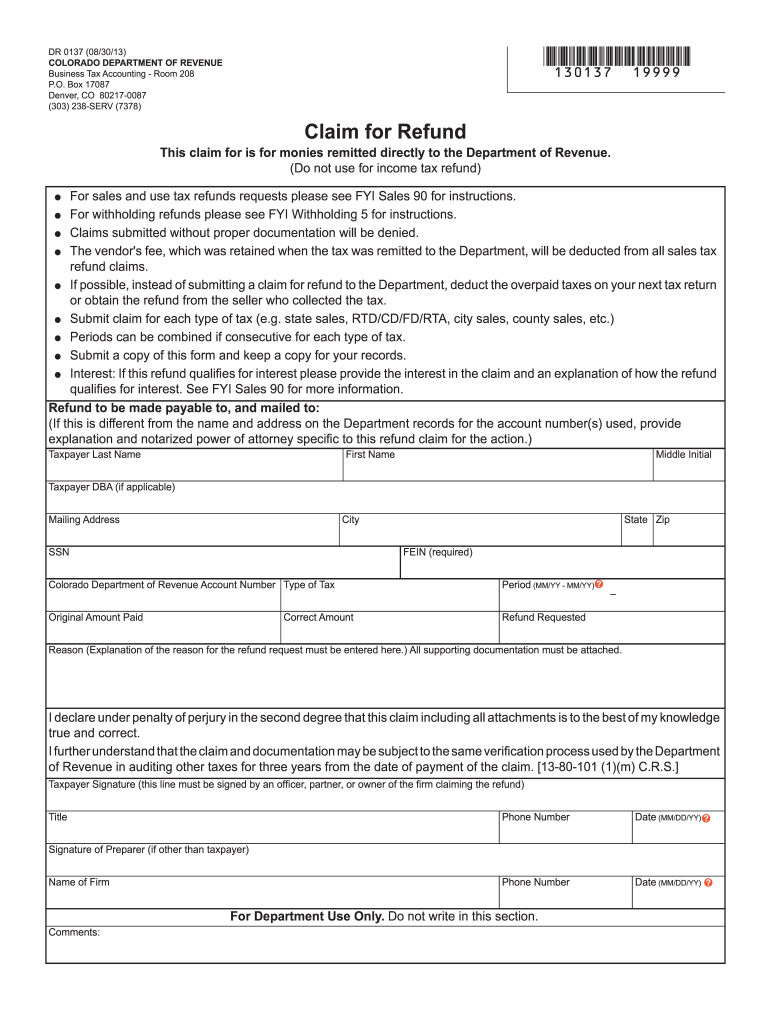
Begin by entering your personal information in the Taxpayer section. Fill in your last name, first name, middle initial, and DBA if applicable. Ensure that your mailing address, city, state, and zip code are accurate.
Provide your Social Security Number (SSN) and Federal Employer Identification Number (FEIN), which is required for processing your claim.
Indicate the type of tax for which you are requesting a refund and specify the period of overpayment using the MM/YY format.
Fill in the original amount paid and the refund requested. Be sure to explain the reason for your refund request clearly in the designated section.
Attach all necessary supporting documentation as required. Remember to sign and date the form at the bottom, ensuring it is signed by an authorized individual.
Start filling out dr 0137 today on our platform for free!
Jun 19, 2012 The point of contact is Dr. Emily May Lent, Toxicology Portfolio, Toxicity Evaluation. Program, at 410-436-3980, DSN 584-3980, or FAX at 410-Read more
DR 0137 (08/30/13). COLORADO DEPARTMENT OF REVENUE. Business Tax Accounting - Room 208. P.O. Box 17087. Denver, CO 80217-0087. (303) 238-SERV (7378). Claim forRead more
Cookie consent notice
This site uses cookies to enhance site navigation and personalize your experience.
By using this site you agree to our use of cookies as described in our Privacy Notice.
You can modify your selections by visiting our Cookie and Advertising Notice.