Hs 200 2026

Get Form
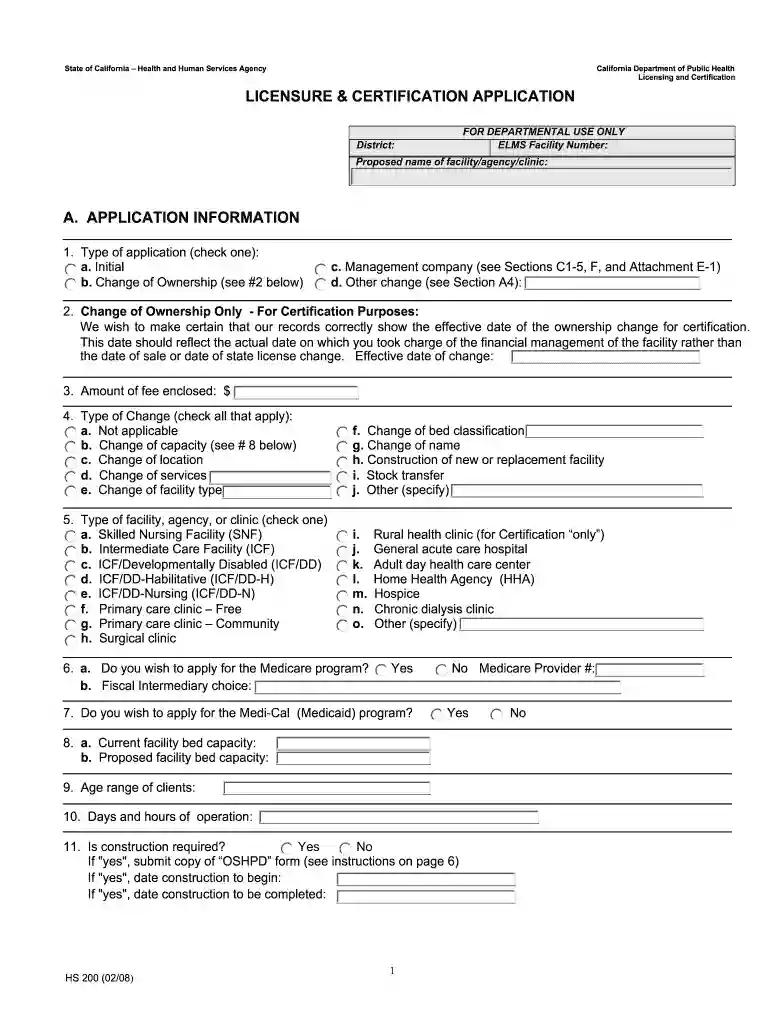
hs 200 form Preview on Page 1

Here's how it works

01. Edit your hs 200 form online
Type text, add images, blackout confidential details, add comments, highlights and more.

02. Sign it in a few clicks
Draw your signature, type it, upload its image, or use your mobile device as a signature pad.

03. Share your form with others
Send form hs 200 via email, link, or fax. You can also download it, export it or print it out.

How to use or fill out hs 200 with our platform

Form edit decoration
9.5
Ease of Setup
DocHub User Ratings on G2
9.0
Ease of Use
DocHub User Ratings on G2
  1. Click ‘Get Form’ to open the hs 200 in the editor.
  2. Begin with Section A, APPLICATION INFORMATION. Select the type of application by checking one of the options: Initial, Change of Ownership, Management Company, or Other Change.
  3. For Change of Ownership applications, provide the effective date of ownership change in item 2. Enter the amount of fee enclosed in item 3.
  4. In item 4, check all applicable types of changes and specify the type of facility in item 5 by selecting from the provided options.
  5. Proceed to Section B for LICENSEE INFORMATION. Fill in your licensee name and federal employer’s tax ID number. Ensure that all contact details are accurate.
  6. Complete Section C with FACILITY, AGENCY OR CLINIC INFORMATION. Provide details about management agreements if applicable and ensure all required attachments are included.
  7. Finally, review all sections for accuracy before submitting your application through our platform.

Start filling out your hs 200 form today for free using our editor!

See more hs 200 versions

We've got more versions of the hs 200 form. Select the right hs 200 version from the list and start editing it straight away!
Versions Form popularity Fillable & printable
2008 4.9 Satisfied (401 Votes)
be ready to get more

Complete this form in 5 minutes or less

Get form

Got questions?

We have answers to the most popular questions from our customers. If you can't find an answer to your question, please contact us.
Contact us
The HS200 lets you control anything a standard light switch controlsall from your phone. Turn your lights, ceiling fans, and other fixtures off and on no matter where you are. Turn off the light with voice control.
UZIN HS 200 is a flexible one-component, cement-based waterproofing membrane for tile and stone in interior, exterior, commercial, residential, and immersion applications. Used as a -isolation membrane, UZIN HS 200 also reduces transmission in tile and stone floors.
0:06 5:24 Choose smart switch to add the TPLink HS200 smart Wi-Fi light switch. Choose not yet to set up theMoreChoose smart switch to add the TPLink HS200 smart Wi-Fi light switch. Choose not yet to set up the HS200. For the first time detach the HS200 space plate youll reattach it in the final.
The Kasa Smart Wi-Fi Light Switch connects to your homes secure Wi-Fi network. No need for a hub or extra equipment. Set your smart light switch to turn connected fixtures on and off at random intervals to give the appearance youre home even while youre away.
HS100 Wi-Fi Smart Plug The HS100 allows you to create schedules to automatically power on or off your home electronics and appliances at anytime. You can create a schedule for each device any day of the week, or customize it by a specific time in a day.

Security and compliance

At DocHub, your data security is our priority. We follow HIPAA, SOC2, GDPR, and other standards, so you can work on your documents with confidence.

Learn more
ccpa2
pci-dss
gdpr-compliance
hipaa
soc-compliance

People also ask

The HS200 lets you control anything a standard light switch controlsall from your phone. Turn your lights, ceiling fans, and other fixtures off and on no matter where you are.

hs 200