
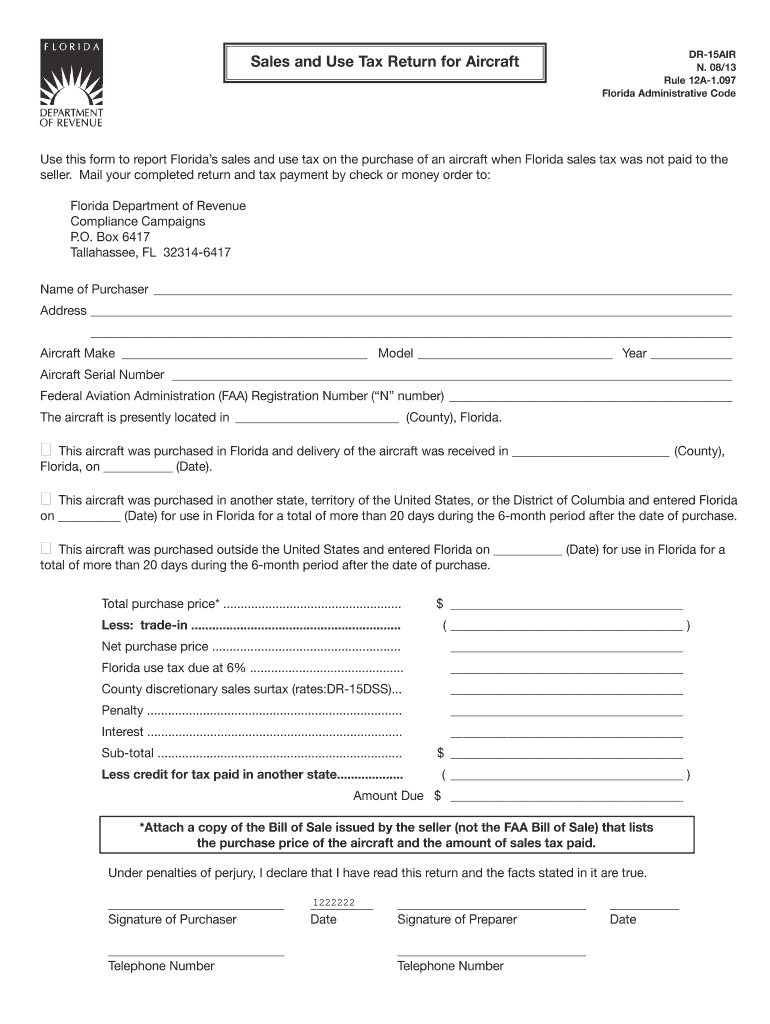







Understanding Form DR-15AIR
Form DR-15AIR is a crucial document used for reporting sales and use tax on aircraft purchases when the Florida sales tax was not paid to the seller. It is essential for individuals and businesses involved in aircraft transactions to understand the purpose and requirements of this form to ensure compliance with state tax laws. This form collects necessary information about the aircraft and the transaction details, including the purchase price and applicable taxes.
How to Use the Form DR-15AIR Efficiently
Using Form DR-15AIR effectively requires a clear understanding of its layout and sections. The form comprises several parts where the purchaser must provide specific details. Start by filling out the purchaser's information, which includes the name, address, and contact details. Then, proceed to the aircraft information section, where you must include the make, model, year, and serial number of the aircraft. Finally, ensure that all tax-related sections are accurately completed to avoid penalties.
Obtaining Form DR-15AIR
Form DR-15AIR can be obtained through various means to accommodate different user preferences. It is typically available on the Florida Department of Revenue’s website, where users can download and print the form. Alternatively, individuals seeking physical copies can obtain them from local tax offices. For those who prefer digital convenience, many document management platforms, like DocHub, offer the option to download and complete the form online.
Completing Form DR-15AIR: A Step-by-Step Guide
- Gather Necessary Information: Ensure you have all relevant details about the aircraft and the purchase transaction.
- Fill Purchaser Information: Enter your full name, address, and contact information in the appropriate sections.
- Detail Aircraft Specifications: Provide complete information about the aircraft, including any unique identifiers.
- Calculate Applicable Taxes: Use the provided sections to detail the purchase price and calculate any sales or use taxes owed.
- Review and Sign: Double-check all entered information for accuracy, sign the form, and date it appropriately.
Reasons to Use Form DR-15AIR
Utilizing Form DR-15AIR is essential to remain compliant with Florida’s tax regulations regarding aircraft purchases. This form ensures that all applicable sales and use taxes are properly reported and paid, which is crucial for legal and financial accuracy. Notably, this helps avoid any legal repercussions or financial penalties that may arise from non-compliance or incorrect reporting.
Typical Users of Form DR-15AIR
Form DR-15AIR is predominantly used by aircraft purchasers who have acquired an aircraft without paying the Florida sales tax at the point of purchase. This includes private buyers, corporations, or any entities involved in the transfer of aircraft ownership. These users need to ensure they report and remit any due taxes promptly.
Key Elements of Form DR-15AIR
Several critical components constitute Form DR-15AIR, each integral to its completion:
- Purchaser Information: Captures the personal details of the buyer.
- Aircraft Details: Includes the specifications and identifying information of the purchased aircraft.
- Transaction Information: Entails the purchase date, price, and related financial details.
- Tax Information: Covers the calculations for sales and use taxes applicable to the purchase.
State-Specific Rules for Form DR-15AIR
For Florida, specific rules dictate the completion and submission of Form DR-15AIR. Purchasers must understand the guidelines regarding sales tax obligations, including exemptions applicable to non-residents and trade-in allowances that may reduce taxable amounts. It's critical to adhere to submission deadlines to avoid late penalties.
Examples of Using Form DR-15AIR in Practice
Consider a scenario where an out-of-state corporation purchases an aircraft in Florida for corporate use. Since the sales tax was not collected during the sale, the corporation must use Form DR-15AIR to report and pay the applicable use tax to Florida. This process ensures the corporation remains compliant with state tax laws.
Filing Deadlines for Form DR-15AIR
Filing deadlines for Form DR-15AIR are crucial to avoid penalties and interest on overdue payments. Typically, the form should be filed along with tax payments on or before the 20th of the month following the purchase date. Adhering to these deadlines is essential for compliance.
Penalties for Non-Compliance
Failing to file Form DR-15AIR or improperly reporting sales and use taxes can result in significant penalties. These can include financial fines and accruing interest on unpaid taxes. Moreover, inaccurate reporting can lead to audits and increased scrutiny from tax authorities. It is therefore essential to complete the form accurately and submit it on time.




