







Key Elements of the USD 489 Preschool Enrollment Form
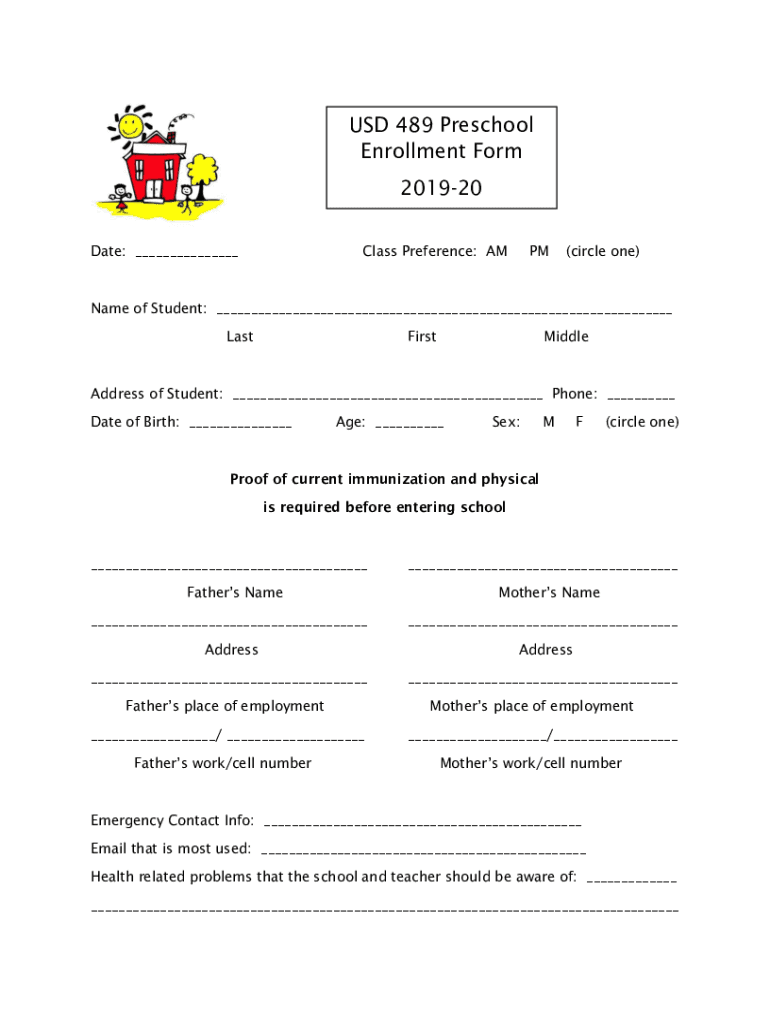
The USD 489 Preschool enrollment form is designed to collect essential details regarding the child's entry into the preschool program. This section will break down the main components of the form, which ensures every necessary aspect is covered for a smooth enrollment process.
-
Student Information: The form begins with gathering personal details about the child, including full name, date of birth, gender, and home address. This information helps identify the student and link them to a family or household.
-
Parental and Guardian Details: This part requires the names and contact information of the child's parents or guardians, including phone numbers and email addresses. Providing multiple contacts ensures that the preschool can reach someone in case of emergencies or updates.
-
Emergency Contacts: Apart from parental contacts, the form also requests additional emergency contact details. These should be other trusted individuals who can be reached if the parents or guardians are unavailable.
-
Class Preference: Applicants can also indicate their preferred class or session, which is crucial for schools to manage class sizes and accommodate individual schedules. This section may include options like morning or afternoon sessions.
-
Health and Medical Information: This is a critical section where you provide details about any medical conditions, allergies, or special needs the child may have. Schools use this information to ensure a safe environment and to prepare proper medical responses.
How to Use the USD 489 Preschool Enrollment Form
Understanding how to navigate the USD 489 Preschool enrollment form efficiently is vital for accurate completion. These step-by-step instructions will guide you through the process.
- Review the Form: Begin by reading through the entire form to familiarize yourself with the questions and sections.
- Gather Necessary Information: Before filling out the form, collect all required documents like birth certificates, immunization records, and contact details.
- Complete the Form Online or Offline: Depending on availability, the form might be filled online or printed for offline completion. Make sure to write clearly if it's a paper form.
- Double-Check Entries: After completing the form, review all entries for accuracy, especially contact information and health details.
- Attach Supporting Documents: Ensure all necessary documents are attached or uploaded, such as proof of residency or health records.
- Submit the Form: Follow the instructions for submission, which might include mailing it to the school district or submitting it via an online portal.
Steps to Complete the USD 489 Preschool Enrollment Form
Successfully completing the USD 489 Preschool form involves multiple steps. This section outlines each stage to ensure a streamlined process.
Gathering Information
- Obtain all personal, medical, and contact information necessary to fill out the form.
- Collect any specific requests or preferences for class sessions.
Filling Out The Form
- Use a black or blue pen for paper forms to ensure legibility.
- Enter all details accurately, paying close attention to required fields.
Reviewing and Proofing
- Double-check all personal information for spelling and accuracy.
- Verify that all emergency and health sections are complete and correct.
Submitting The Form
- Depending on the submission method, ensure the envelope is sealed properly for mail or confirm a successful upload online.
- Keep copies of the completed form and attachments for personal records.
Legal Use and Compliance for USD 489 Preschool
Compliance with legal standards is crucial when completing the USD 489 Preschool form. This section explains the form's legal requirements to mitigate any compliance issues.
-
Accuracy and Truthfulness: Providing accurate and truthful information ensures compliance with legal standards. Falsifying information can result in penalties or refusal of enrollment.
-
Privacy and Data Protection: The form handles sensitive data, and all provided information is protected under privacy laws. Parents and guardians have the right to know how their information will be used.
-
Signature and Authorization: A legal guardian's signature is typically required at the end of the form to validate the information and authorize the preschool to act on behalf of the child in emergencies.
Who Typically Uses the USD 489 Preschool Enrollment Form
Different individuals interact with the USD 489 Preschool form for various reasons. Knowing who typically fills out this form can help streamline the process and ensure completeness.
- Parents and Guardians: They are the primary users, responsible for providing accurate information and signing the form.
- School Administrators: Use the completed forms to organize classes, communicate with parents, and ensure each child's needs are met.
- Healthcare Professionals: May need to access medical information provided during emergencies or for health planning.

Important Terms Related to USD 489 Preschool Enrollment
Understanding terminology associated with the USD 489 Preschool enrollment form can prevent confusion and errors.
Key Terms
- Enrollment Period: The timespan when the school district accepts admissions. Keeping track of this is vital for timely submission.
- Medical Release: Authorization that allows the school to seek medical treatment for the student if necessary.
- Proof of Residency: Document required to verify that the family resides within the district boundaries.
Submission Methods for USD 489 Preschool Enrollment Form
Offering multiple submission methods ensures flexibility for parents and guardians. This section discusses the available options.
- Online Submission: Fast and straightforward, allowing for electronic uploads of supporting documents.
- Mail Submission: Traditional method for those preferring a physical submission. It requires proper postage and careful handling.
- In-Person Drop-Off: Directly delivering the form to the school provides immediate verification of receipt.
State-Specific Rules for USD 489 Preschool Enrollment
Different states may have varying requirements and rules for preschool enrollment, which can affect how the USD 489 form is completed.
- Immunization Records: States have different vaccination requirements; ensure compliance with Kansas state laws.
- Age Eligibility: Verify with local regulations the appropriate age range for preschool enrollment in Kansas.
- Residency Requirements: Proof of residency is often necessary, with some states having unique document requirements.
Harnessing detailed knowledge about the USD 489 Preschool enrollment form improves accuracy and ensures a successful start to your child's education journey.


