Type text, add images, blackout confidential details, add comments, highlights and more.
02. Sign it in a few clicks
Draw your signature, type it, upload its image, or use your mobile device as a signature pad.
03. Share your form with others
Send it via email, link, or fax. You can also download it, export it or print it out.
How to use or fill out Record of Termination with DocHub
Ease of Setup
DocHub User Ratings on G2
Ease of Use
DocHub User Ratings on G2
Click ‘Get Form’ to open the Record of Termination in our editor.
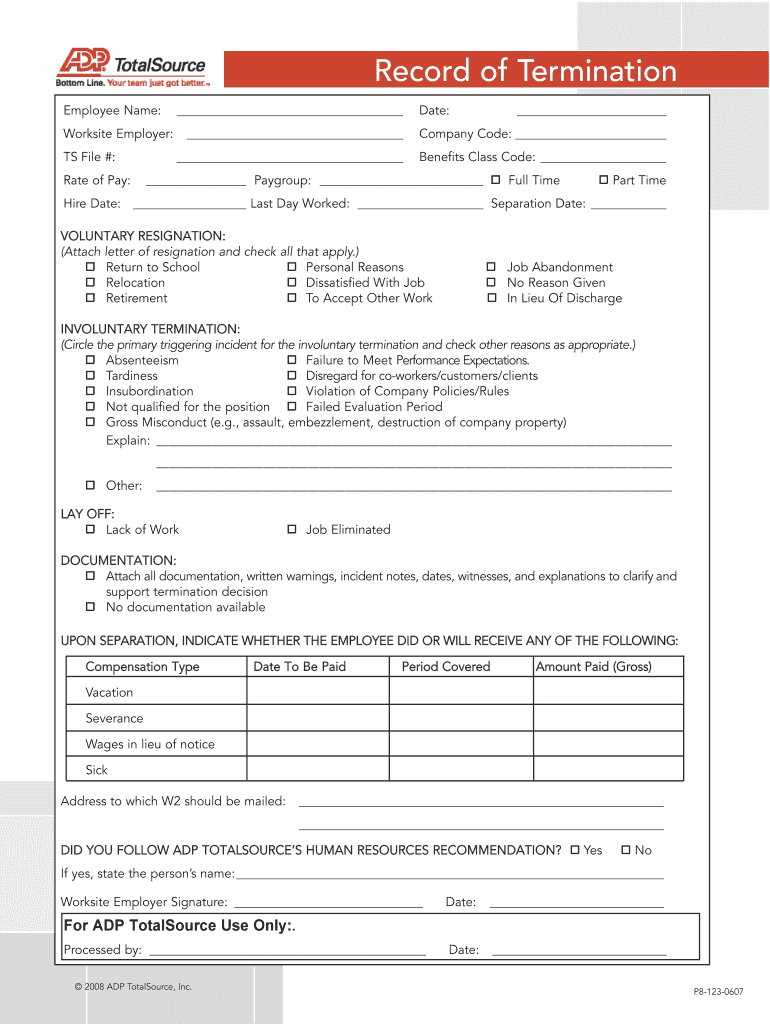
Begin by entering the Employee Name and Worksite Employer details at the top of the form. Ensure accuracy as this information is crucial for record-keeping.
Fill in the TS File #, Rate of Pay, Date, Company Code, Benefits Class Code, and Paygroup. Select whether the employee is Full Time or Part Time.
Document the Hire Date, Last Day Worked, and Separation Date. This section is vital for tracking employment history.
Indicate if the termination was voluntary or involuntary. For voluntary resignations, attach a resignation letter and check applicable reasons. For involuntary terminations, circle the primary incident and check other relevant reasons.
Attach any necessary documentation that supports the termination decision in the Documentation section.
Complete compensation details upon separation, including types of compensation and amounts to be paid.
Finally, ensure all signatures are obtained before finalizing the document.
Start using our platform today to streamline your Record of Termination process for free!
Record of termination letterRecord of termination templateRecord of termination sampleRecord of termination californiaRecord of termination exampleTermination letter to employee sampleImmediate termination letter to employeeRecord of termination pdf
Security and compliance
At DocHub, your data security is our priority. We follow HIPAA, SOC2, GDPR, and other standards, so you can work on your documents with confidence.
The physician should write a termination note in the patients chart documenting that the patient was contacted and told of the physicians decision.Read more
To terminate a grant, a written, signed notice of termination must be served on the relevant grantee (i.e., the individual or entity that received the grantRead more
The court noted that the governments declarations were utterly silent as to which files or record termination because they preceded termination. The courtRead more
Cookie consent notice
This site uses cookies to enhance site navigation and personalize your experience.
By using this site you agree to our use of cookies as described in our Privacy Notice.
You can modify your selections by visiting our Cookie and Advertising Notice.