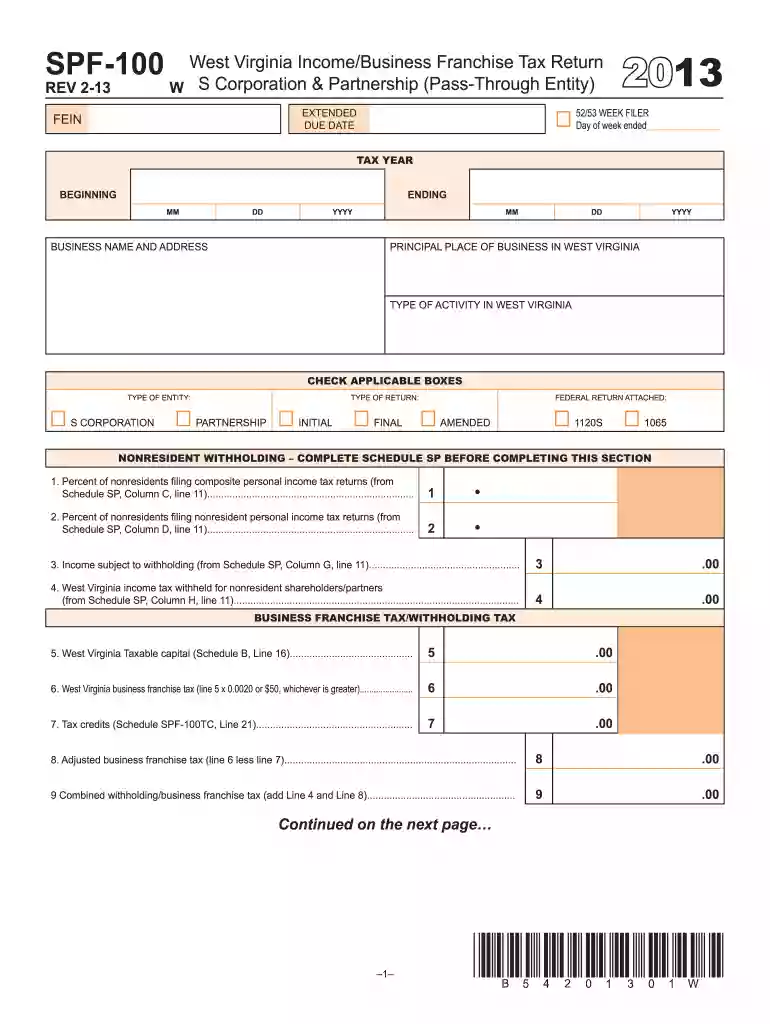
2013 spf 100 form-2026

Get Form
2013 spf 100 form Preview on Page 1

Here's how it works

01. Edit your form online
Type text, add images, blackout confidential details, add comments, highlights and more.

02. Sign it in a few clicks
Draw your signature, type it, upload its image, or use your mobile device as a signature pad.

03. Share your form with others
Send it via email, link, or fax. You can also download it, export it or print it out.

Definition & Meaning

The 2013 SPF-100 form is the West Virginia Income/Business Franchise Tax Return specifically designed for S Corporations and Partnerships. This form is used to report business income, calculate taxes owed, claim tax credits, and provide information on nonresident withholding for the fiscal year of 2013. The SPF-100 form encompasses various schedules that help in determining taxable capital, income modifications, and apportionment for businesses operating in multiple states. Understanding the specific requirements of this form is crucial for complying with West Virginia state tax laws.

Key Components

  • Business Income Reporting: The form requires detailed information about the business's income, including gross receipts and tax deductions.
  • Tax Credits and Deductions: Instructions for claiming eligible tax credits that may reduce the tax liabilities.
  • Nonresident Withholding: Businesses must report any income withheld from nonresidents who are recipients of West Virginia-sourced income.

How to Use the 2013 SPF-100 Form

Using the 2013 SPF-100 form involves several critical steps to ensure accuracy and completeness. Understanding these steps simplifies the process and helps avoid common mistakes.

Detailed Steps

  1. Gather Necessary Documents: Collect all financial documents related to your business, including income statements, expense ledgers, and prior year tax returns.
  2. Review Eligibility: Confirm that your business entity qualifies under the S Corporation or Partnership status for the year 2013.
  3. Complete Required Sections: Fill in all required sections, focusing on business income, deductions, credits, and nonresident withholding details.
  4. Final Check and Review: Verify all entries for accuracy, ensuring that figures match supporting financial documents.

Common Mistakes to Avoid

  • Incorrect Calculations: Ensure all mathematical operations are correct to prevent discrepancies.
  • Missing Deadlines: File before the deadline to avoid penalties and interest on unpaid taxes.

Key Elements of the 2013 SPF-100 Form

The 2013 SPF-100 form comprises several crucial elements required for accurate filing. Each section requires specific information related to business operations and financial performance.

Sections Overview

  • Business Details: Information such as business name, address, and federal employer identification number (FEIN).
  • Taxable Income: Lines dedicated to income earned within and outside West Virginia.
  • Apportionment Factor: Helps determine the taxable portion of income attributable to West Virginia.
  • Payment and Refund Instructions: Guidelines for payments due and procedures for receiving overpayments as refunds.

Steps to Complete the 2013 SPF-100 Form

Filing the 2013 SPF-100 form involves a structured approach to ensure compliance with West Virginia's tax requirements. Each step needs careful attention for accurate submission.

Step-by-Step Process

  1. Acquire the Form: Obtain the 2013 SPF-100 form from the West Virginia State Tax Department.
  2. Fill Personal and Business Information: Start by entering the general and contact information about your business.
  3. Enter Financial Data: Populate sections with financial data from business operations for 2013.
  4. Calculate Adjustments: Use the provided schedules to compute any necessary adjustments to income or deductions.
  5. Finalize the Form: Complete remaining parts with total tax computations, tax credits, and any applicable payments.

Important Considerations

  • Consult a Professional: When necessary, seek guidance from a tax professional to ensure all entries are correct and lawful practices are followed.
  • Double-Check Entries: Review every line for completeness and correctness before submission.

IRS Guidelines for the 2013 SPF-100 Form

The IRS guidelines provide specific instructions for the 2013 SPF-100 form to ensure federal alignment with state tax filings.

Federal Compliance

  • Consistency with Federal Returns: Ensure that figures reported on the SPF-100 align with federal S Corporation or Partnership returns.
  • Record Retention: Maintain all records for a minimum of three years in case of audits or inquiries.

Tips for Compliance

  • Follow Federal Law: Ensure compliance with IRS regulations regarding income and deductions.
  • Consult IRS Publications: Reference applicable IRS publications for guidance on specific tax issues.

Important Terms Related to the 2013 SPF-100 Form

Understanding the terms related to the 2013 SPF-100 form is crucial for completing it correctly.

Glossary of Key Terms

  • Apportionment Ratio: The fraction of business income allocated to West Virginia based on property, payroll, and sales.
  • Nonresident Withholding: Tax withheld from partnerships' income that is allocated to nonresident partners.

State-Specific Rules for the 2013 SPF-100 Form

Different states have specific requirements for state tax forms, and West Virginia is no exception.

West Virginia Specifics

  • Apportionment Methods: West Virginia requires specific calculations for determining taxable income attributed to the state based on various factors.
  • Filing Thresholds: Be aware of minimum financial thresholds that dictate filing requirements.

State Compliance Strategies

  • State Resources: Utilize state-provided resources such as official tax department guidelines to stay informed.
  • Regular Updates: Keep abreast of any changes in tax legislation that may impact current or future filings.

Business Entity Types Using the 2013 SPF-100 Form

Understanding which business entities are required to use the 2013 SPF-100 form is essential for accurate compliance.

Eligible Entities

  • S Corporations: Corporations that pass corporate income, losses, deductions, and credits through to their shareholders.
  • Partnerships: Entities where business operations involve two or more individuals sharing management and profits.

Considerations for Each Entity Type

  • Corporations: Ensure all shareholder information and distributions are correctly reported.
  • Partnerships: Report partner-specific income and deductions accurately to prevent issues at both state and federal levels.

See more 2013 spf 100 form versions

We've got more versions of the 2013 spf 100 form form. Select the right 2013 spf 100 form version from the list and start editing it straight away!
Versions Form popularity Fillable & printable
2022 4.3 Satisfied (54 Votes)
2019 4.8 Satisfied (175 Votes)
2017 4.2 Satisfied (57 Votes)
2016 4.4 Satisfied (597 Votes)
2015 4 Satisfied (41 Votes)
2014 4 Satisfied (41 Votes)
2013 4 Satisfied (40 Votes)
2011 4 Satisfied (47 Votes)
be ready to get more

Complete this form in 5 minutes or less

Get form

Got questions?

We have answers to the most popular questions from our customers. If you can't find an answer to your question, please contact us.
Contact us
If you already have children under 16 Children under 16Grant if you have twinsGrant if you have triplets You have 1 or more (and none of them are from multiple births) 500 1,000 Youve already had twins 0 500 Youve already had triplets 0 0
The Best Start Grant is a package of 3 Scottish benefits to help parents and carers on low incomes with the costs of having a child in the family. The 3 payments are: the Pregnancy and Baby Payment - a one-off payment of 754.65 for a first child or 377.35 for a second or later child.
Sure Start Maternity Grant is a one-off payment of 500 to help you with the costs of a new child. You usually only get it if you have no other children aged under 16. You can only get it if you are on a qualifying benefit which covers the date when you make your claim.
Claim by post Print out and fill in the Sure Start Maternity Grant (SF100) claim form. You also need to provide evidence of the pregnancy or childbirth from a health professional (such as a doctor or midwife).
Child Tax Credit If you are getting Working Tax Credit you may be able to claim help with the costs of childcare if you work. Also, if you do not currently qualify for Working Tax Credit, but start working enough hours to qualify, you can add Working Tax Credit to an existing Child Tax Credit claim.

Security and compliance

At DocHub, your data security is our priority. We follow HIPAA, SOC2, GDPR, and other standards, so you can work on your documents with confidence.

Learn more
ccpa2
pci-dss
gdpr-compliance
hipaa
soc-compliance

People also ask

You can apply for Maternity Allowance once youve been pregnant for 26 weeks. Payments can start any time between the 11th week before your baby is due and the day after the baby is born.
Completed forms should be posted to Freepost DWP SSMG. You do not need a postcode or stamp. Completed forms should not be taken to a Jobcentre as it may be closed. Claims for a Sure Start Maternity Grant cannot be processed without a completed claim form.
You must claim the grant within 11 weeks of the babys due date or within 6 months after the babys birth. You do not have to pay the grant back and it will not affect your other benefits or tax credits.

Related links