Type text, add images, blackout confidential details, add comments, highlights and more.
02. Sign it in a few clicks
Draw your signature, type it, upload its image, or use your mobile device as a signature pad.
03. Share your form with others
Send 8453 ol via email, link, or fax. You can also download it, export it or print it out.
How to use or fill out ftb 8453 ol with our platform
Ease of Setup
DocHub User Ratings on G2
Ease of Use
DocHub User Ratings on G2
Click ‘Get Form’ to open the ftb 8453 ol in the editor.
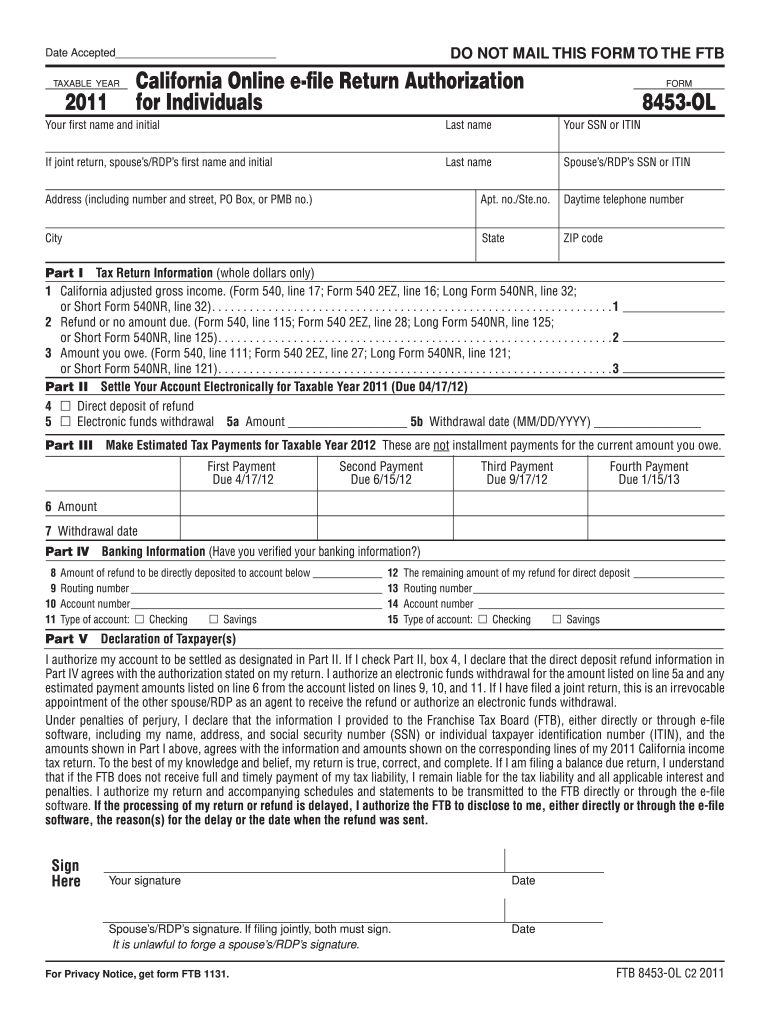
Begin by entering your first name, last name, and SSN or ITIN in the designated fields. If filing jointly, include your spouse’s/RDP’s information as well.
Fill in your address details, including city, state, and ZIP code. Ensure all information is accurate to avoid processing delays.
In Part I, input your California adjusted gross income and any amounts owed or due for refund as specified on your tax forms.
Proceed to Part II to select direct deposit options for refunds or electronic funds withdrawal for payments. Fill in the required banking information accurately.
Complete Part V by signing and dating the form. Remember that both spouses must sign if filing jointly.
Start using our platform today to streamline your form completion process for free!
Form 8453-OL InstructionsFtb 8453 ol instructionsFtb 8453 ol 2022Ftb 8453 ol pdfFtb 8453 ol turbotaxForm 8453-OL requiredCA form 8453-OLDo I need to mail form 8453-OL
Security and compliance
At DocHub, your data security is our priority. We follow HIPAA, SOC2, GDPR, and other standards, so you can work on your documents with confidence.
FTB 8453-OL 2025. Date Accepted. California Online e-file Return Authorization for Individuals. FORM. 8453-OL. TAXABLE YEAR. 2025. Part IV Banking InformationRead more
Jan 15, 1999 Line 1 of Forms 8453 and 8453-OL is being modified from Total Income to. Adjusted Gross Income. The Form 8453 jurat will contain theRead more
Cookie consent notice
This site uses cookies to enhance site navigation and personalize your experience.
By using this site you agree to our use of cookies as described in our Privacy Notice.
You can modify your selections by visiting our Cookie and Advertising Notice.