




Here's how it works

01. Edit your bell hole inspection online
Type text, add images, blackout confidential details, add comments, highlights and more.

02. Sign it in a few clicks
Draw your signature, type it, upload its image, or use your mobile device as a signature pad.

03. Share your form with others
Send bell report via email, link, or fax. You can also download it, export it or print it out.
How to use or fill out bell hole report with our platform

- Click ‘Get Form’ to open the bell hole report in the editor.
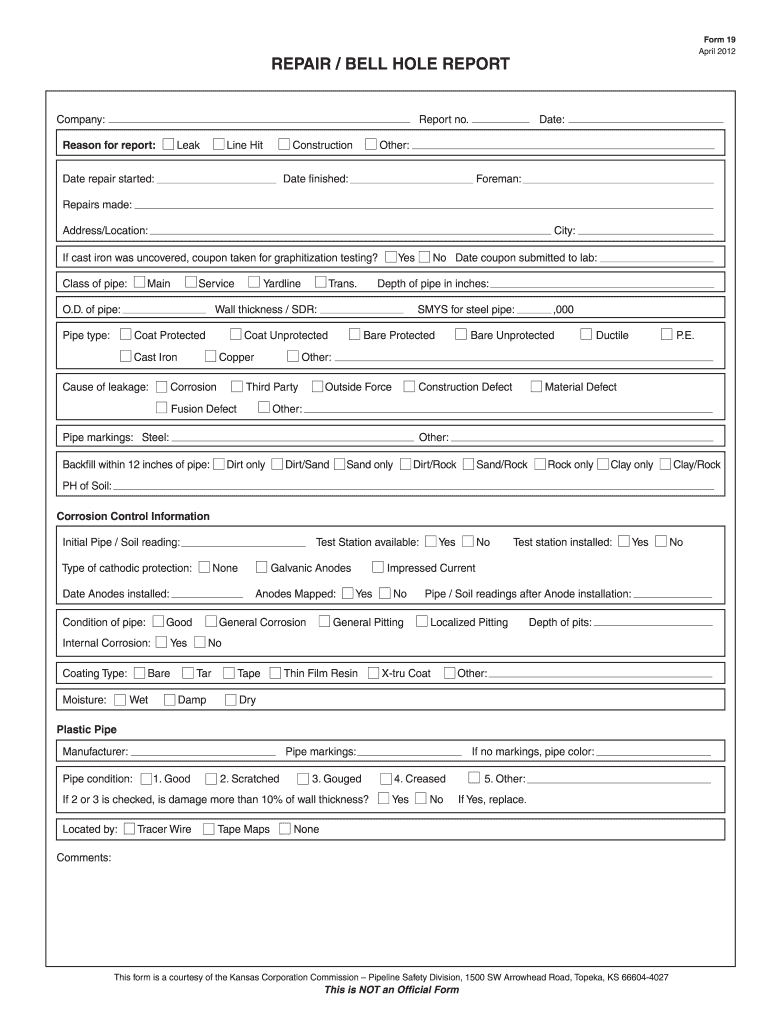
- Begin by entering the company name and report number at the top of the form. This information is essential for tracking and reference.
- Fill in the date of the report and select the reason for the report from options such as Leak, Line Hit, Construction, or Other.
- Document the dates when repairs started and finished, along with the foreman's name responsible for overseeing the work.
- In the 'Repairs made' section, provide a detailed description of all repairs conducted. Include address/location and city for precise identification.
- Indicate whether a coupon was taken for graphitization testing if cast iron was uncovered, and note its submission date to the lab.
- Complete details regarding pipe specifications including class, depth, outer diameter (O.D.), wall thickness/SDR, and SMYS for steel pipe.
- Identify causes of leakage from provided options and document any relevant pipe markings.
- For backfill material within 12 inches of pipe, select from options like Dirt only or Sand/Rock. Also, record soil pH if applicable.
- Finally, review all sections thoroughly before saving your completed form to ensure accuracy and completeness.
Start using our platform today to streamline your bell hole report process effortlessly!
Fill out bell hole report online
It's free
It's free
See more bell hole report versions
We've got more versions of the bell hole report form. Select the right bell hole report version from the list and start editing it straight away!
| Versions | Form popularity | Fillable & printable |
|---|---|---|
| 2012 | 4.9 Satisfied (31 Votes) |
Security and compliance
At DocHub, your data security is our priority. We follow HIPAA, SOC2, GDPR, and other standards, so you can work on your documents with confidence.
Learn more


