Certificate error form 2026

Get Form
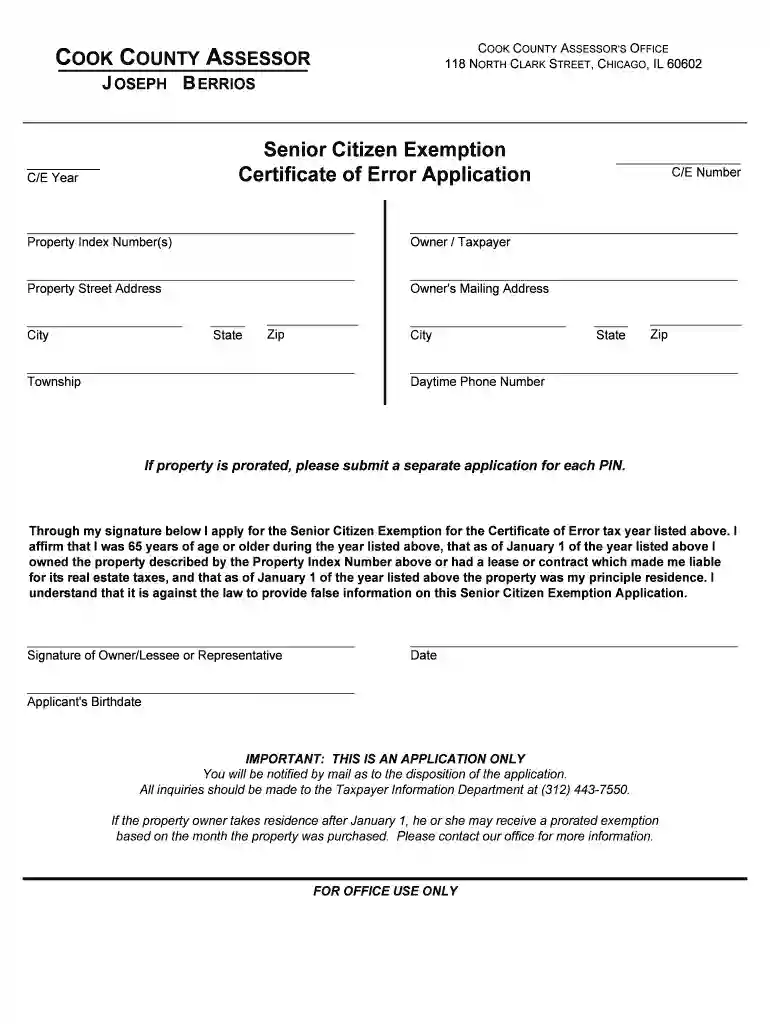
certificate error form Preview on Page 1

Here's how it works

01. Edit your certificate error form online
Type text, add images, blackout confidential details, add comments, highlights and more.

02. Sign it in a few clicks
Draw your signature, type it, upload its image, or use your mobile device as a signature pad.

03. Share your form with others
Send cook county assessor certificate of error senior exemption via email, link, or fax. You can also download it, export it or print it out.

How to use or fill out the certificate error form

Form edit decoration
9.5
Ease of Setup
DocHub User Ratings on G2
9.0
Ease of Use
DocHub User Ratings on G2
  1. Click ‘Get Form’ to open it in the editor.
  2. Begin by entering the 'C/E Year' and 'Property Index Number(s)' at the top of the form. This information is crucial for identifying your application.
  3. Fill in your personal details under 'Owner / Taxpayer', including your name, property street address, and mailing address. Ensure accuracy to avoid delays.
  4. Provide your contact information, including city, state, zip code, and daytime phone number. This will help the office reach you regarding your application.
  5. In the signature section, affirm that you meet all eligibility criteria for the Senior Citizen Exemption. Sign and date the form to validate your application.
  6. If applicable, attach required documentation such as proof of age and residency. This may include a driver's license or recent property tax bill.

Start using our platform today to complete your certificate error form easily and for free!

be ready to get more

Complete this form in 5 minutes or less

Get form

Got questions?

We have answers to the most popular questions from our customers. If you can't find an answer to your question, please contact us.
Contact us
To fix this problem, do the following: Create a CSR. On your server where you are trying to the certificate, create a new CSR. Reissue Your SSL Certificate. Your Reissued Certificate. Assign and Configure Server to Use Reissued Certificate.
How to Fix SSL Connection Errors? Confirm Date and Time of Your PC. Verify certificate expiry. Ensure SSL has been installed properly. Use an updated version of Google Chrome. Disable SSL Scanning from Antivirus. Enable strongest 256-bit encryption instead of 128- bit. Migrate site from outdated algorithm SHA-1 to SHA-2.
In India, you can use the online or offline methods offered by the state government or the local Municipal Corporation to fix a spelling error on your birth certificate. Usually, the procedure includes filing an application, providing supporting documentation, and paying the required amount.
How to Resolve the SSL Error: Self Signed Certificate in Certificate Chain? Update the certificate and chain by installing the new files and rebooting services as necessary. Use an SSL analysis tool to check the expiration dates of all certificates. Clear your browser cache and return to the website over HTTPS.
What is an SSL certificate error? An SSL certificate error results from an issue with the websites certificate itself or its configuration on the server. If your browser is unable to establish a secure connection with a website due to any of the above issues it will display a particular error message.

Security and compliance

At DocHub, your data security is our priority. We follow HIPAA, SOC2, GDPR, and other standards, so you can work on your documents with confidence.

Learn more
be ready to get more

Complete this form in 5 minutes or less

Get form