Type text, add images, blackout confidential details, add comments, highlights and more.
02. Sign it in a few clicks
Draw your signature, type it, upload its image, or use your mobile device as a signature pad.
03. Share your form with others
Send form 2801 via email, link, or fax. You can also download it, export it or print it out.
How to use or fill out AS 2801 with our platform
Ease of Setup
DocHub User Ratings on G2
Ease of Use
DocHub User Ratings on G2
Click ‘Get Form’ to open the AS 2801 in the editor.
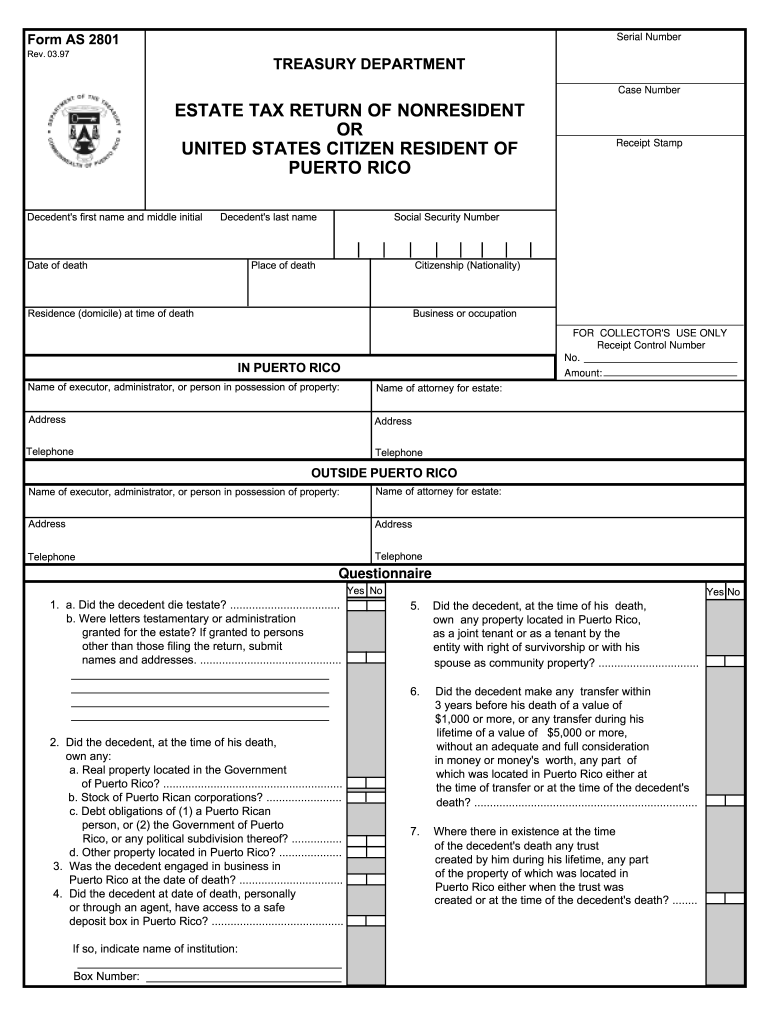
Begin by filling in the decedent's information, including their first name, last name, date of death, and Social Security Number. Ensure accuracy as this data is crucial for processing.
Complete the sections regarding the decedent's citizenship and residence at the time of death. This helps establish tax obligations.
In Schedule A, provide a detailed description of all real property and other assets owned by the decedent. Include values at the date of death in U.S. dollars.
Proceed to Schedule B to compute the taxable estate. Enter gross estate values and applicable deductions carefully to ensure compliance with tax regulations.
Finally, review all entries for accuracy before signing and submitting your form through our platform for a seamless filing experience.
Start using our platform today to fill out your AS 2801 form online for free!
As 2801 formAs 2801 pdfAs 2801 exampleType 1 subsequent eventSubsequent events Accounting StandardWhat are subsequent events in auditingASC 855, subsequent eventsType 1 vs type 2 subsequent event
Security and compliance
At DocHub, your data security is our priority. We follow HIPAA, SOC2, GDPR, and other standards, so you can work on your documents with confidence.
Form AS 2801. Rev. 03.97. Rep. 06.15. Serial Number. Receipt Stamp. FOR COLLECTORS USE ONLY. Receipt Control Number. Case Number. Date of death. Place of death.Read more
Cookie consent notice
This site uses cookies to enhance site navigation and personalize your experience.
By using this site you agree to our use of cookies as described in our Privacy Notice.
You can modify your selections by visiting our Cookie and Advertising Notice.