Fppc form 461 2026

Get Form
form 461 Preview on Page 1

Here's how it works

01. Edit your form 461 online
Type text, add images, blackout confidential details, add comments, highlights and more.

02. Sign it in a few clicks
Draw your signature, type it, upload its image, or use your mobile device as a signature pad.

03. Share your form with others
Send fppc form 461 via email, link, or fax. You can also download it, export it or print it out.

How to use or fill out fppc form 461 with our platform

Form edit decoration
9.5
Ease of Setup
DocHub User Ratings on G2
9.0
Ease of Use
DocHub User Ratings on G2
  1. Click ‘Get Form’ to open the fppc form 461 in the editor.
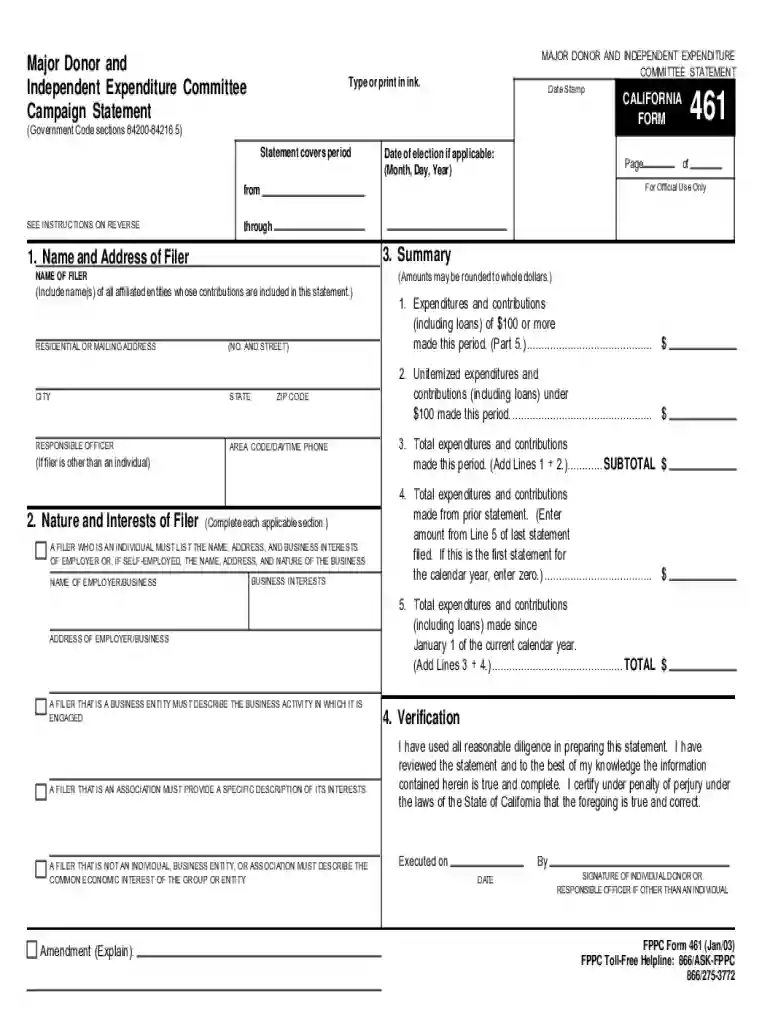
  2. Begin by entering your name and address in the 'Name and Address of Filer' section. Ensure all affiliated entities are included.
  3. In the 'Nature and Interests of Filer' section, provide details about your business interests or affiliations. If you are self-employed, include your business name and address.
  4. Complete the 'Summary' section by detailing expenditures and contributions made during the reporting period. Use whole dollar amounts for clarity.
  5. For each contribution or expenditure over $100, list the date, payee's information, type of payment, and amount in the designated fields.
  6. Finally, review all entries for accuracy before signing in the 'Verification' section to certify that your information is true and complete.

Start using our platform today to easily fill out your fppc form 461 online for free!

be ready to get more

Complete this form in 5 minutes or less

Get form

Got questions?

We have answers to the most popular questions from our customers. If you can't find an answer to your question, please contact us.
Contact us

Electronic document signing demands a software solution that works in compliance with data protection and eSignature laws. DocHub is a great tool for that, as it fulfills all the previously mentioned requirements. Whatever method you like to sign your fppc form 461 in DocHub, your electronic signature will be legally binding and court-admissible.

If you edit your fppc form 461 with DocHub, you simply will not need to look for other software or solutions to sign it. An electronic signature is a component of DocHub’s substantial editing toolset, which allows you to implement changes in your form without jumping between websites. Just complete your form, double-check the correctness of your information and put your electronic signature at the end to make it submission-ready in minutes.

County General Purpose Committee (Major Donor and Independent Expenditure Committees and PACs) Type of FormWhere to fileFiling MethodForm 461 (Major Donor and Independent Expenditure Committee Campaign Statement)County Elections OfficePaper (original and one copy) or Electronically (check with your County)10 more rows
Form 460. Generally, candidate controlled committees and committees primarily formed to support or oppose a candidate(s) use the Recipient Committee Campaign Statement (Form 460) to report campaign activity for all semi-annual and preelection statements.
tion Reports (Form 497) The Political Reform Act (\u201cAct\u201d) requires primarily formed ballot measure committees to file the Form 497 within 24 hours of receiving contributions totaling $1,000 or more from a single source during the 90 days before an election, including the date of the election.

Security and compliance

At DocHub, your data security is our priority. We follow HIPAA, SOC2, GDPR, and other standards, so you can work on your documents with confidence.

Learn more
ccpa2
pci-dss
gdpr-compliance
hipaa
soc-compliance
be ready to get more

Complete this form in 5 minutes or less

Get form

People also ask

must report investments, business positions, and sources of income, including receipt of gifts, loans, and travel payments, from sources located in or doing business in their agency's jurisdiction. All interests in real property within the agency's jurisdiction must also be reported.
Form 700 is the tool used by public officials to disclose their financial interests that may be affected by their public official decisions. This ensures that the public is aware of a public official's financial interests and also reminds the public official of potential conflicts.
An excess business loss is the amount by which the total deductions (computed without regard to any deduction allowed under section 172 or 199A) from your trades or businesses are more than your total gross income or gains from your trades or businesses, plus the threshold amount.
Use Form 461 to figure the excess business loss that is reported on your noncorporate tax return.
Campaign filing deadlines, forms, and other informational materials are available on the FPPC website (www.fppc.ca.gov). FPPC Form 460 (Jan/2016)) FPPC Advice: advice@fppc.ca.gov (866/275-3772) www.fppc.ca.gov.

Related links