form hub com Preview on Page 1

Cites paperwork 2026

Here's how it works

  • 01. Edit your form hub com online

    Type text, add images, blackout confidential details, add comments, highlights and more.

  • 02. Sign it in a few clicks

    Draw your signature, type it, upload its image, or use your mobile device as a signature pad.

  • 03. Share your form with others

    Send cites document via email, link, or fax. You can also download it, export it or print it out.

How to use or fill out cites paperwork with our platform

Form edit decoration
9.5
Ease of Setup
DocHub User Ratings on G2
9.0
Ease of Use
DocHub User Ratings on G2
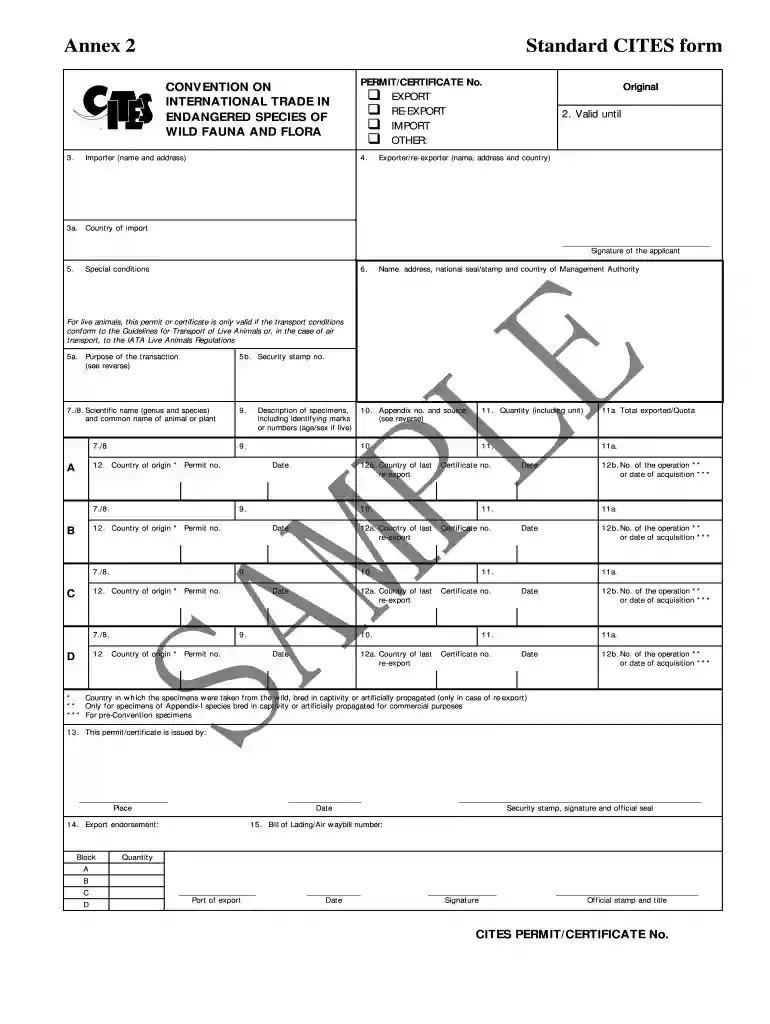
  1. Click ‘Get Form’ to open the cites paperwork in the editor.
  2. Begin by selecting the type of document you need: export, re-export, import, or other. Ensure you tick the appropriate box.
  3. Fill in the importer’s name and address accurately. This information is crucial for processing your application.
  4. Next, provide the exporter/re-exporter’s details, including their full name, address, and country. Remember that a signature from the applicant is mandatory.
  5. In section 5, outline any special conditions related to your transaction. Use codes for specific purposes as indicated in the instructions.
  6. Complete sections 7 and 8 by entering the scientific name and common name of the species involved. Ensure accuracy to avoid delays.
  7. Describe the specimens clearly in section 9, including any identifying marks or numbers. This helps in proper identification during inspections.
  8. Finally, review all entries for completeness and accuracy before submitting your form through our platform.

Start filling out your cites paperwork online for free today!

be ready to get more

Complete this form in 5 minutes or less

Security and compliance

At DocHub, your data security is our priority. We follow HIPAA, SOC2, GDPR, and other standards, so you can work on your documents with confidence.

Related links

RADIO GUIDE - Googleapis.com

Working on Paperwork. When parked in the City to work on paperwork in the unit, the Officer is to advise Dispatch of the location. Example: Officer: DispatchRead more

Learn more
3-200-73: Re-Export of Wildlife (CITES)

Application form 3-200-27 should be used to apply to the U.S. Fish and Wildlife Service (USFWS) for CITES export permits. Each shipment of CITES specimens mustRead more

Learn more
50 CFR 23.32 - How do I apply for a U.S. CITES document?

(a) To apply for a U.S. CITES document, you must complete a standard application form and submit it to the appropriate office shown on the top of the form.Read more

Learn more
If you believe that this page should be taken down, please follow our DMCA take down process here