Type text, add images, blackout confidential details, add comments, highlights and more.
02. Sign it in a few clicks
Draw your signature, type it, upload its image, or use your mobile device as a signature pad.
03. Share your form with others
Send form 8050 via email, link, or fax. You can also download it, export it or print it out.
How to use or fill out FAA Form 8050-5 2011 with our platform
Ease of Setup
DocHub User Ratings on G2
Ease of Use
DocHub User Ratings on G2
Click ‘Get Form’ to open FAA Form 8050-5 in the editor.
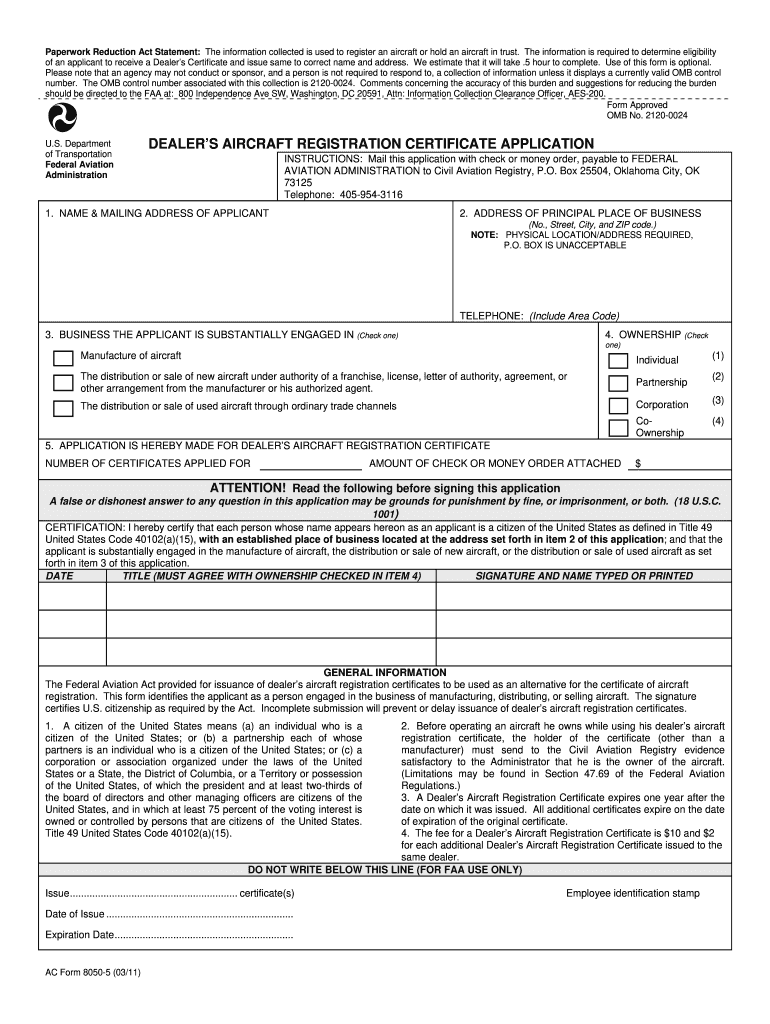
Begin by filling in your name and mailing address in the first section. Ensure that all details are accurate to avoid delays.
In the second section, provide the address of your principal place of business. Remember, a physical address is required; P.O. Boxes are not acceptable.
Next, indicate the business you are substantially engaged in by checking the appropriate box. Options include manufacturing or distributing new or used aircraft.
Select your ownership type from the options provided: Individual, Partnership, Corporation, or Co-Ownership.
Specify the number of certificates you are applying for and attach a check or money order for the required fee.
Finally, certify your application by signing and dating it. Ensure that your title corresponds with the ownership type selected earlier.
Start using our platform today to complete FAA Form 8050-5 easily and for free!
We've got more versions of the faa form 8050 5 2011 form. Select the right faa form 8050 5 2011 version from the list and start editing it straight away!
Faa form 8050 5 2011 pdf downloadFaa form 8050 5 2011 pdfFaa form 8050 5 2011 instructionsFaa form 8050 5 2011 onlineFaa form 8050 5 2011 downloadAc form 8050 5FAA Aircraft dealer applicationAc form 8050 6
Security and compliance
At DocHub, your data security is our priority. We follow HIPAA, SOC2, GDPR, and other standards, so you can work on your documents with confidence.
Regardless of mail class, a customs declaration (PS Form 2976, PS. Form 2976-A, or PS Form 2976-B) is required for all items weighing 16 ounces or more or
index to aircraft registration and recordation processes
DEFINITIONS. ABANDON. To desert, surrender, forsake, or cede. To relinquish or give up with intent of never again resuming ones right or interest.Read more
Registering an Amateur-Built Light Sport Kit Aircraft
by K Condron 2012 Once the paperwork was processed, the FAA mailed the aircraft owner AC Form 8050-3, Certificate of Aircraft Registry. This form must be kept in the aircraft at.Read more
Cookie consent notice
This site uses cookies to enhance site navigation and personalize your experience.
By using this site you agree to our use of cookies as described in our Privacy Notice.
You can modify your selections by visiting our Cookie and Advertising Notice.