




01. Edit your tfn declaration form download 2024 online
Type text, add images, blackout confidential details, add comments, highlights and more.

Type text, add images, blackout confidential details, add comments, highlights and more.

Draw your signature, type it, upload its image, or use your mobile device as a signature pad.

Send tax file number declaration form 2024 pdf download via email, link, or fax. You can also download it, export it or print it out.
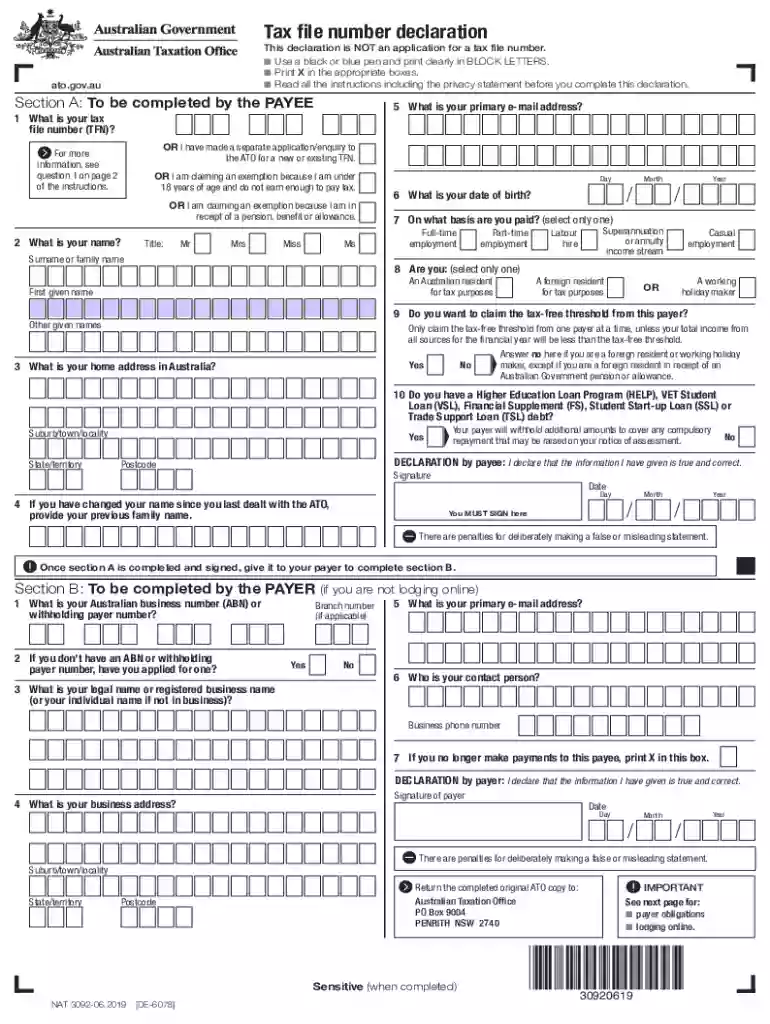
The ATO Tax File Number declaration form is an essential document used for tax administration in Australia. It must be completed by both the payee and the payer, serving as a formal declaration of a taxpayer's identity and tax obligations. This form allows the Australian Taxation Office (ATO) to link a taxpayer's income with their Tax File Number (TFN), ensuring that the correct amount of tax is withheld from payments. By accurately providing personal and employment details, the form facilitates compliance with tax laws and helps avoid penalties for incorrect or false information.
To acquire the ATO Tax File Number declaration form in DOCX format, individuals can visit the ATO's official website, where it is available for download. Alternatively, employers often provide this form to new employees as part of their onboarding process. It's crucial to ensure that the most current version of the form is used to avoid discrepancies or compliance issues. Once downloaded, the form can also be accessed and edited via document management platforms like DocHub, which support a variety of file formats, including DOCX.
Personal Information: Enter the payee's TFN, full name, residential address, and date of birth. Ensure that each detail matches official records to prevent processing delays.
Employment Details: The payee should provide their employment status, including start date and employer details, to establish tax obligations accurately.
Residency Status: Indicate whether the payee is an Australian resident for tax purposes. This affects the tax rate and eligibility for certain tax offsets.
Exemption Claims: Specify any applicable tax exemptions or reductions, such as those related to low-income earners or students, by ticking the appropriate boxes.
Payer Information: The payer must include their ABN and business name to properly associate the employment income with their tax records.
Declaration and Signature: Both parties must sign and date the form to certify that the provided information is true and correct.
The TFN declaration form is legally binding and integral for tax assessment and compliance. It ensures that tax is withheld at the correct rate from an individual's wages, superannuation, and other employment-related payments. Accurate completion of the form is vital, as any misinformation can lead to over or under-withholding of tax, with potential penalties for false statements. The form is protected under the Privacy Act, securing the confidentiality of sensitive personal and financial data.
This form is primarily used by employees starting new jobs in Australia to report their TFN and claim any entitlements or exemptions. Employers use it to ensure they deduct the correct amount of tax from their earnings. The form is also relevant for individuals receiving certain pensions or annuities, as it helps in determining the right amount of tax to withhold.


Failure to correctly complete the TFN declaration form can result in significant penalties. Providing incorrect information can lead to incorrect tax withholding, resulting in potential audits and fines from the ATO. Employers may also face penalties if they fail to submit completed forms to the ATO promptly or retain copies for a specified period, typically five years.
Completed forms can be submitted electronically via document management systems like DocHub, which allow for seamless digital edits, annotations, and signing. While online submission is preferred for its speed and efficiency, forms can also be submitted via mail or through an employer who will forward the documents to the ATO for processing. Each method ensures that the TFN and associated employment details are accurately recorded for tax purposes.
While traditional paper forms are still used, digital versions offer considerable benefits, including ease of completion, error correction, and environmental sustainability. Platforms like DocHub provide features such as electronic signatures and form field management, making it easier to fill out and submit forms from any location. The digital format enhances accessibility and reduces the likelihood of errors associated with manual entry.
At DocHub, your data security is our priority. We follow HIPAA, SOC2, GDPR, and other standards, so you can work on your documents with confidence.


