




01. Edit your 1099s 2015 online
Type text, add images, blackout confidential details, add comments, highlights and more.

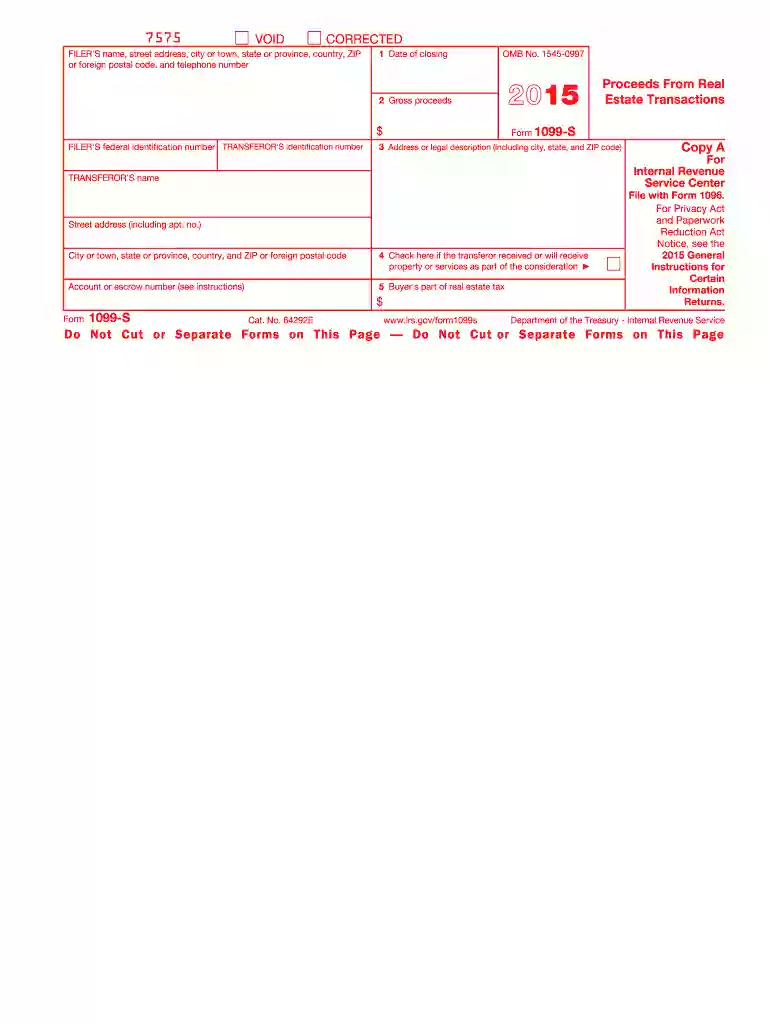
Type text, add images, blackout confidential details, add comments, highlights and more.

Draw your signature, type it, upload its image, or use your mobile device as a signature pad.

Send printable 1099 form 2015 via email, link, or fax. You can also download it, export it or print it out.
The "1099-S" form is a critical document used in the United States to report the proceeds from real estate transactions to the Internal Revenue Service (IRS). The "2015" designation indicates that this form pertains to the tax year 2015. It is essential for sellers who have completed transactions such as sales or exchanges of real estate. The form ensures that the IRS is informed about the proceeds you received, which could affect your taxable income for that year.
Generally, the 1099-S form is used by sellers, transferors, and parties involved in the primary role of a transaction transferring ownership of real estate. This often includes individual property owners, businesses, and sometimes legal representatives or real estate agents acting on behalf of others in facilitating these transactions. Being knowledgeable about who should be using these forms helps ensure compliance with tax laws.


Acquiring the 1099-S 2015 form is a straightforward process. It can be downloaded directly from the IRS website or through authorized tax form distribution services. For businesses or individuals who frequently deal in real estate transactions, it might be beneficial to use tax software that includes built-in capabilities to generate such forms. Additionally, some cloud-based document management platforms can help manage and store these forms securely.
The 1099-S 2015 form consists of several critical sections that must be completed accurately:
Each element is crucial for ensuring the IRS has comprehensive data about the transaction.
Checking for inaccuracies or omissions is crucial to prevent processing delays or penalties.
The IRS has specific guidelines for filing Form 1099-S, which are essential for ensuring compliance and avoiding penalties. According to these guidelines:
Abiding by these guidelines protects against possible legal repercussions or financial penalties.
Filing deadlines are paramount to maintaining compliance:
Knowing these deadlines is vital for preparing documents and scheduling submissions to avoid unnecessary fines.
Failing to file the 1099-S form, or filing it with incorrect information, can lead to substantial penalties. The IRS provides penalties depending on how long past the filing date the forms were submitted and whether the errors were corrected promptly:
Being aware of these potential penalties highlights the importance of timely and accurate submissions.
Software programs such as TurboTax and QuickBooks can assist in both completing and filing the 1099-S form. These tools simplify the input process and provide structured guidance to ensure compliance. For those involved in extensive real estate transactions, using software that offers e-filing capabilities can streamline workflow and reduce the risk of human error.
While the 1099-S form is a federal document, state-specific rules can influence how transactions are reported. Some states might have additional forms or require different filing procedures. It's advisable to consult a tax professional or legal advisor to ensure compliance with both federal and state requirements when filling out and submitting the 1099-S form.
Understanding these nuances allows individuals and businesses to navigate tax responsibilities with greater confidence and agility.
We've got more versions of the 1099s 2015 form. Select the right 1099s 2015 version from the list and start editing it straight away!
| Versions | Form popularity | Fillable & printable |
|---|---|---|
| 2022 | 4.4 Satisfied (24 Votes) | |
| 2021 | 4.8 Satisfied (46 Votes) | |
| 2020 | 4.2 Satisfied (86 Votes) | |
| 2019 | 4.4 Satisfied (442 Votes) | |
| 2018 | 4.4 Satisfied (213 Votes) | |
| 2017 | 4.4 Satisfied (740 Votes) | |
| 2016 | 4.4 Satisfied (529 Votes) | |
| 2015 | 4.1 Satisfied (36 Votes) | |
| 2014 | 4.1 Satisfied (68 Votes) | |
| 2013 | 4 Satisfied (31 Votes) | |
| 2012 | 4 Satisfied (60 Votes) | |
| 2011 | 4.4 Satisfied (65 Votes) | |
| 2010 | 4 Satisfied (26 Votes) | |
| 1999 | 4.7 Satisfied (28 Votes) |
Yes, a typed name is recognized as a valid electronic signature when you create it on your form utilizing a compliant solution like DocHub. Simply upload your 1099s 2015 form to our editor, click Sign in the top tool pane → Create your signature → Type your name in the appropriate tab, and decide how it will appear on your document.
If you choose analog ways of completing your 1099s 2015 form, you can easily download your file for printing. Search DocHub’s Forms & Templates catalog to find the exact file template you require and open it for editing or download it on your gadget in the format of your choice. It is easy to complete your form electronically and put your handwritten signature on it right after printing or eSign your file with DocHub.
At DocHub, your data security is our priority. We follow HIPAA, SOC2, GDPR, and other standards, so you can work on your documents with confidence.




Jan 19, 2017 This publication discusses common business expenses and explains what is and is not de ductible. The general rules for deducting busi.Read more
To complete Form 1099-S, use: the 2015 General Instructions for Certain Information. Returns, and. the 2015 Instructions for Form 1099-S. To order theseRead more
1099-MISC OR 1042-S FORMS FOR TAX PURPOSES. PER IRS REGULATIONS must be marked as tax reportable on the payment processing form submitted for payment (PIR, etc.)Read more


