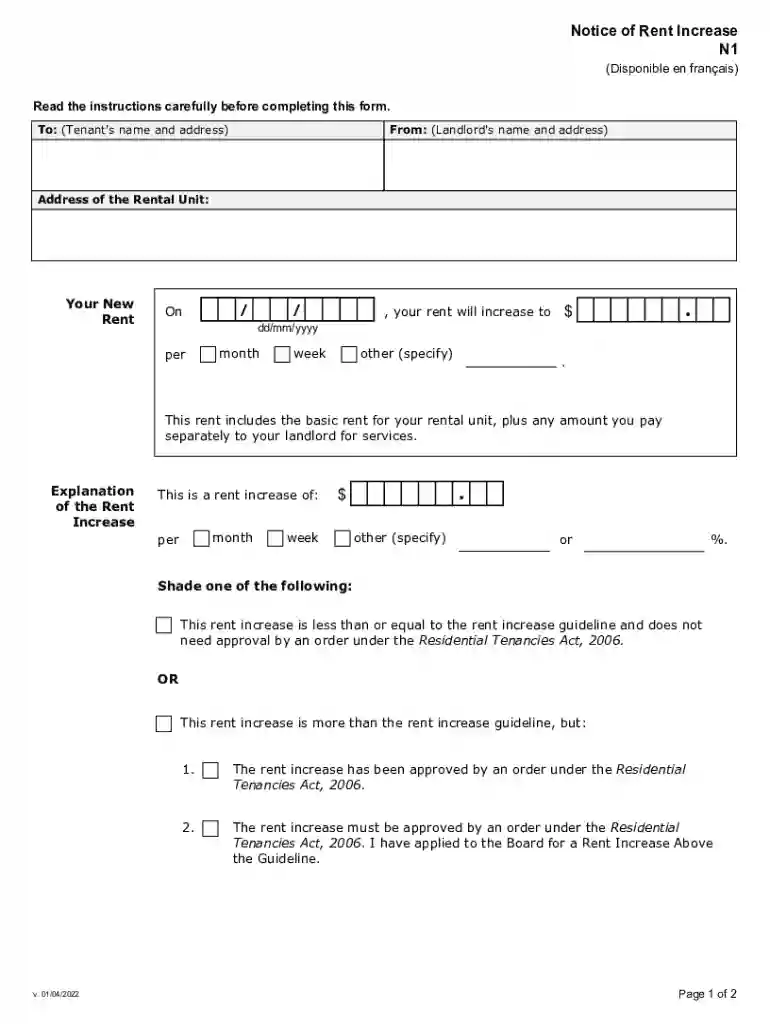
n1 form Preview on Page 1

N1 form 2026

Here's how it works

  • 01. Edit your n1 form online

    Type text, add images, blackout confidential details, add comments, highlights and more.

  • 02. Sign it in a few clicks

    Draw your signature, type it, upload its image, or use your mobile device as a signature pad.

  • 03. Share your form with others

    Send notice of rent increase ontario via email, link, or fax. You can also download it, export it or print it out.

How to use or fill out n1 form with our platform

Form edit decoration
9.5
Ease of Setup
DocHub User Ratings on G2
9.0
Ease of Use
DocHub User Ratings on G2
  1. Click ‘Get Form’ to open the n1 form in the editor.
  2. Begin by entering the tenant's name and address in the designated fields at the top of the form.
  3. Next, fill in your name and address as the landlord, ensuring all details are accurate.
  4. Provide the address of the rental unit where the rent increase will apply.
  5. Specify your new rent amount and indicate whether it is per month, week, or another frequency.
  6. In the explanation section, detail the nature of the rent increase, including whether it adheres to guidelines or requires approval.
  7. Complete any additional required information regarding approvals under the Residential Tenancies Act.
  8. Finally, sign and date the form before sending it to ensure compliance with legal requirements.

Start using our platform today for free to streamline your document editing and signing process!

See more n1 form versions

We've got more versions of the n1 form form. Select the right n1 form version from the list and start editing it straight away!

VersionsForm popularityFillable & printable
20224.8 Satisfied (53 Votes)
20154.9 Satisfied (45 Votes)
20064 Satisfied (31 Votes)

be ready to get more

Complete this form in 5 minutes or less

Security and compliance

At DocHub, your data security is our priority. We follow HIPAA, SOC2, GDPR, and other standards, so you can work on your documents with confidence.

rent increase form pdf

Cisco Optics-to-Device Compatibility Matrix Results

)N1( 1) NX-OS )N 1(1) Transceiver )N1( 1) Transceiver Notes for above line : Only Version -02 and later of this DAC is supported N5K-C5010P-BF

Learn more
IEP Evaluation Consent Form Attachment N1A, Revised

Jan 21, 2020 DESE has revised the IEP Evaluation Consent Form Attachment (N1A) to include a checkbox for parents to indicate their request for evaluationRead more

Learn more
If you believe that this page should be taken down, please follow our DMCA take down process here