Type text, add images, blackout confidential details, add comments, highlights and more.
02. Sign it in a few clicks
Draw your signature, type it, upload its image, or use your mobile device as a signature pad.
03. Share your form with others
Send blank nfirs report via email, link, or fax. You can also download it, export it or print it out.
How to use or fill out nfirs with our platform
Ease of Setup
DocHub User Ratings on G2
Ease of Use
DocHub User Ratings on G2
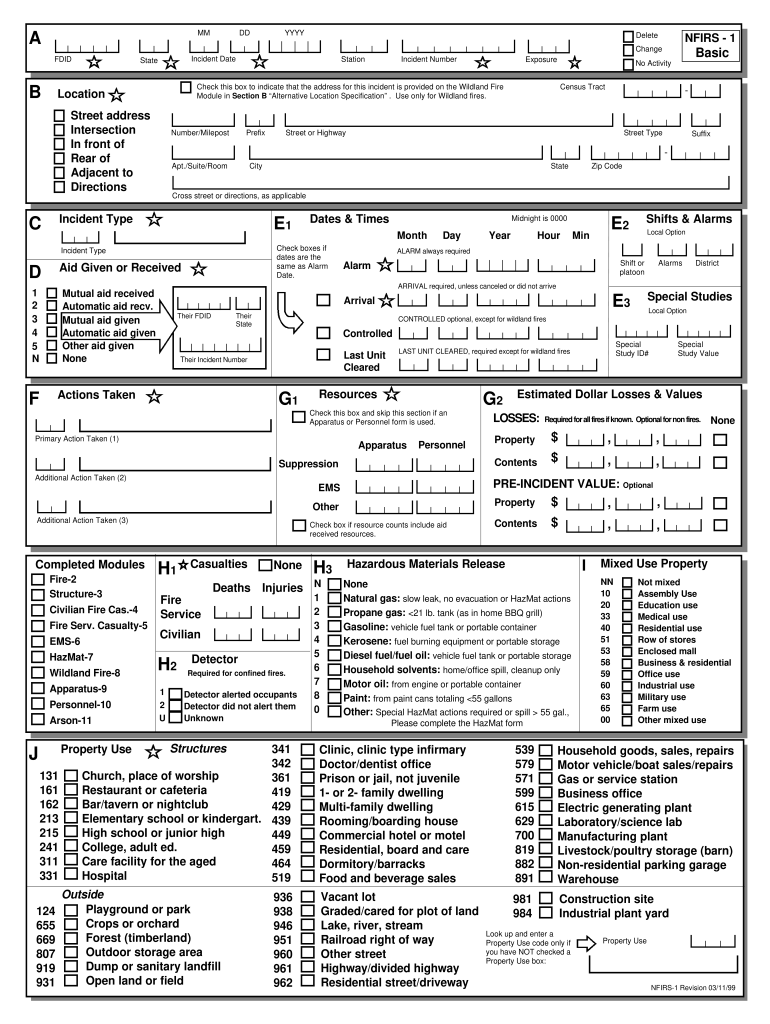
Click ‘Get Form’ to open the nfirs document in the editor.
Begin by filling in the 'Incident Number' and 'Date & Times' sections. Ensure you accurately enter the date, time, and any relevant identifiers such as your FDID.
Proceed to the 'Resources' section where you will detail any resources utilized during the incident. This includes personnel and equipment involved.
In the 'Casualties' section, record any injuries or fatalities that occurred. Be sure to provide details for each individual affected.
Complete the 'Property Details' section by entering information about the property involved, including its address and type of structure.
Finally, review all entries for accuracy before saving or submitting your completed form. Utilize our platform's features to easily edit or sign as needed.
Start using our platform today to streamline your nfirs form completion for free!
Over 22,000 U.S. fire departments are helping their communities reduce the risk from fires and other emergencies by reporting their incident data to NFIRS.Read more
Jan 16, 2018 If your department would like to send newer NFIRS data, FireCARES can directly ingest NFIRS exchange files. is can be done using the paperRead more
NFIRS : National fire incident reporting system handbook
NFIRS : National fire incident reporting system handbook ; Author: Duncan, Ross ; Author: National Fire Data Center (U.S.) ; Note: Federal Emergency ManagementRead more
Cookie consent notice
This site uses cookies to enhance site navigation and personalize your experience.
By using this site you agree to our use of cookies as described in our Privacy Notice.
You can modify your selections by visiting our Cookie and Advertising Notice.