Type text, add images, blackout confidential details, add comments, highlights and more.

02. Sign it in a few clicks
Draw your signature, type it, upload its image, or use your mobile device as a signature pad.

03. Share your form with others
Send dr501sc via email, link, or fax. You can also download it, export it or print it out.

How to use or fill out dr 501sc with our platform
Ease of Setup
DocHub User Ratings on G2
Ease of Use
DocHub User Ratings on G2
Click ‘Get Form’ to open the dr 501sc in the editor.
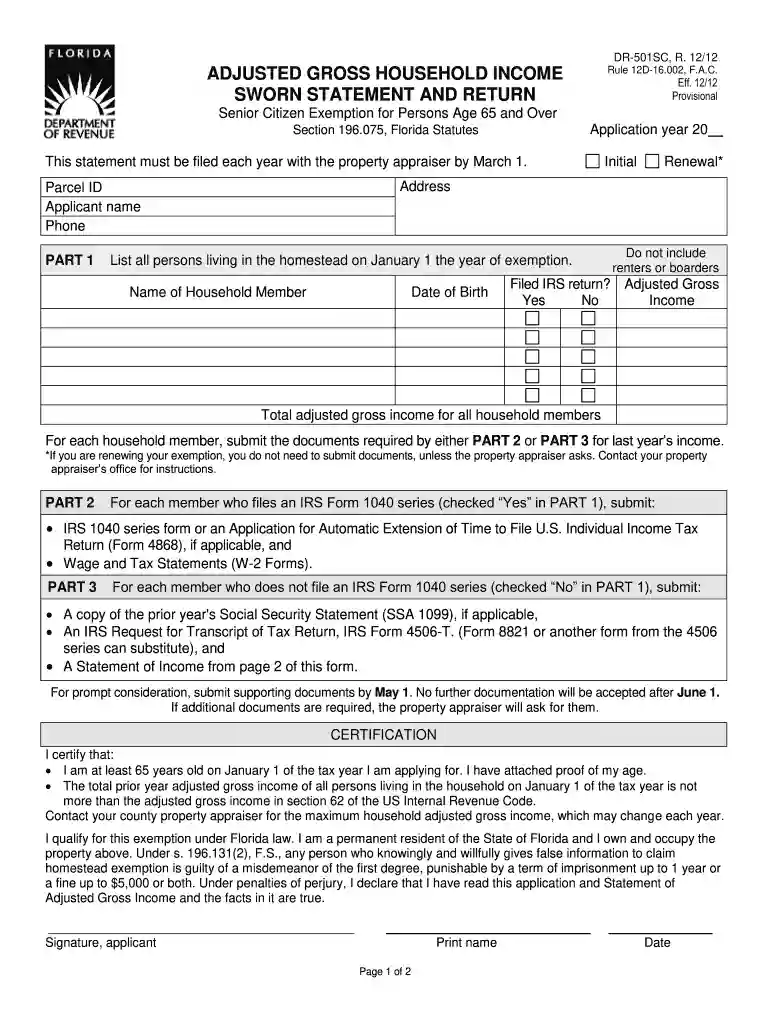
Begin by filling in your address and Parcel ID at the top of the form. Ensure that all information is accurate to avoid delays.
In PART 1, list all household members living in the homestead as of January 1. Include their names and dates of birth, and indicate if they filed an IRS return by checking 'Yes' or 'No'.
For each member who filed an IRS Form 1040 series, complete PART 2 by attaching the necessary documents such as W-2 forms and IRS 1040 series forms.
If any household member did not file an IRS Form 1040 series, complete PART 3 by providing alternative documentation like Social Security Statements or income statements.
Finally, ensure you sign and date the certification section at the bottom of the form to validate your application.
Start using our platform today for free to streamline your dr 501sc completion!
DR-501SC, household income. 196.075. The amount of the assessed value. Local ordinance, just value under $250,000, permanent residency for 25 years or more. DRRead more
This form is for use by property owners as a sworn statement of adjusted gross household income to qualify for the additional homestead exemption forRead more
Cookie consent notice
This site uses cookies to enhance site navigation and personalize your experience.
By using this site you agree to our use of cookies as described in our Privacy Notice.
You can modify your selections by visiting our Cookie and Advertising Notice.