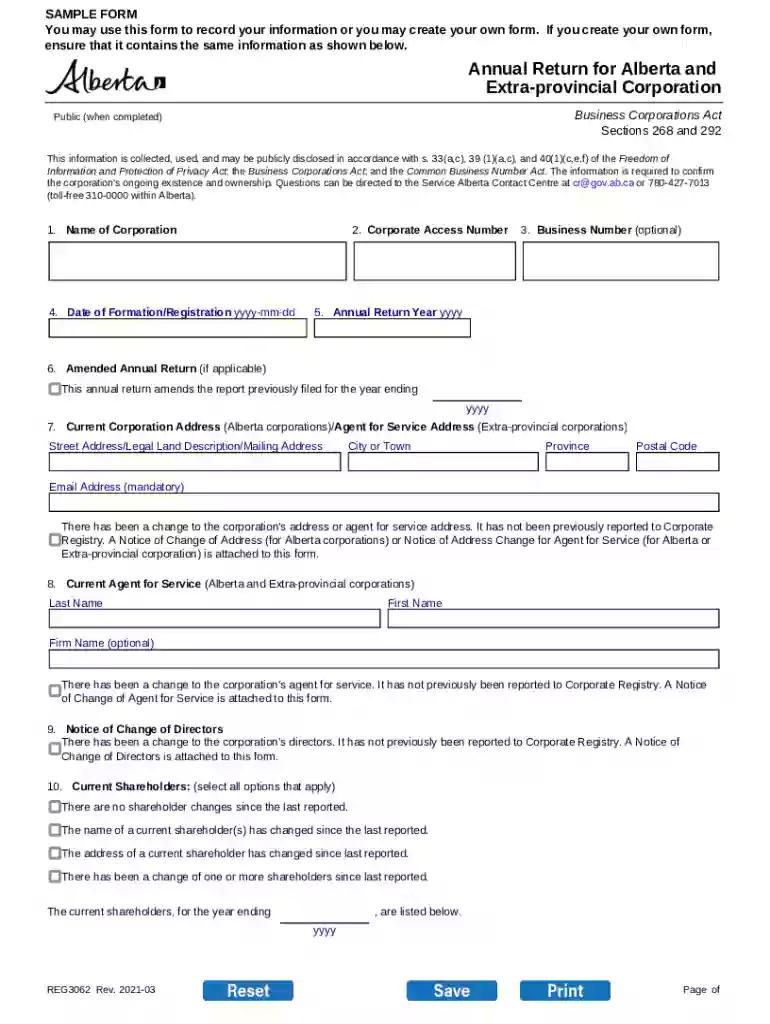
Annual Return for Alberta and Extra-provincial Corporation Annual Return sent out to clients for Cor Preview on Page 1

Annual Return for Alberta and Extra-provincial Corporation Annual Return sent out to clients for Cor 2026

Here's how it works

  • 01. Edit your form online

    Type text, add images, blackout confidential details, add comments, highlights and more.

  • 02. Sign it in a few clicks

    Draw your signature, type it, upload its image, or use your mobile device as a signature pad.

  • 03. Share your form with others

    Send it via email, link, or fax. You can also download it, export it or print it out.

How to use or fill out Annual Return for Alberta and Extra-provincial Corporation Annual Return sent out to clients for Cor with our platform

Form edit decoration
9.5
Ease of Setup
DocHub User Ratings on G2
9.0
Ease of Use
DocHub User Ratings on G2
  1. Click ‘Get Form’ to open it in the editor.
  2. Begin by entering the full legal name of your corporation in Item 1. This name is essential as it appears on all official documents.
  3. In Item 2, input your corporate access number, which can be found on previous certificates issued by the Registrar of Corporations.
  4. If applicable, provide your Business Number in Item 3. This step is optional but recommended if known.
  5. For Item 4, enter the date of formation or registration. Ensure this matches the date on your formation certificate.
  6. In Item 5, specify the annual return year end based on your incorporation anniversary month.
  7. If you are submitting an amended return, check the box in Item 6 and indicate the year being replaced.
  8. Complete Item 7 with your current address or agent for service address. Remember to include a valid email address as it's mandatory.
  9. Fill out Items 8 and 9 regarding changes to agents for service and directors respectively, marking any necessary checkboxes.
  10. Finally, complete Item 11 with details of the authorized representative including their relationship to the corporation and ensure you sign the form before submission.

Start using our platform today to streamline your document editing and form completion process for free!

be ready to get more

Complete this form in 5 minutes or less

Security and compliance

At DocHub, your data security is our priority. We follow HIPAA, SOC2, GDPR, and other standards, so you can work on your documents with confidence.

Related links

Characterization, Modeling, Monitoring, and Remediation

Characterization, Modeling, Monitoring, and Remediation of Fractured Rock (800) 624-6242 or (202) 334-3313;

Learn more
DocHub Reform of the Canada Business Corporations Act

by LS LaRue 2004 Cited by 1 The purposes of this Act are to revise and reform the law applicable to business corporations incorporated to carry on business through- out Canada,

Learn more
If you believe that this page should be taken down, please follow our DMCA take down process here