Part C Affidavit - Fill and Sign Printable Template Online 2026

Get Form
Part C Affidavit - Fill and Sign Printable Template Online Preview on Page 1

Here's how it works

01. Edit your form online
Type text, add images, blackout confidential details, add comments, highlights and more.
02. Sign it in a few clicks
Draw your signature, type it, upload its image, or use your mobile device as a signature pad.
03. Share your form with others
Send it via email, link, or fax. You can also download it, export it or print it out.

How to use or fill out Part C Affidavit - Fill and Sign Printable Template Online

Form edit decoration
9.5
Ease of Setup
DocHub User Ratings on G2
9.0
Ease of Use
DocHub User Ratings on G2
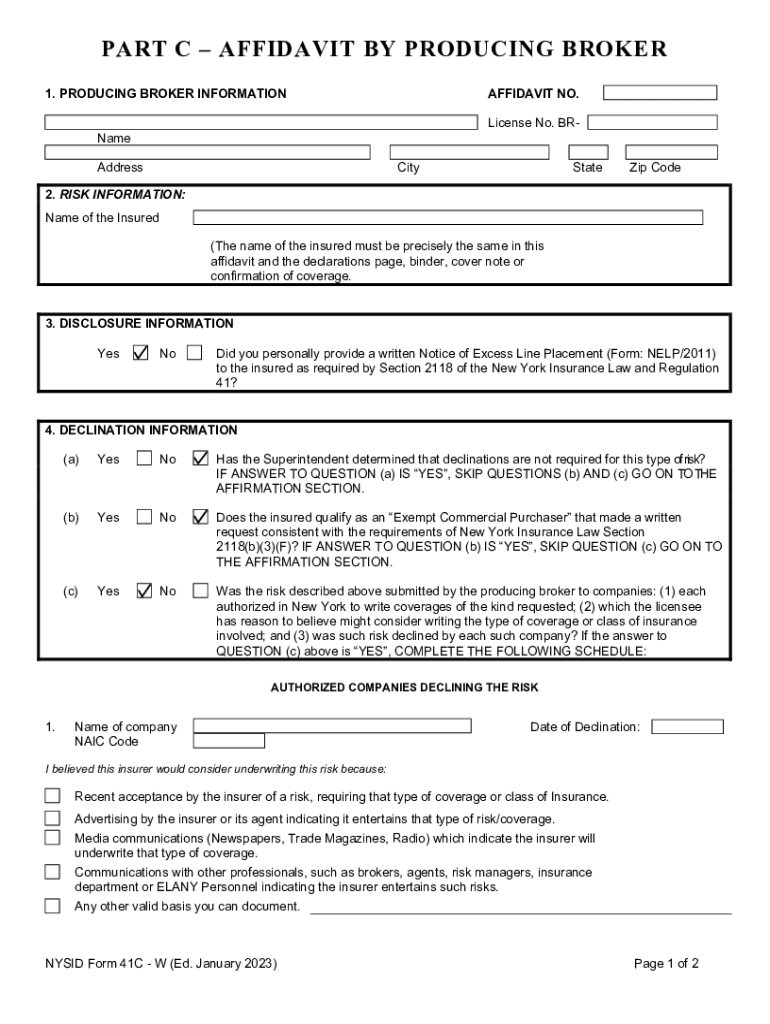
  1. Click ‘Get Form’ to open the Part C Affidavit in our editor.
  2. Begin by filling in the Producing Broker Information section. Enter your License Number, Name, Address, City, State, and Zip Code accurately.
  3. Proceed to the Risk Information section. Ensure that the Name of the Insured matches exactly with the declarations page or any related documents.
  4. In the Disclosure Information section, select 'Yes' or 'No' regarding whether you provided a written Notice of Excess Line Placement as required.
  5. For Declination Information, answer questions (a), (b), and (c) as applicable. If you answer 'Yes' to question (a), skip to the Affirmation section.
  6. If necessary, complete the Authorized Companies Declining the Risk sections by providing details for each company that declined coverage.
  7. Finally, in the Affirmation section, sign and date the affidavit to confirm that all information is true to your knowledge.

Start using our platform today for free to fill out your Part C Affidavit efficiently!

be ready to get more

Complete this form in 5 minutes or less

Get form

Got questions?

We have answers to the most popular questions from our customers. If you can't find an answer to your question, please contact us.
Contact us
When writing an affidavit, you must include: A signature block for the affiant to sign. A notary signature block to make the document official. An opening statement declaring the facts are true and correct. Detailed information about the affiants identity and relationship to the case.
You can easily make an Affidavit within a few minutes using our document builder. You simply fill in some information, then print the form to bring to a notary public for signing.
The following are six critical sections that must be included: Title. This is either your name (Affidavit of Jane Doe) or the specific case information. Statement of identity. The next paragraph tells the court about yourself. Statement of truth. Statement of facts. Closing statement of truth. Sign and docHub.
Steps to Fill Out an Affidavit Step 1: Obtain the Correct Form. Start by selecting the appropriate affidavit form for your jurisdiction and purpose. Step 2: Enter Personal Information. Step 3: Write the Statement of Truth. Step 4: Sign in Front of a Notary.
Create affidavits quickly with our user-friendly online template. Simply fill in the required fields, sign, and submit. Use this free template to generate affidavits for legal proceedings, evidence documentation, and more.
be ready to get more

Complete this form in 5 minutes or less

Get form

People also ask

The bottom part of the Affidavit should include the following: Full name of the deponent and their signature. Statement indicating whether the affidavit has been sworn or not. Date and place where the affidavit is being signed. Designation and full name of the Notary or Magistrate (person attesting the affidavit)
Free Affidavit Template for Every State (US) | LawDepot.
Conclusion. Best RON platforms in US have changed the way document notarization is done, rendering it quick, convenient, and just as legally binding as in-person notarization. Affidavits docHubd online are accepted in court, provided the notary follows applicable laws and regulations.

Related links