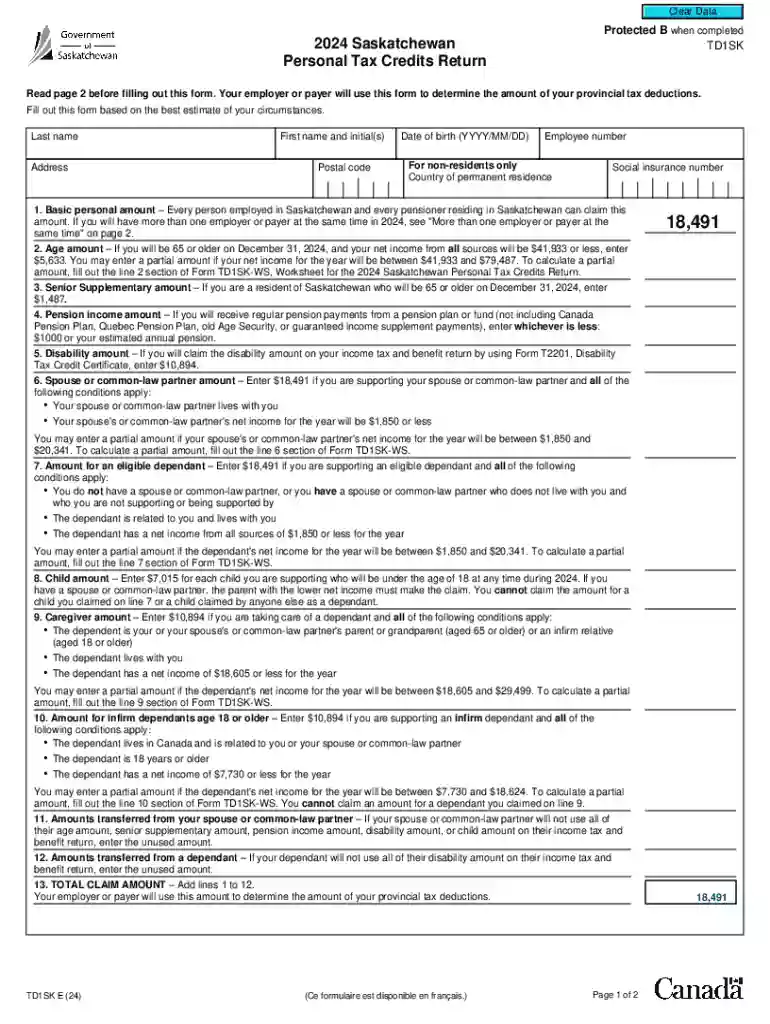
2024 saskatchewan personal tax credits return Preview on Page 1

2024 Saskatchewan Personal Tax Credits Return-2026

Here's how it works

  • 01. Edit your 2024 saskatchewan personal tax credits return online

    Type text, add images, blackout confidential details, add comments, highlights and more.

  • 02. Sign it in a few clicks

    Draw your signature, type it, upload its image, or use your mobile device as a signature pad.

  • 03. Share your form with others

    Send it via email, link, or fax. You can also download it, export it or print it out.

How to use or fill out 2024 Saskatchewan Personal Tax Credits Return with DocHub

Form edit decoration
9.5
Ease of Setup
DocHub User Ratings on G2
9.0
Ease of Use
DocHub User Ratings on G2
  1. Click ‘Get Form’ to open the 2024 Saskatchewan Personal Tax Credits Return in our editor.
  2. Begin by entering your personal information, including your last name, first name, date of birth, and social insurance number. Ensure accuracy as this data is crucial for tax calculations.
  3. Proceed to fill out the Basic Personal Amount section. If you have multiple employers, refer to the guidelines provided on page 2 of the form.
  4. Continue with the Age Amount and Senior Supplementary Amount sections if applicable. Use the income thresholds mentioned to determine eligibility.
  5. Complete the remaining fields such as Pension Income Amount, Disability Amount, and amounts for dependants. Be sure to calculate any partial amounts using the provided worksheets.
  6. After filling out all relevant sections, review your entries for accuracy before signing and dating the form.
  7. Finally, submit your completed form to your employer or payer as instructed.

Start using our platform today for free to simplify your tax return process!

be ready to get more

Complete this form in 5 minutes or less

Security and compliance

At DocHub, your data security is our priority. We follow HIPAA, SOC2, GDPR, and other standards, so you can work on your documents with confidence.

Related links

Instructions for Form IT-112-C New York State Resident Credit

Dec 12, 2024 Column A: On lines 1 through 18, enter the amount of each item of income or deduction reported on Form IT-201 or the amount of income reportedRead more

Learn more
If you believe that this page should be taken down, please follow our DMCA take down process here