



Type text, add images, blackout confidential details, add comments, highlights and more.

02. Sign it in a few clicks
Draw your signature, type it, upload its image, or use your mobile device as a signature pad.

03. Share your form with others
Send it via email, link, or fax. You can also download it, export it or print it out.
How to use or fill out Company Office Applicants Name: with our platform

Ease of Setup
DocHub User Ratings on G2
Ease of Use
DocHub User Ratings on G2
Click ‘Get Form’ to open the Company Office Applicants Name: application form in the editor.
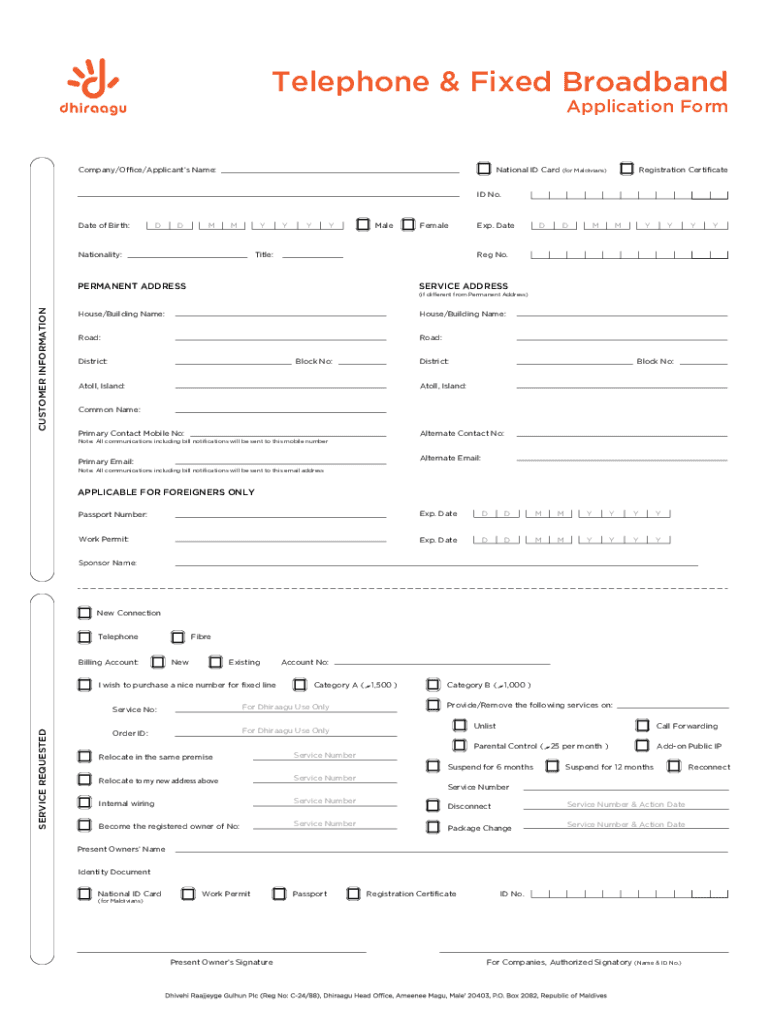
Begin by entering your Company/Office/Applicant’s Name at the top of the form. Ensure this is accurate as it will be used for all official communications.
Fill in your National ID Card number if you are a Maldivian, or provide your Passport Number and Work Permit details if you are a foreign applicant.
Complete the Date of Birth section by selecting the day, month, and year from the dropdown menus provided.
Indicate your nationality and gender by selecting the appropriate options available in the form.
Provide both your Permanent Address and Service Address, ensuring that all fields such as House/Building Name, Road, District, and Atoll/Island are filled out correctly.
Enter your primary contact mobile number and email address. Remember that all communications will be sent to these contacts.
Review all entered information for accuracy before submitting the form to ensure a smooth processing experience.
Start filling out your application today using our platform for free!
Fill out Company Office Applicants Name: online It's free
We've got more versions of the Company Office Applicants Name: form. Select the right Company Office Applicants Name: version from the list and start editing it straight away!
The individual who directly files the document that creates the entity, or in the case of a foreign reporting company, the document that first registers the entity to do business in the United States must be listed as a company applicant.
What is a company applicant?
The company applicants of a reporting company include the individual primarily responsible for directing the filing of the creation or registration document.
What is the company applicant?
There can be up to two individuals who qualify as company applicants (1) the individual who directly files the document that creates, or first registers, the reporting company; and (2) the individual that is primarily responsible for directing or controlling the filing of the relevant document.
What is a CTA company applicant?
In brief, a company applicant is: (a) the person who directly files the document that creates or registers the reporting company; and (b) if more than one person is involved with the filing of the document, the person who is primarily responsible for directing or controlling the filing.
Who is the company applicant for FinCEN?
Under the CTA, a company applicant is defined as: The individual who directly files the document to create or register the reporting company; and. The individual who is primarily responsible for directing or controlling such filing, if more than one individual is involved in the filing.
Related Searches
Company office applicants name listCompany office applicants name exampleCompany applicant BOICompany applicant vs beneficial ownerCompany applicant meaningCompany applicant FinCEN IDCompany applicant informationWhat is company applicant fincen
Security and compliance
At DocHub, your data security is our priority. We follow HIPAA, SOC2, GDPR, and other standards, so you can work on your documents with confidence.
HireRight requires candidate employment documents to contain candidate name, company name (and affiliation explanation where applicable) and a date reference.
PS Form 3615 - Mailing Permit Application and Customer Profile
Section A, Applicant Information. 1. Enter applicants name and company/agency name under which mailings will be entered. 2. Enter the date application was
Cookie consent notice
This site uses cookies to enhance site navigation and personalize your experience.
By using this site you agree to our use of cookies as described in our Privacy Notice.
You can modify your selections by visiting our Cookie and Advertising Notice.

