




01. Edit your entrance conference worksheet online
Type text, add images, blackout confidential details, add comments, highlights and more.

Type text, add images, blackout confidential details, add comments, highlights and more.

Draw your signature, type it, upload its image, or use your mobile device as a signature pad.

Send hhs entrance conference worksheet via email, link, or fax. You can also download it, export it or print it out.
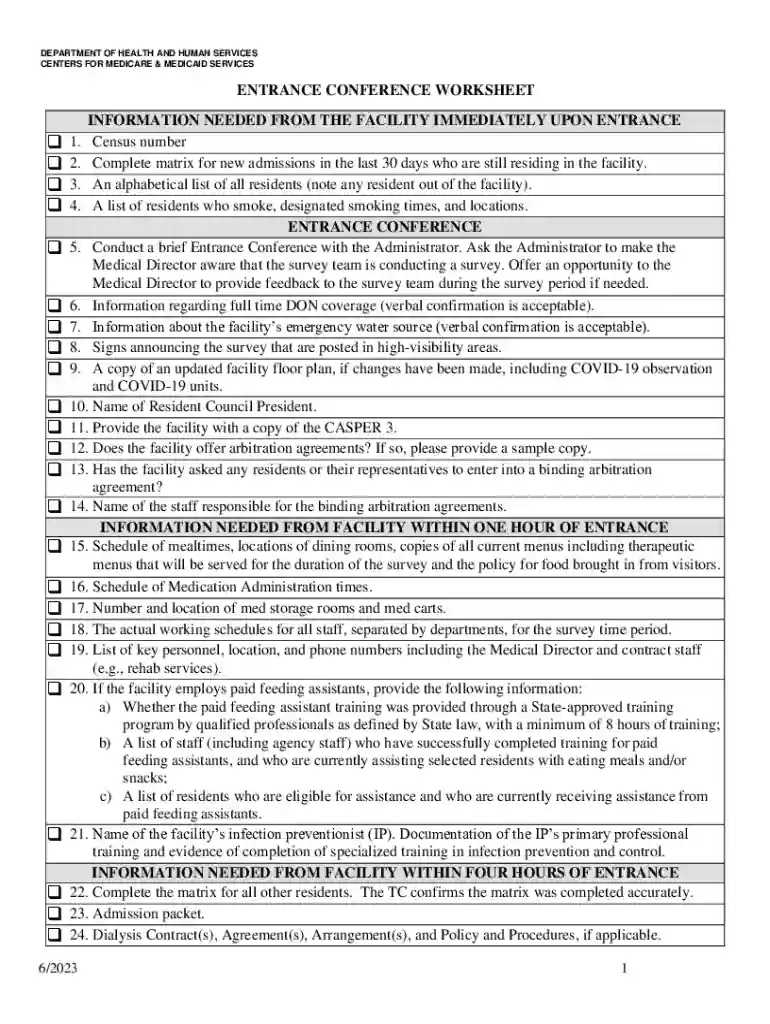
The Entrance Conference Worksheet is a crucial tool utilized during regulatory surveys, particularly within healthcare facilities, to ensure compliance with health regulations. Developed by the Department of Health and Human Services, Centers for Medicare & Medicaid Services, this document facilitates the systematic collection of important information from these facilities. The worksheet is integral in capturing resident census data, documenting admission matrices, detailing smoking policies, and outlining meal schedules. Additional data includes medication administration times and agreements related to arbitration and dialysis. Each piece of information collected through the worksheet supports regulatory bodies in effectively evaluating facility operations and care standards.
Using the Entrance Conference Worksheet requires a methodical approach to ensure all necessary data is captured accurately. Facilities should coordinate team efforts to gather information that mirrors daily operations and complies with the worksheet's requirements. Begin by identifying each category of data required, such as resident census and admission matrices. Responsibility for each section should be assigned to staff members familiar with that area of operation. Real-time data entry during the survey entrance conference ensures that the most current information is provided. This worksheet serves as both a checklist and a roadmap for compliance, guiding facilities through the initial stages of a survey.
This worksheet is generally used by healthcare administrators, compliance officers, and nursing staff within facilities regulated by Medicare and Medicaid Services. It is also employed by surveyors during regulatory reviews to assess a facility's adherence to health standards and operational protocols. Professionals involved in compliance and quality assurance will frequently engage with this document to ensure that internal data practices align with regulatory expectations.


The Entrance Conference Worksheet is used to maintain transparency and regulatory compliance within healthcare facilities. Legally, it serves as a documented reflection of a facility’s operations and compliance efforts during a survey. Accurate and truthful completion is mandated, as providing false information can result in penalties or legal repercussions. Facilities should treat this document with the same care and confidentiality as other sensitive medical or operational records.
While the core content of the Entrance Conference Worksheet remains consistent, states may have specific additional data requirements or variances in how certain information is presented. Some states require additional supporting documentation, while others may provide their unique guidelines for certain elements, such as smoking policies or resident census reporting. It is essential for facilities to be aware of and comply with their state’s specific regulations when completing the worksheet.
A practical scenario for utilizing the Entrance Conference Worksheet might involve a healthcare facility preparing for a Medicare survey. The administrative team would gather all recent resident census data and have the dietary staff ready meal schedules. During the entrance conference, the surveyors use the worksheet to request and verify the provided information, ensuring compliance with the outlined standards. In another instance, a facility might conduct an internal mock survey using the worksheet as a checklist to preemptively address areas needing improvement.
We've got more versions of the entrance conference worksheet form. Select the right entrance conference worksheet version from the list and start editing it straight away!
At DocHub, your data security is our priority. We follow HIPAA, SOC2, GDPR, and other standards, so you can work on your documents with confidence.


