Vaccination letter format 2026

Get Form
vaccination letter format for employees Preview on Page 1

Here's how it works

01. Edit your vaccination letter format for employees online
Type text, add images, blackout confidential details, add comments, highlights and more.
02. Sign it in a few clicks
Draw your signature, type it, upload its image, or use your mobile device as a signature pad.
03. Share your form with others
Send vaccination letter format via email, link, or fax. You can also download it, export it or print it out.

How to use or fill out vaccination letter format with our platform

Form edit decoration
9.5
Ease of Setup
DocHub User Ratings on G2
9.0
Ease of Use
DocHub User Ratings on G2
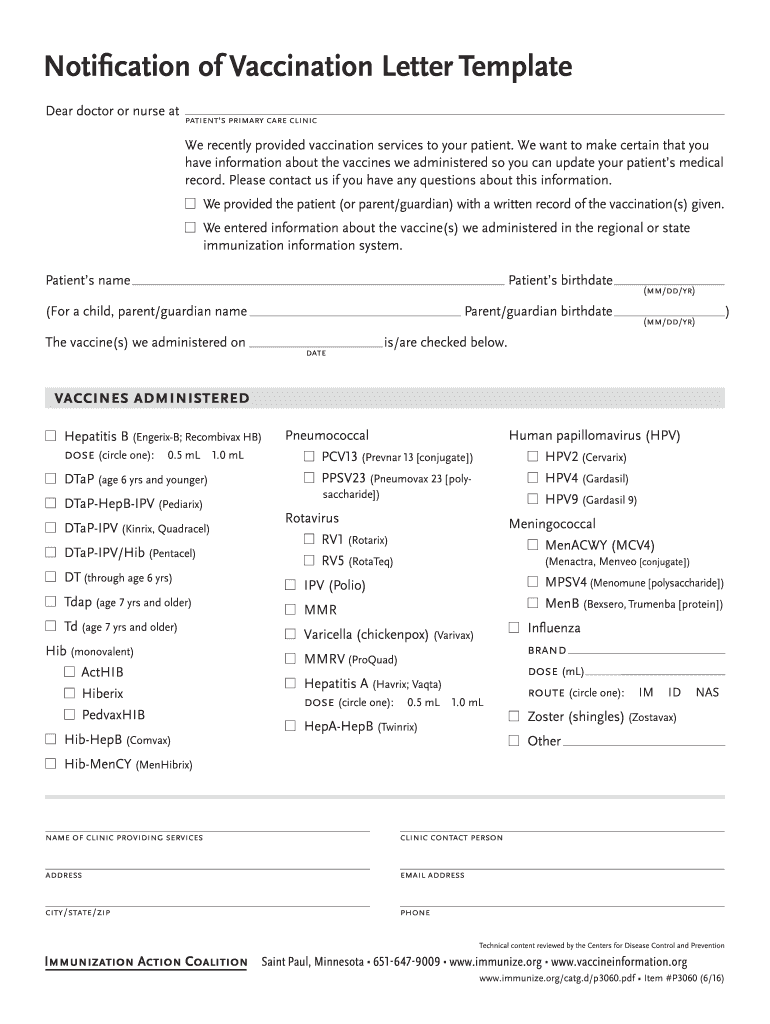
  1. Click ‘Get Form’ to open the vaccination letter format in the editor.
  2. Begin by entering the patient's name and birthdate at the top of the form. If applicable, include the parent or guardian's name and birthdate.
  3. In the section for vaccines administered, check off each vaccine that was given. Be sure to circle the appropriate dose for Hepatitis A and Influenza.
  4. Fill in the date when the vaccines were administered. This is crucial for accurate medical records.
  5. Complete the clinic information section by providing the name of your clinic, contact person, address, email, city/state/zip, and phone number.
  6. Review all entered information for accuracy before saving or sending your completed vaccination letter.

Start using our platform today to easily fill out your vaccination letter format for free!

See more vaccination letter format versions

We've got more versions of the vaccination letter format form. Select the right vaccination letter format version from the list and start editing it straight away!
Versions Form popularity Fillable & printable
2021 4.8 Satisfied (130 Votes)
2018 4.4 Satisfied (151 Votes)
2016 4.4 Satisfied (135 Votes)
2012 4 Satisfied (33 Votes)
be ready to get more

Complete this form in 5 minutes or less

Get form

Got questions?

We have answers to the most popular questions from our customers. If you can't find an answer to your question, please contact us.
Contact us
What information does federal law require us to document when we immunize a patient? The vaccine manufacturer. The lot number of the vaccine. The date the vaccine is administered. The name, office address, and title of the healthcare provider administering the vaccine.
Please initial next to each of the statements below: I request a reasonable accommodation due to my sincere religious beliefs. I understand and assume the risks of non-vaccination. I accept full responsibility for my health, thus removing liability from the City to the required vaccinations.
Asking your friends about their vaccination status is as simple as I have been vaccinated for COVID-19. Have you? If they dont wish to answer, you should engage with the person as if they are unvaccinated. SCENARIO: My dentist told me that shes not going to get vaccinated.
I hereby request and authorize the patient named above to receive a Pfizer-BioNTech COVID-19 vaccine from Vaccination Site, and further receive any and all health care services available from and deemed necessary by the staff of the vaccination site in the event of an adverse reaction

Security and compliance

At DocHub, your data security is our priority. We follow HIPAA, SOC2, GDPR, and other standards, so you can work on your documents with confidence.

Learn more
ccpa2
pci-dss
gdpr-compliance
hipaa
soc-compliance