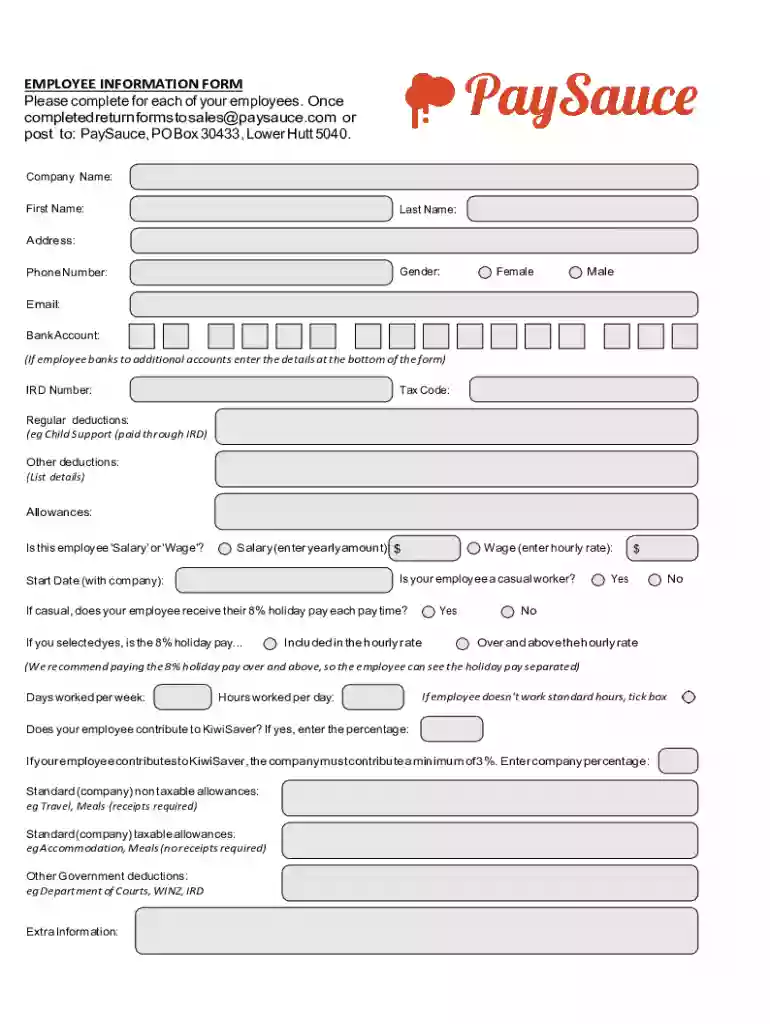
PaySauce - Employee Information form Preview on Page 1

PaySauce - Employee Information form 2026

Here's how it works

  • 01. Edit your form online

    Type text, add images, blackout confidential details, add comments, highlights and more.

  • 02. Sign it in a few clicks

    Draw your signature, type it, upload its image, or use your mobile device as a signature pad.

  • 03. Share your form with others

    Send it via email, link, or fax. You can also download it, export it or print it out.

How to use or fill out PaySauce - Employee Information form with our platform

Form edit decoration
9.5
Ease of Setup
DocHub User Ratings on G2
9.0
Ease of Use
DocHub User Ratings on G2
  1. Click ‘Get Form’ to open the PaySauce - Employee Information form in the editor.
  2. Begin by entering the Company Name, followed by the employee's First Name and Last Name. Ensure accuracy as this information is crucial for identification.
  3. Fill in the Address, Gender, Phone Number, and Email fields. Select either 'Female' or 'Male' for gender and provide a valid phone number and email address for communication.
  4. Input Bank Account details. If there are additional accounts, enter those at the bottom of the form. Next, provide the IRD Number and Tax Code.
  5. Specify Regular deductions (e.g., Child Support) and Other deductions if applicable. List any Allowances that apply to the employee.
  6. Indicate whether the employee is on Salary or Wage by entering either a yearly amount or hourly rate respectively. Also, note if they are a casual worker.
  7. Complete sections regarding holiday pay, days worked per week, hours worked per day, and KiwiSaver contributions as necessary.

Start filling out your PaySauce - Employee Information form online for free today!

See more PaySauce - Employee Information form versions

We've got more versions of the PaySauce - Employee Information form form. Select the right PaySauce - Employee Information form version from the list and start editing it straight away!

VersionsForm popularityFillable & printable
20174.4 Satisfied (47 Votes)

be ready to get more

Complete this form in 5 minutes or less

Security and compliance

At DocHub, your data security is our priority. We follow HIPAA, SOC2, GDPR, and other standards, so you can work on your documents with confidence.

If you believe that this page should be taken down, please follow our DMCA take down process here