Kentucky ust form 2026

Get Form
ust onedrive Preview on Page 1

Here's how it works

01. Edit your ust onedrive online
Type text, add images, blackout confidential details, add comments, highlights and more.

02. Sign it in a few clicks
Draw your signature, type it, upload its image, or use your mobile device as a signature pad.

03. Share your form with others
Send it via email, link, or fax. You can also download it, export it or print it out.

How to use or fill out Kentucky UST Form with DocHub

Form edit decoration
9.5
Ease of Setup
DocHub User Ratings on G2
9.0
Ease of Use
DocHub User Ratings on G2
  1. Click ‘Get Form’ to open the Kentucky UST form in our platform's editor.
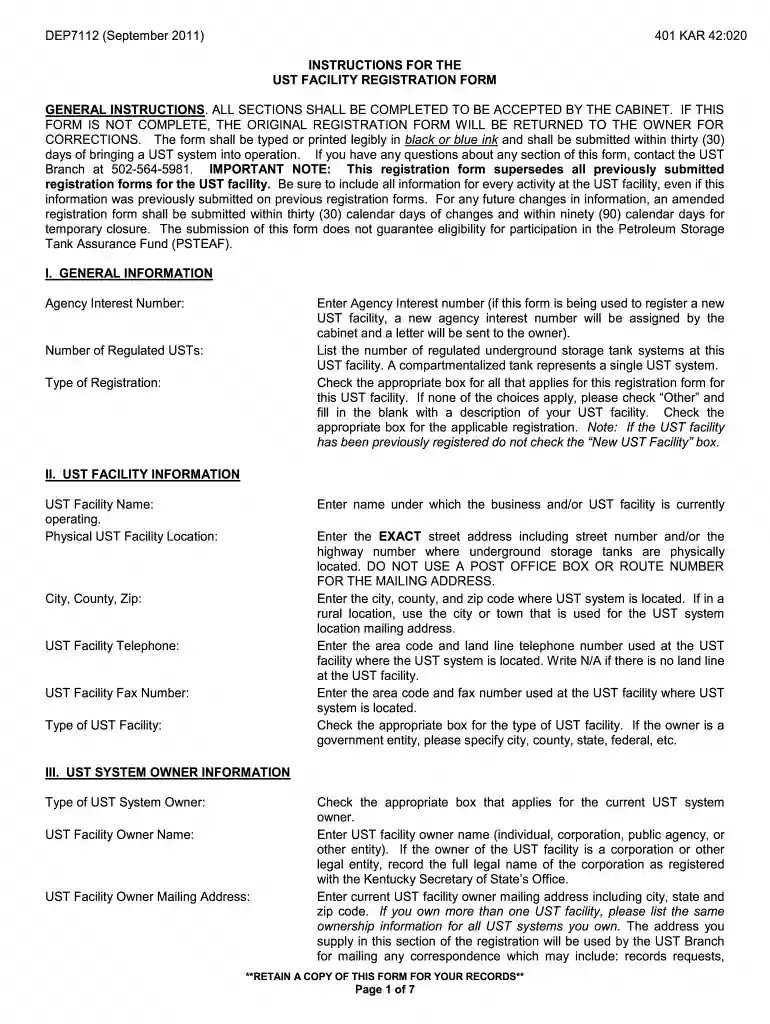
  2. Begin by filling out the 'General Information' section. Enter your Agency Interest Number and indicate the number of regulated underground storage tank systems at your facility.
  3. In the 'UST Facility Information' section, provide the name and physical address of your UST facility. Ensure that you include the exact street address without using a P.O. Box.
  4. Complete the 'UST System Owner Information' by entering details about the owner, including their name, mailing address, and contact information.
  5. Proceed to fill out the 'UST System History/Identification/Description' section. Here, indicate whether tanks contained products on or after January 1, 1974, and provide details about each tank's contents and installation dates.
  6. Finally, ensure that both the UST system owner and operator sign and date the form in their respective sections. Remember to have these signatures notarized for compliance.

Start using our platform today to streamline your document editing and form completion for free!

See more kentucky ust form versions

We've got more versions of the kentucky ust form form. Select the right kentucky ust form version from the list and start editing it straight away!
Versions Form popularity Fillable & printable
2011 4.8 Satisfied (61 Votes)
be ready to get more

Complete this form in 5 minutes or less

Get form

Got questions?

We have answers to the most popular questions from our customers. If you can't find an answer to your question, please contact us.
Contact us
Form K-5. Form K-5 is used to report withholding statement information from Form W-2, W-2G and 1099 and can be completed and submitted online in the MyTaxes portal at MyTaxes.ky.gov. Once in the portal, you will click on Transactions in the page header. From this drop down box, choose, File A Form.
A full-year resident of Kentucky files Form 740 and a person who moves into or out of Kentucky during the year or is a full-year nonresident files Form 740-NP.
FORM E. PRE-ACQUISITION NOTIFICATION FORM. REGARDING THE POTENTIAL COMPETITIVE IMPACT OF A PROPOSED MERGER OR. ACQUISITION BY A NON-DOMICILIARY INSURER. DOING BUSINESS IN THIS STATE OR BY A DOMESTIC INSURER.
Kentucky fully exempts all Social Security income from taxation while providing a docHub deduction for seniors receiving other types of retirement income. The state has relatively low sales and property taxes, but also has an inheritance tax.
Kentucky has a flat 4.00 percent individual income tax rate. There are also jurisdictions that collect local income taxes. Kentucky has a 5.0 percent corporate income tax rate. Kentucky also has a 6.00 percent state sales tax rate and does not have local sales taxes.

Security and compliance

At DocHub, your data security is our priority. We follow HIPAA, SOC2, GDPR, and other standards, so you can work on your documents with confidence.

Learn more
ccpa2
pci-dss
gdpr-compliance
hipaa
soc-compliance
be ready to get more

Complete this form in 5 minutes or less

Get form

People also ask

All Pass-through Entities Nonresidents with income from Kentucky sources and part-year residents receiving income while a Kentucky resident or from Kentucky sources while a nonresident must file a Kentucky return.
Kentucky Revised Statute Chapter 141 requires employers to withhold income tax for both residents and nonresidents employees (unless exempted by law).

Related links