




01. Edit your form online
Type text, add images, blackout confidential details, add comments, highlights and more.

Type text, add images, blackout confidential details, add comments, highlights and more.

Draw your signature, type it, upload its image, or use your mobile device as a signature pad.

Send it via email, link, or fax. You can also download it, export it or print it out.
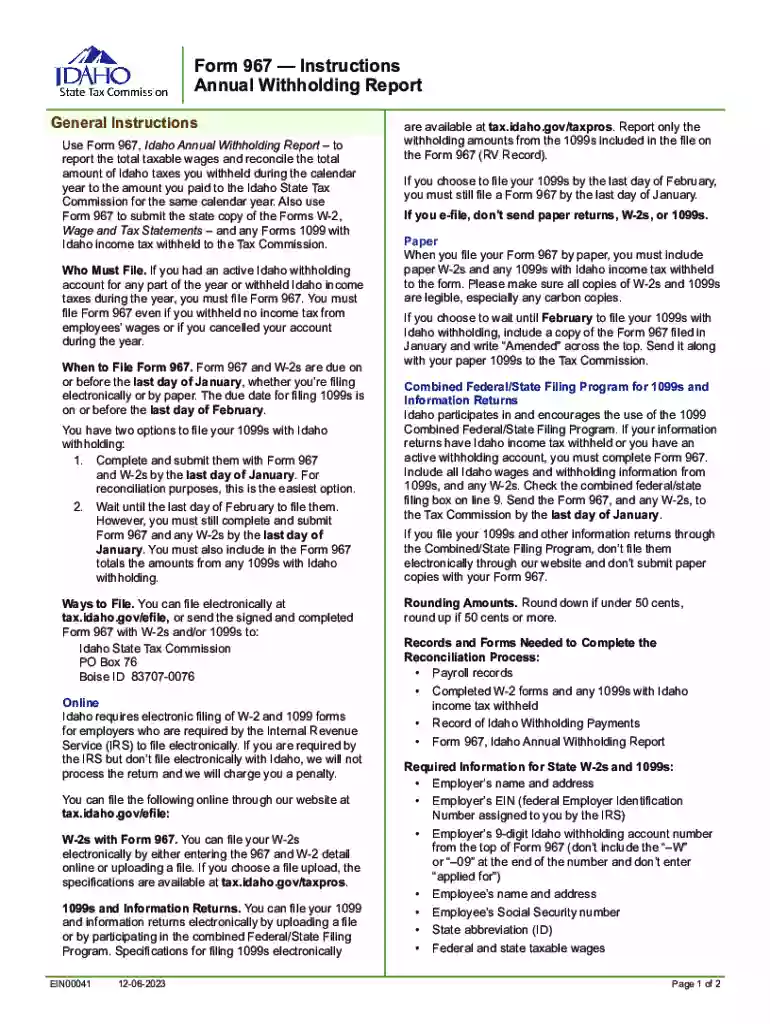
Idaho Form 967 is the Annual Withholding Report required for employers within the state of Idaho to report total taxable wages and reconcile any Idaho taxes withheld during a calendar year. This form is crucial for businesses that have an active Idaho withholding account, ensuring that they accurately report the amount of tax withheld from employee wages. Even if no taxes have been withheld, submission of Form 967 is mandatory if an account is active.
The primary purpose of this form is to provide the Idaho State Tax Commission with a detailed account of how much was withheld by an employer throughout the year. The form acts as a record for both employers and the state, helping to prevent discrepancies in tax credits and withholdings. Additionally, it ensures compliance with tax obligations and helps the state maintain accurate records of employment taxes.
Access the Form: Visit a platform like DocHub to find and open Idaho Form 967. Ensure you have all necessary information on hand, such as employer identification number, total wages paid, and amount of taxes withheld.
Input Required Information: Use the interactive fields to enter details specific to your business. This includes business name, address, Idaho withholding account number, and total wages and withholdings for the year.
Add Supporting Documents: Attach any required supporting documentation, like W-2s and relevant 1099 forms, as part of your submission. These documents will corroborate the reported figures on Form 967.
Review and Edit: Double-check all entries for accuracy. Online tools often allow users to review and make necessary edits before submitting.
Electronically Sign the Form: Apply your digital signature to certify the information provided is true and accurate. Electronic signatures on platforms like DocHub are legally binding.
Submit the Form: Once completed and signed, submit the form electronically. Retain a copy for your records.
Timely submission of Idaho Form 967 is crucial to avoid penalties. The form is due by the end of January for reporting W-2s and by the end of February for 1099s. Meeting these deadlines ensures compliance with state tax laws and prevents unnecessary fines.
For 2023, the deadlines are:
If the deadline falls on a weekend or holiday, it typically extends to the next business day. Monitoring these deadlines closely and preparing documentation well in advance can facilitate a smooth filing process.
To correctly file Form 967, gather the following documents:
Ensure these documents are accurate and complete before commencing the online filing process, as they substantiate the figures reported on your Form 967.
Filing Idaho Form 967 online via platforms like DocHub offers numerous advantages:
These benefits make online filing an attractive option for busy employers seeking a streamlined, secure method for fulfilling state tax obligations.
Failing to file Idaho Form 967 or submitting the form late can result in penalties imposed by the Idaho State Tax Commission. The penalties typically include:
To avoid these financial setbacks, ensure the form is filed accurately and on time. Adhering to deadlines and verifying information before submission can help mitigate the risk of non-compliance.
When filing Idaho Form 967 online, using an electronic signature is an accepted practice. Digital signatures through platforms like DocHub comply with the ESIGN Act, making them legally binding. Employers can choose from several methods to create a signature:
Once created, signatures can be saved for future use, providing a quick and reliable method for signing subsequent forms.
Both digital and paper versions of Idaho Form 967 serve the same purpose but have distinct differences:
Employers often choose the digital route for its time-saving advantages and reduced error rate, streamlining the overall filing process.
Several state-specific regulations and requirements apply to Idaho Form 967. Employers must adhere to Idaho's taxation laws concerning:
Understanding these rules will help ensure compliance and accurate reporting, promoting a smooth relationship with state tax authorities.
We've got more versions of the Idaho form 967: Fill out and sign online form. Select the right Idaho form 967: Fill out and sign online version from the list and start editing it straight away!
At DocHub, your data security is our priority. We follow HIPAA, SOC2, GDPR, and other standards, so you can work on your documents with confidence.
Use Form 967 to send Idaho the state copy of the Form W-2s, Wage and Tax Statements, You can do this either online using TAP or through the mail.
Feb 20, 2026 Use this form to report the Idaho income tax you withheld, reconcile payments you made during the year with the amount of tax you withheld, and submit your W-2Read more
This research was funded by the Environmental Security Technology Certification Program. (ESTCP). This research was performed by Elisabeth L. Hawley, P.E.;Read more


