Type text, add images, blackout confidential details, add comments, highlights and more.
02. Sign it in a few clicks
Draw your signature, type it, upload its image, or use your mobile device as a signature pad.
03. Share your form with others
Send mdinr form via email, link, or fax. You can also download it, export it or print it out.
How to use or fill out form patient inr with our platform
Ease of Setup
DocHub User Ratings on G2
Ease of Use
DocHub User Ratings on G2
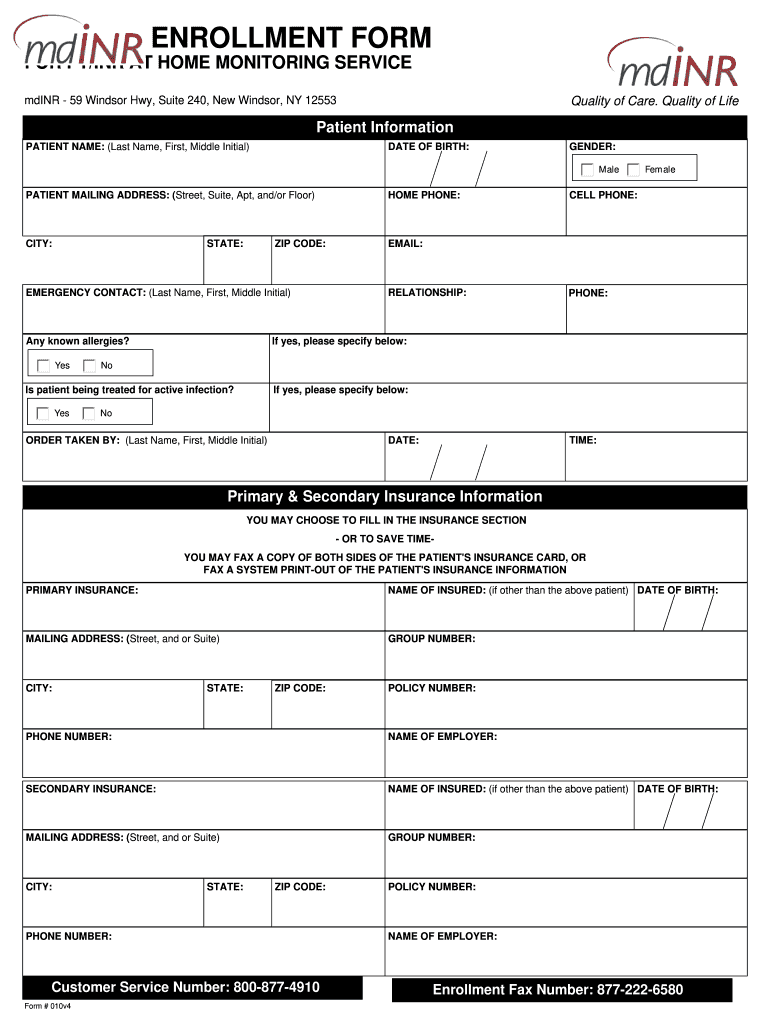
Click ‘Get Form’ to open the Patient INR Enrollment Form in the editor.
Begin by entering the Patient Information. Fill in the patient's name, date of birth, gender, mailing address, and contact details. Ensure accuracy for effective communication.
Complete the Emergency Contact section by providing their name, relationship to the patient, and phone number. This is crucial for any urgent situations.
In the Insurance Information section, you can either fill in the details manually or choose to fax a copy of the insurance card for convenience.
Proceed to the Physician Order Form. Enter the effective date, prescribing physician's information, and confirm any known allergies or active infections.
Finally, review all entries for accuracy before submitting. Use our platform’s features to save your progress or share it directly with relevant parties.
Start using our platform today for free and streamline your form completion process!
mdINR FORM pdfInr formsBest INR home testing KitmdINR patient portalmdINR order formHome INR monitoringmdINR Phone numberINR home testing kit covered by Medicare
Security and compliance
At DocHub, your data security is our priority. We follow HIPAA, SOC2, GDPR, and other standards, so you can work on your documents with confidence.
May 15, 2024 A PT/INR test helps find out if your blood is clotting normally. It also checks to see if a medicine that prevents blood clots is working the way it should.Read more
Guideline for stopping anticoagulants prior to urological
Patients at low risk for thrombosis in whom warfarin is being held before a procedure should have an INR of less than 1.5.2,7 These patients can be started on aRead more
1. The first items include a Patient-Provider Agreement and a Patient Contact Information form. The Patient-Provider Agreement explains your responsibilities asRead more
Cookie consent notice
This site uses cookies to enhance site navigation and personalize your experience.
By using this site you agree to our use of cookies as described in our Privacy Notice.
You can modify your selections by visiting our Cookie and Advertising Notice.