



Instructions for Form 720-V Electronic Filing Payment Voucher 2026

Get Form
kentucky 720 es online Preview on Page 1

Here's how it works

01. Edit your kentucky 720 es online online
Type text, add images, blackout confidential details, add comments, highlights and more.

02. Sign it in a few clicks
Draw your signature, type it, upload its image, or use your mobile device as a signature pad.

03. Share your form with others
Send form 720es limited via email, link, or fax. You can also download it, export it or print it out.

How to use or fill out Instructions for Form 720-V Electronic Filing Payment Voucher with DocHub

Form edit decoration
9.5
Ease of Setup
DocHub User Ratings on G2
9.0
Ease of Use
DocHub User Ratings on G2
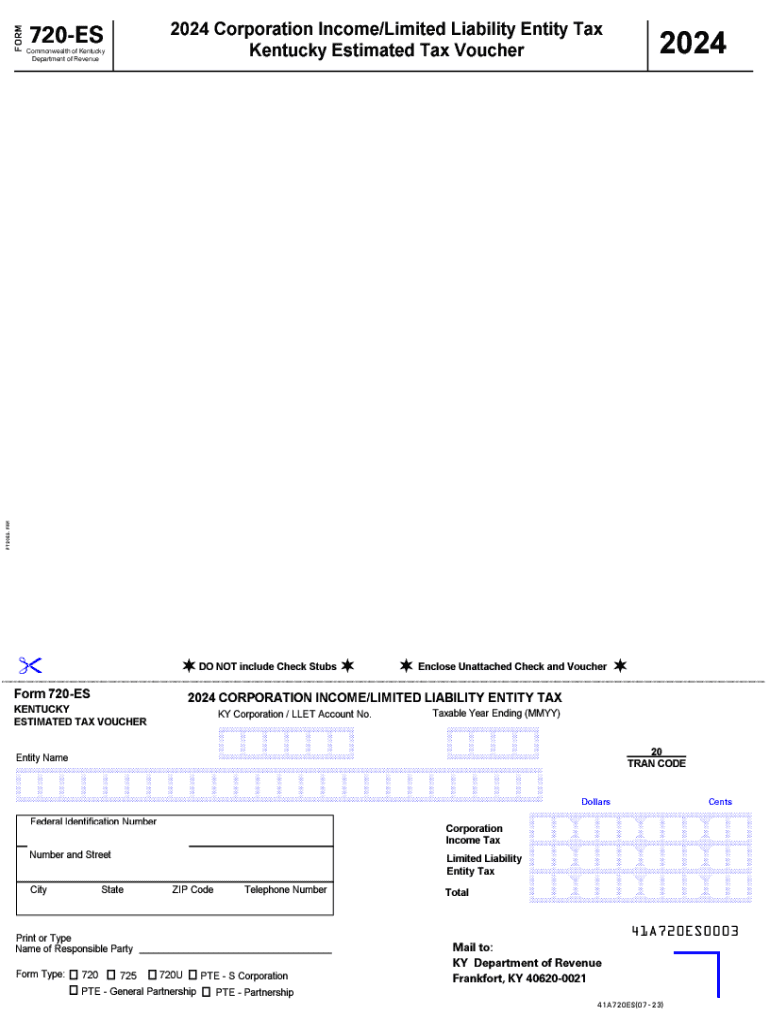
  1. Click ‘Get Form’ to open the Instructions for Form 720-V in our editor.
  2. Begin by entering your KY Corporation / LLET Account Number in the designated field. This is crucial for identifying your tax account.
  3. Next, specify the Taxable Year Ending by entering the month and year in MMYY format. Ensure accuracy to avoid processing delays.
  4. Fill in the TRAN CODE as required, which helps categorize your payment type.
  5. Provide your Entity Name and Federal Identification Number. Double-check these details for correctness.
  6. Complete the address section with your Number and Street, City, State, and ZIP Code to ensure proper correspondence.
  7. Enter the Telephone Number of the responsible party for any follow-up inquiries regarding this form.
  8. Finally, review all entries for accuracy before saving or printing your completed voucher for submission.

Start using our platform today to easily fill out and manage your tax forms online for free!

See more Instructions for Form 720-V Electronic Filing Payment Voucher versions

We've got more versions of the Instructions for Form 720-V Electronic Filing Payment Voucher form. Select the right Instructions for Form 720-V Electronic Filing Payment Voucher version from the list and start editing it straight away!
Versions Form popularity Fillable & printable
2024 4.4 Satisfied (44 Votes)
2020 4.5 Satisfied (38 Votes)
2012 4 Satisfied (53 Votes)
be ready to get more

Complete this form in 5 minutes or less

Get form

Got questions?

We have answers to the most popular questions from our customers. If you can't find an answer to your question, please contact us.
Contact us
Simple720 is an IRS-Approved 720 online portal designed to make your federal excise tax filings effortless and stress-free.
Filing Form 720 isnt difficult, but some common mistakes can make it a headache. One of the biggest issues is filling out the entire form when only a few sections apply this can lead to confusion and errors. Many businesses also miss the quarterly deadlines, which can trigger penalties.
The US Internal Revenue Service (IRS) announced on 30 October 2023 in IR-2023-199 that certain forms can be signed with electronic or digital signatures (e-signatures) instead of wet ink signatures, including Form 1128, Form 3115, Form 8832, elections under section 83(b) of the Internal Revenue Code (IRC), and Form
Forms not eligible for e-filing Dual-Status Return or Dual-Status Statement. Form 56, Notice concerning fiduciary relationship. Form 433-F, Collection Information Statement. Form 8283, Noncash Charitable Contributions. Form 8873, Extraterritorial Income Exclusion. Form 14039, Identity Theft Affidavit.
You can sign your tax return electronically by using a Self-select PIN, which serves as your digital signature when using tax preparation software, or a Practitioner PIN when using an Electronic Return Originator (ERO).

Security and compliance

At DocHub, your data security is our priority. We follow HIPAA, SOC2, GDPR, and other standards, so you can work on your documents with confidence.

Learn more
ccpa2
pci-dss
gdpr-compliance
hipaa
soc-compliance

People also ask

Reporting and Paying for Excise Taxes Schedule A of Form 720 is used to show the total amount of excise taxes you must pay for the quarter. You can send your completed Form 720 by mail or online through an IRS-approved software provider.
The IRS strongly encourages taxpayers to opt for electronic filing when submitting Form 720, the Quarterly Federal Excise Tax Return. One reason electronic signatures are not permitted for manual filings is that the IRS promotes the use of the electronic filing method.

ky 720es

