




Here's how it works

01. Edit your berkheimer w2 reconciliation online
Type text, add images, blackout confidential details, add comments, highlights and more.

02. Sign it in a few clicks
Draw your signature, type it, upload its image, or use your mobile device as a signature pad.

03. Share your form with others
Send tax return reconciliation worksheet via email, link, or fax. You can also download it, export it or print it out.
How to use or fill out W2-R Annual Reconciliation Form 2019 with DocHub

- Click ‘Get Form’ to open the W2-R Annual Reconciliation Form 2019 in our platform.
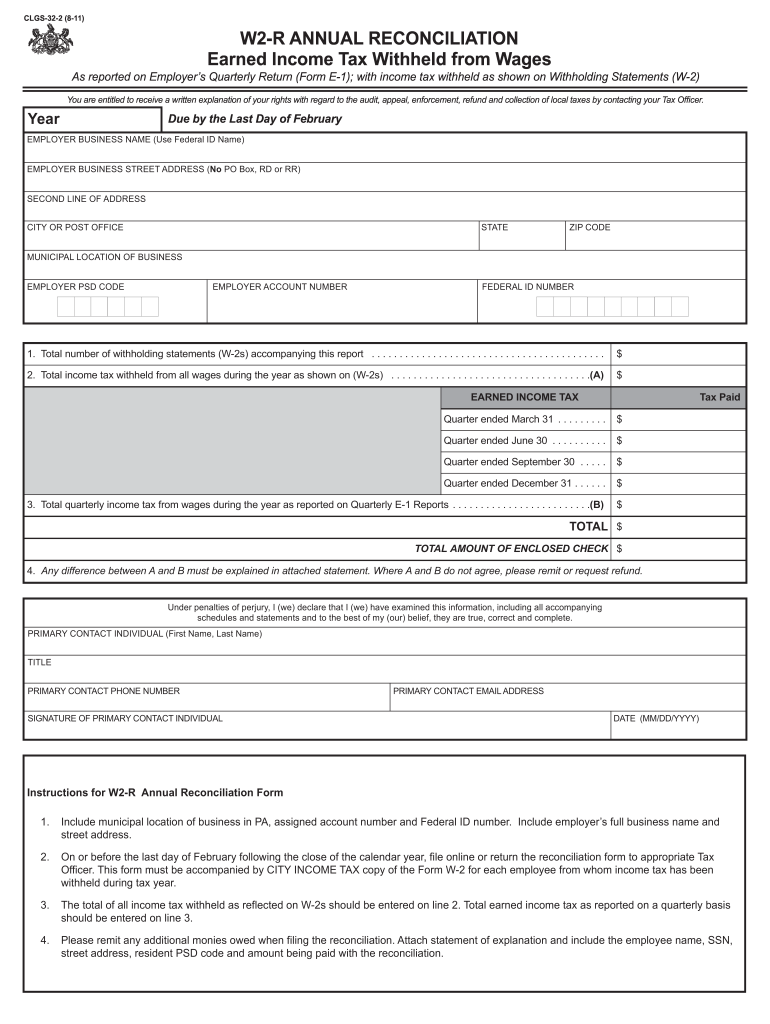
- Begin by entering your employer business name, street address (no PO Box), city, state, and ZIP code in the designated fields.
- Fill in the municipal location of your business, employer PSD code, employer account number, and federal ID number accurately.
- Indicate the total number of withholding statements (W-2s) you are submitting with this report on line 1.
- On line 2, enter the total income tax withheld from all wages during the year as shown on your W-2s.
- Complete lines for earned income tax paid for each quarter and ensure that totals match with quarterly E-1 reports on line 3.
- If there is a discrepancy between total amounts A and B, provide an explanation in an attached statement as instructed.
- Finally, sign and date the form at the bottom before submitting it online or returning it to your Tax Officer by the last day of February.
Start using our editor today to complete your W2-R Annual Reconciliation Form effortlessly and for free!
Fill out w2 r annual reconciliation form 2019 online
It's free
It's free
Security and compliance
At DocHub, your data security is our priority. We follow HIPAA, SOC2, GDPR, and other standards, so you can work on your documents with confidence.
Learn more




