Ersga refund 2026

Get Form
ersga refund Preview on Page 1

Here's how it works

01. Edit your ersga refund online
Type text, add images, blackout confidential details, add comments, highlights and more.
02. Sign it in a few clicks
Draw your signature, type it, upload its image, or use your mobile device as a signature pad.
03. Share your form with others
Send ersga via email, link, or fax. You can also download it, export it or print it out.

How to use or fill out ersga refund with our platform

Form edit decoration
9.5
Ease of Setup
DocHub User Ratings on G2
9.0
Ease of Use
DocHub User Ratings on G2
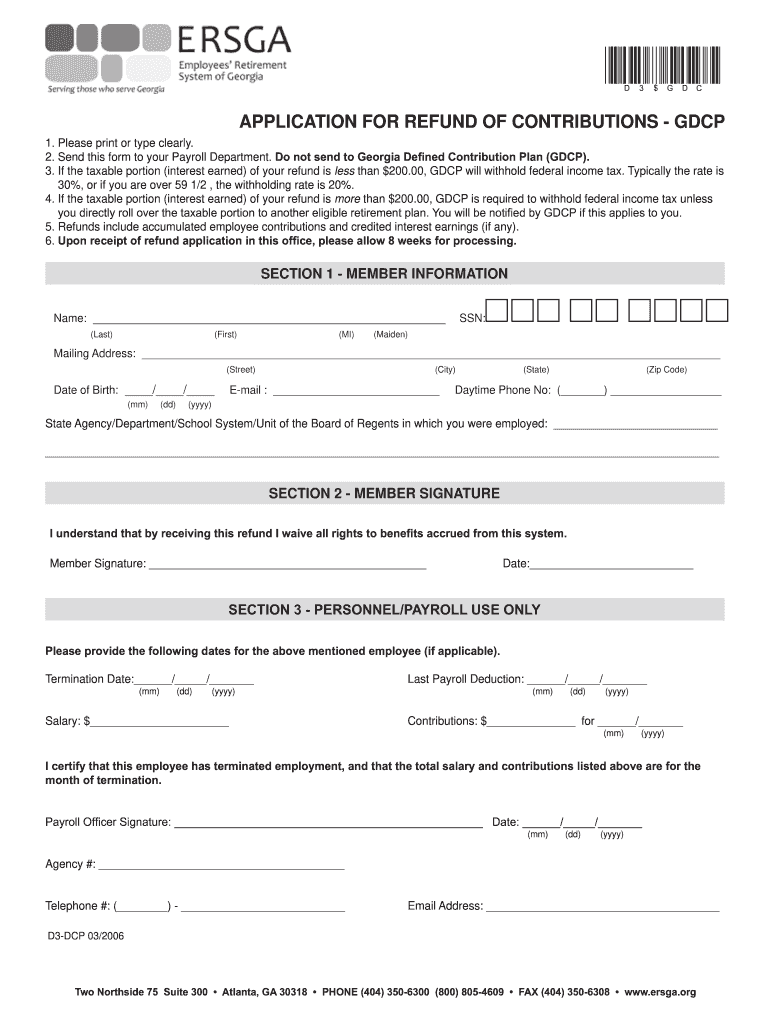
  1. Click ‘Get Form’ to open the ersga refund application in the editor.
  2. In Section 1, enter your personal information clearly. Fill in your name, Social Security Number (SSN), mailing address, date of birth, email, and daytime phone number.
  3. Specify the state agency or department where you were employed. Ensure all details are accurate to avoid processing delays.
  4. Proceed to Section 2 and sign the form. By signing, you acknowledge that you waive all rights to benefits accrued from this system. Also, include the date of your signature.
  5. If applicable, Section 3 is for personnel/payroll use only. This section requires termination dates and salary information. Ensure that a payroll officer completes this section and signs it.
  6. Once completed, save your document and send it directly to your Payroll Department as instructed.

Start using our platform today for free to streamline your ersga refund application process!

See more ersga refund versions

We've got more versions of the ersga refund form. Select the right ersga refund version from the list and start editing it straight away!
Versions Form popularity Fillable & printable
2006 4.8 Satisfied (148 Votes)
be ready to get more

Complete this form in 5 minutes or less

Get form

Got questions?

We have answers to the most popular questions from our customers. If you can't find an answer to your question, please contact us.
Contact us
Log into your ERSGA online account at .ers.ga.gov to make changes to your beneficiary designations or to request a refund of your contributions and interest. Using your online account is fast, easy, and secure! If you are not able to apply for a refund online, please contact ERSGA for assistance at 404-350-6300.
A: Individuals who filed their tax year 2023 return on time and filed their 2024 tax return by May 1, 2025 or by the October 15 extended tax deadline with a valid extension are eligible to receive the Georgia State Surplus Tax Refund. This includes taxpayers who owed state taxes for that tax year.
If you leave your pension scheme within 30 days of joining it (or two years if its a defined benefit scheme), you can usually ask for a refund of your contributions.
A terminated employee is eligible to receive a refund of employee contributions plus interest. Refunds can be requested online at our website at ers.ga.gov. Refunds are processed within 2-4 weeks upon receipt.
Most refunds are issued within 21 days of the return being received. However, the process may take up to 90 days. If your tax refund issue involves a deceased taxpayer, a lost, stolen, or stale-dated check, or a changed name, contact the Department of Revenue for assistance.

Security and compliance

At DocHub, your data security is our priority. We follow HIPAA, SOC2, GDPR, and other standards, so you can work on your documents with confidence.

Learn more
ccpa2
pci-dss
gdpr-compliance
hipaa
soc-compliance
be ready to get more

Complete this form in 5 minutes or less

Get form

People also ask

Remember, acceptance by the IRS doesnt mean approval of the refund yetit just means you have made it to the starting line of the refund process. Keep an eye on the prize: most refunds, especially if youre using direct deposit, arrive within a 21-day window after acceptance.

Related links