




Here's how it works



How to use or fill out DJ Agreement Form with Our Platform

- Click ‘Get Form’ to open the DJ Agreement Form in the editor.
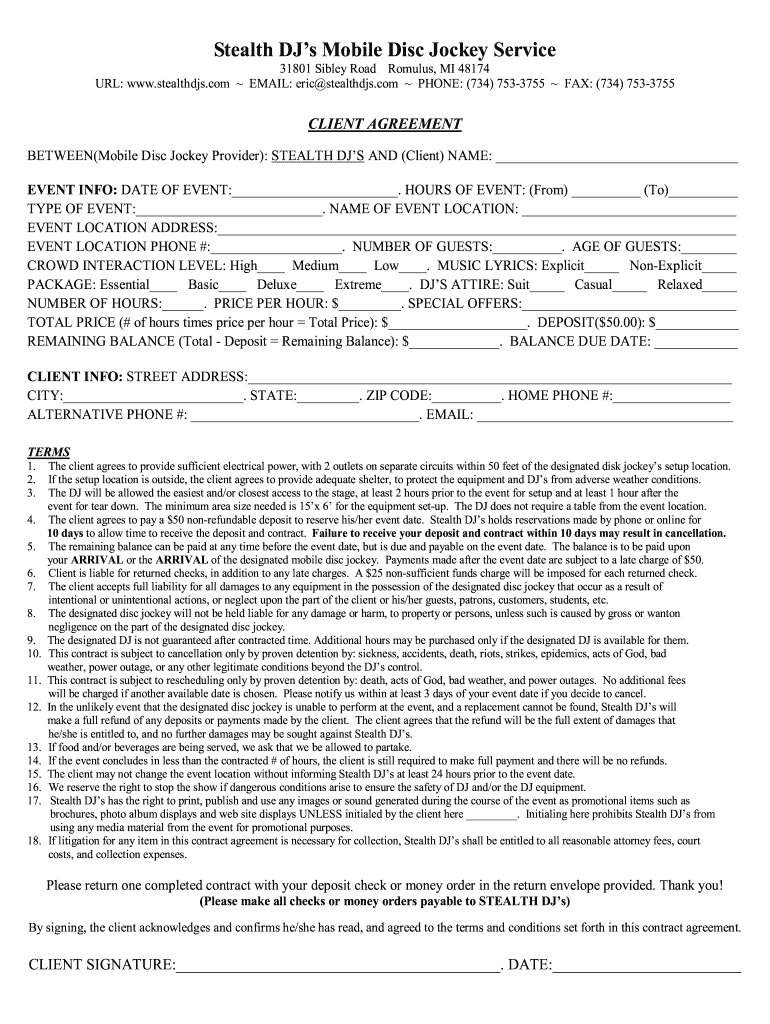
- Begin by entering your name as the client in the designated field. This identifies you as the party entering into the agreement.
- Fill in the event details, including the date, hours (from and to), type of event, and location. Ensure accuracy for smooth coordination.
- Specify the number of guests and their age range. Indicate your preferred crowd interaction level and music lyrics preference.
- Select your desired package and attire for the DJ. Enter the number of hours required and price per hour to calculate total costs.
- Complete client information, including address, phone numbers, and email for effective communication.
- Review all terms outlined in the agreement carefully before signing. Ensure you understand your obligations regarding deposits and payments.
Start filling out your DJ Agreement Form today for free using our platform!
It's free
Got questions?
How do I sign my dj agreement form online?
Log in to your DocHub account and add your dj agreement form to our editor using one of its upload methods - from your device, cloud storage, secure URL, or your DocHub folders if you have already processed your document before. Open our editor, click the Sign button in the top toolbar, and choose your signing method. You can upload an image of your handwritten signature, draw it, type in your name, or utilize a QR code instead.
How do you fill out dj agreement form online?
You may get and edit your dj agreement form online with the help of DocHub. Its straightforward but feature-rich design enables you to start effective work immediately after you register your account. Create your profile and add your file, then our interface will guide you via our stress-free form completion experience.
How do I write a DJ contract?
How much does a famous DJ Charge?
Why are contracts important in the entertainment industry?
Security and compliance
At DocHub, your data security is our priority. We follow HIPAA, SOC2, GDPR, and other standards, so you can work on your documents with confidence.
Learn more


