Type text, add images, blackout confidential details, add comments, highlights and more.
02. Sign it in a few clicks
Draw your signature, type it, upload its image, or use your mobile device as a signature pad.
03. Share your form with others
Send it via email, link, or fax. You can also download it, export it or print it out.
How to use or fill out g 49 with our platform
Ease of Setup
DocHub User Ratings on G2
Ease of Use
DocHub User Ratings on G2
Click ‘Get Form’ to open the g 49 in the editor.
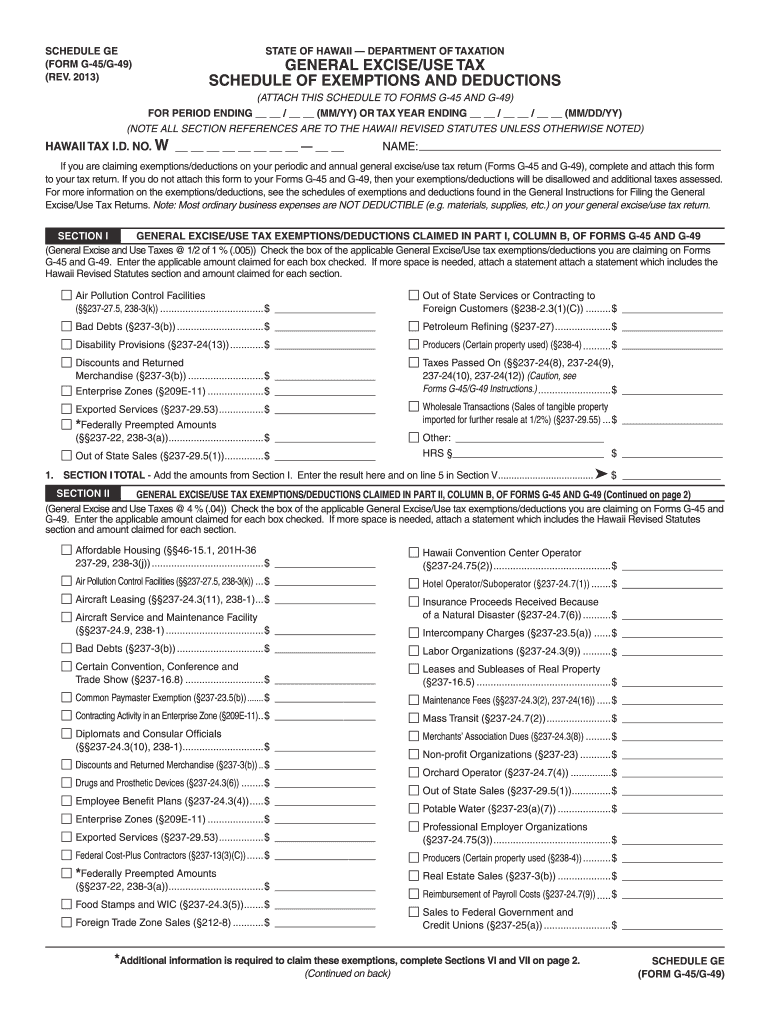
Begin by entering your Hawaii Tax I.D. number and name at the top of the form. This information is crucial for identifying your tax records.
For each exemption or deduction you are claiming, check the corresponding box in Section I and enter the applicable amount. If additional space is needed, attach a separate statement detailing each claim.
Proceed to Section II and repeat the process for any further exemptions or deductions applicable under this section, ensuring all amounts are accurately recorded.
Complete Sections III and IV similarly, checking boxes and entering amounts as necessary.
Finally, calculate the totals from each section and enter them in Section V. Ensure that your grand total is accurate before submission.
Start using our platform today to simplify your g 49 form completion!
G 49 hawaiiG 49 onlineHawaii G-49 instructionsHawaii Tax Form G-49 fillableHawaii g 49 due dateHawaii General Excise Tax Form G-45Hawaii Tax Form G-45 FillableHawaii Form G-17 instructions
Security and compliance
At DocHub, your data security is our priority. We follow HIPAA, SOC2, GDPR, and other standards, so you can work on your documents with confidence.
The purpose of our design is to allow E. coli bacteria to produce caddisfly silk solution: specifically, silk of the caddisfly species Glyphotaelius pellucidus.Read more
DECLARATION - I declare, under the penalties set forth in section 231-36, HRS, that this return (including any accompanying schedules or statements) hasRead more
Cookie consent notice
This site uses cookies to enhance site navigation and personalize your experience.
By using this site you agree to our use of cookies as described in our Privacy Notice.
You can modify your selections by visiting our Cookie and Advertising Notice.