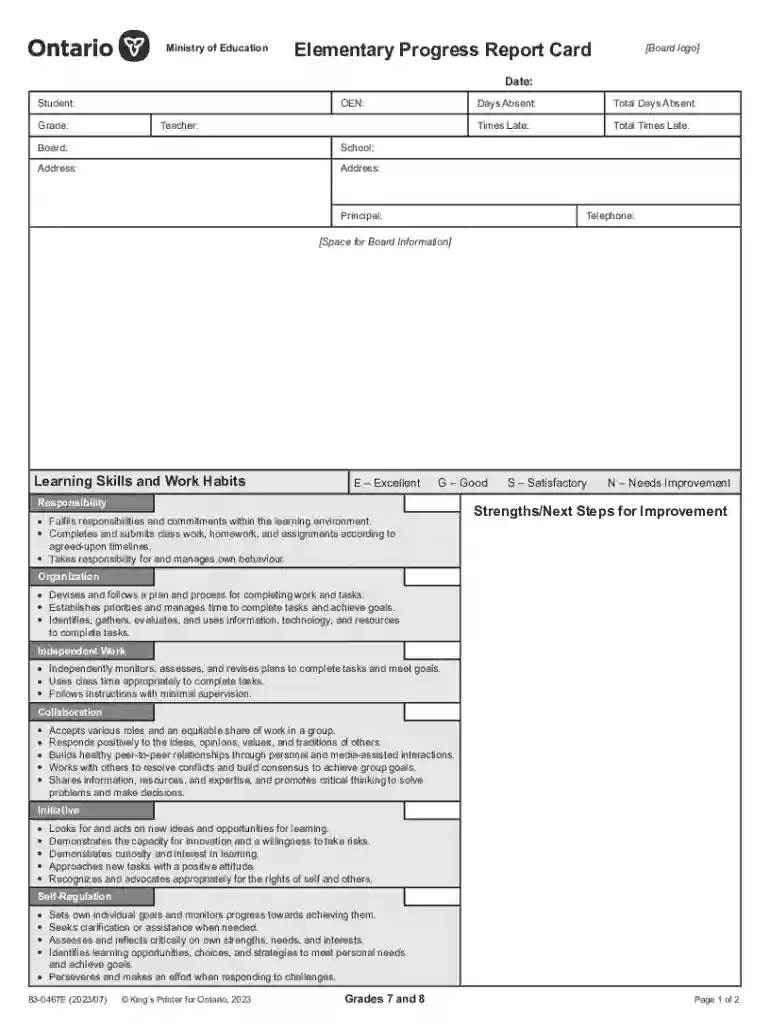
Elementary Progress Report Card, Grades 7 and 8 Public An illustration of the template that schools 2026

Get Form
Elementary Progress Report Card, Grades 7 and 8 Public An illustration of the template that schools  Preview on Page 1

Here's how it works

01. Edit your form online
Type text, add images, blackout confidential details, add comments, highlights and more.

02. Sign it in a few clicks
Draw your signature, type it, upload its image, or use your mobile device as a signature pad.

03. Share your form with others
Send it via email, link, or fax. You can also download it, export it or print it out.

How to use or fill out Elementary Progress Report Card, Grades 7 and 8 Public Template

Form edit decoration
9.5
Ease of Setup
DocHub User Ratings on G2
9.0
Ease of Use
DocHub User Ratings on G2
  1. Click ‘Get Form’ to open it in the editor.
  2. Begin by entering the date, student name, OEN, grade, teacher's name, board, and school address in the designated fields.
  3. Fill in the attendance details: days absent and total times late. This information is crucial for tracking student engagement.
  4. In the 'Learning Skills and Work Habits' section, assess each skill (Responsibility, Organization, etc.) using the provided scale (E, G, S, N) based on your observations.
  5. Provide specific strengths and next steps for improvement in the designated areas to offer constructive feedback.
  6. For each subject listed under 'Subjects', indicate the student's progress level (Progressing Very Well, Well, With Difficulty) and note any applicable IEP or ESL/ELD considerations.
  7. Finally, ensure both teacher's and principal's signatures are included before saving or sharing the completed report card.

Start using our platform today to effortlessly complete your Elementary Progress Report Card!

be ready to get more

Complete this form in 5 minutes or less

Get form

Got questions?

We have answers to the most popular questions from our customers. If you can't find an answer to your question, please contact us.
Contact us
Start by checking your schools online portal. If your childs school uses an online tool to store their grades and test scores, thats a good place to start. Access to the login page should be available on your school districts website. How to Get Your Childs School Records (and Why You - EdNavigator EdNavigator resources how-to-get-yo EdNavigator resources how-to-get-yo
PROGRESSING VERY WELL - This one is easy. Youre child surpasses the expectations of the curriculum with a high degree of efficacy. PROGRESSING WELL - Your student is doing fairly well. They are able to meet the mean standard of what would be expected for their grade or level of achievement.
How do I get my Ontario high school transcripts if Ive graduated? If you are a graduate of an Ontario high school, AND your high school uses the electronic transcript management process, you will be able to request a transcript as a step in your online application through ontariocolleges.ca. FAQ: Transcripts | ontariocolleges.ca Ontario Colleges faq transcripts Ontario Colleges faq transcripts
How Do Ontario Report Cards Work? Student Information Basic details such as student name, grade, and reporting period. Learning Skills Work Habits Assessment of personal development skills like responsibility, organization, and collaboration. Academic Achievement Subject-specific letter grades or percentages.
If an educational organization has chosen to share Report Cards online through Edsby, parents can view their childrens Report Cards through their Edsby account. If the organization is sharing its Report Cards online, a button will become available at the bottom of the Classes panel of each child.

Security and compliance

At DocHub, your data security is our priority. We follow HIPAA, SOC2, GDPR, and other standards, so you can work on your documents with confidence.

Learn more
ccpa2
pci-dss
gdpr-compliance
hipaa
soc-compliance
be ready to get more

Complete this form in 5 minutes or less

Get form

People also ask

five years Other records in the OSR including report cards and the documentation file must be retained for five years after the student leaves school. Safeguarding and retaining information Information and Privacy Commissioner of Ontario education safeguarding-and-ret Information and Privacy Commissioner of Ontario education safeguarding-and-ret
Student progress reports help teachers anticipate the future needs of each student. They use it to communicate clearly with parents and help students identify areas where they should apply more effort or seek additional help.
Page 1 Sign into your PowerSchool Parent Portal account. options on the left by clicking on the arrow.) On the left side of the screen, click on Report Cards. Accessing your Childs Report Card through. Note: You need to have a parent portal account in order to access your childs report card. Important to Note: Accessing your Childs Report Card through PowerSchool Parent Portal Ngin attachments document Acces Ngin attachments document Acces

Related links