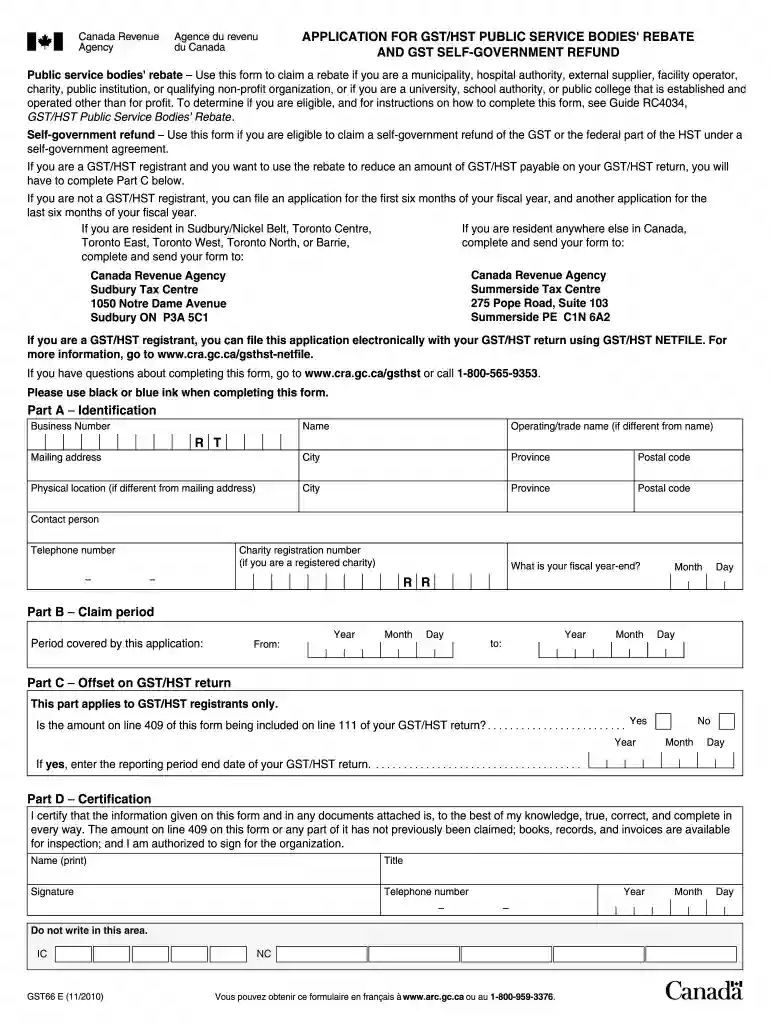
Gst66 fillable form 2010-2026

Get Form
gst66 Preview on Page 1

Here's how it works

01. Edit your gst66 online
Type text, add images, blackout confidential details, add comments, highlights and more.

02. Sign it in a few clicks
Draw your signature, type it, upload its image, or use your mobile device as a signature pad.

03. Share your form with others
Send gst66 e via email, link, or fax. You can also download it, export it or print it out.

How to use or fill out Gst66 fillable form 2010 with our platform

Form edit decoration
9.5
Ease of Setup
DocHub User Ratings on G2
9.0
Ease of Use
DocHub User Ratings on G2
  1. Click ‘Get Form’ to open the Gst66 fillable form 2010 in the editor.
  2. Begin by entering your charity's name and registration number in the designated fields. Ensure that this information is accurate as it is crucial for processing your application.
  3. Proceed to fill out the section regarding eligible purchases and expenses. Carefully list all items for which you are claiming a rebate, ensuring that they meet the criteria outlined in the guide.
  4. In the next section, calculate and enter the total amount of GST/HST paid on these eligible purchases. This will help determine your rebate amount.
  5. Review all entered information for accuracy. Use our platform’s features to highlight any sections that may need further attention or correction before submission.
  6. Once satisfied with your entries, save your completed form and follow the instructions for submission provided within our platform.

Start using our platform today to easily complete your Gst66 form online for free!

See more Gst66 fillable form 2010 versions

We've got more versions of the Gst66 fillable form 2010 form. Select the right Gst66 fillable form 2010 version from the list and start editing it straight away!
Versions Form popularity Fillable & printable
2020 4.8 Satisfied (77 Votes)
2018 4.3 Satisfied (41 Votes)
2013 4.4 Satisfied (193 Votes)
2010 4.2 Satisfied (102 Votes)
2000 4.3 Satisfied (68 Votes)
be ready to get more

Complete this form in 5 minutes or less

Get form

Got questions?

We have answers to the most popular questions from our customers. If you can't find an answer to your question, please contact us.
Contact us

Yes, and it’s really easy! DocHub is a web-based PDF editor with advanced document processing capabilities that allow you rapidly edit your documents, fill out empty fields and drop new ones for other people to fill out, and create eSignatures in several ways. Import your gst66 form, provide information as required, and decide how you want to eSign your document - by typing your name, drawing your signature, uploading its image, or using a QR code.

When you edit your gst66e form with DocHub, you only require a stable internet connection and virtually any web browser installed on your device. No need to set up any third-party software or research guides. Just open a tab with DocHub, drag and drop your file, and edit it on the spot.

GST66 - Application for GST/HST Public Service Bodies Rebate and GST Self-Government Refund.
How to file Access the GST/HST NETFILE form online. Enter your initial details into the form: Select any additional options that apply to you. Follow the instructions to enter your return amounts and select Next when you are finished entering your information. Review your return to make sure it is correct and complete.
Youll most likely report amounts from Form 1099-R as ordinary income on line 4b and 5b of the Form 1040. The 1099-R form is an informational return, which means youll use it to report income on your federal tax return. If the form shows federal income tax withheld in Box 4, attach a copy Copy Bto your tax return.
be ready to get more

Complete this form in 5 minutes or less

Get form

People also ask

How do you file this application electronically? GST/HST NETFILE at .cra.gc.ca/gsthst-netfile; File a return at .cra.gc.ca/mybusinessaccount if you are a business owner; or. File a return at .cra.gc.ca/representatives if you are a representative (including employees).
GST filing process involves: Logging into the GST portal. Navigating to the return dashboard. Choosing the right tax period and return form. Filling in and submitting the relevant details. Offsetting the tax liability against the tax credits available. Completing the tax payment for the balance amount.