Utah real sales transaction 2026

Get Form
real estate transaction log Preview on Page 1

Here's how it works

01. Edit your real estate transaction log online
Type text, add images, blackout confidential details, add comments, highlights and more.

02. Sign it in a few clicks
Draw your signature, type it, upload its image, or use your mobile device as a signature pad.

03. Share your form with others
Send estate transaction log via email, link, or fax. You can also download it, export it or print it out.

How to use or fill out utah real sales transaction with our platform

Form edit decoration
9.5
Ease of Setup
DocHub User Ratings on G2
9.0
Ease of Use
DocHub User Ratings on G2
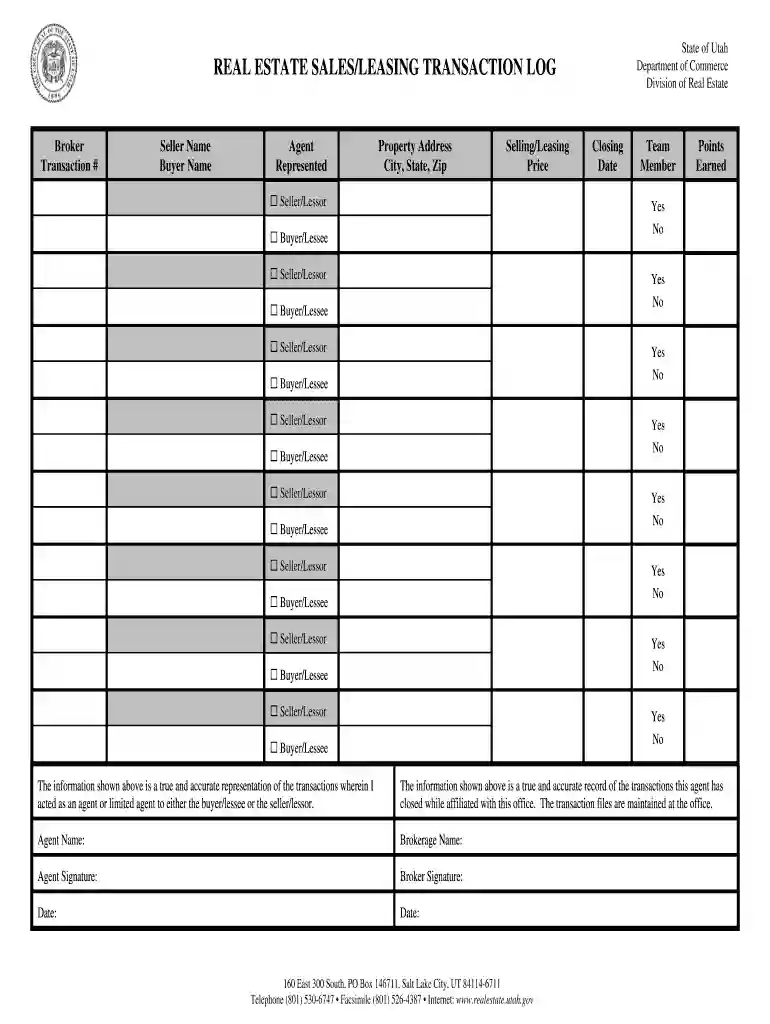
  1. Click ‘Get Form’ to open the Utah Real Sales Transaction in the editor.
  2. Begin by entering the Broker's name and Transaction # at the top of the form. This information is essential for tracking and identification.
  3. Fill in the Seller Name and Buyer Name fields accurately. Ensure that all names are spelled correctly to avoid any legal issues.
  4. Complete the Agent and Represented sections, indicating who is representing whom in this transaction.
  5. Input the Property Address, including City, State, and Zip code. This helps in identifying the exact location of the property involved.
  6. Enter the Selling/Leasing Price clearly. This figure is crucial for financial records and agreements.
  7. Specify the Closing Date to indicate when the transaction will be finalized.
  8. For each Buyer/Lessee and Seller/Lessor listed, check 'Yes' or 'No' as applicable to confirm their involvement in multiple transactions.
  9. Finally, ensure that both Agent Name and Brokerage Name are filled out, followed by signatures from both Agent and Broker along with dates.

Start using our platform today for free to streamline your document editing and signing process!

be ready to get more

Complete this form in 5 minutes or less

Get form

Got questions?

We have answers to the most popular questions from our customers. If you can't find an answer to your question, please contact us.
Contact us
File your Sales and Use tax return at tap.utah.gov. If you have not registered for a Sales and Use Tax account, you must do so before filing. You can apply for an account on TAP at tap.utah.gov. Once you have your tax account, you can use that account number and your PIN to create a TAP login.
What states dont charge sales tax? Alaska, Delaware, Montana, New Hampshire and Oregon are the five U.S. states that do not levy a statewide sales tax. Individual municipalities may charge local sales tax in some areas, and property and income taxes may be higher in these states to offset the revenue loss.
What is Not Taxed in Utah? Food: In Utah, groceries are not subject to state sales tax. Prescription Medications: Prescription medications are also exempt from sales tax in Utah. Medical Devices: Clothing: Nonprofit Organizations: Services: Subject to other taxes.
Utah is an origin-based state. This means youre responsible for applying the sales tax rate determined by the ship-from address on all taxable sales.
If you purchase an item for use in Utah from an out-of-state retailer or on the internet and the retailer or internet seller does not collect the sales tax, then you must pay use tax on the item directly to the Tax Commission.

Security and compliance

At DocHub, your data security is our priority. We follow HIPAA, SOC2, GDPR, and other standards, so you can work on your documents with confidence.

Learn more
ccpa2
pci-dss
gdpr-compliance
hipaa
soc-compliance

People also ask

This permit, issued by the Utah State Tax Commission, is required for businesses with either a physical or economic presence in Utah. It makes sure that businesses collect and remit sales tax to the state on behalf of their customers.
Sales of goods purchased in another state and brought into Utah by a resident of Utah or to be used to conduct business in Utah are subject to Utah sales and use tax to the extent they have not already been taxed in another state.

Related links