Fidelity non prototype retirement account application 2026

Get Form
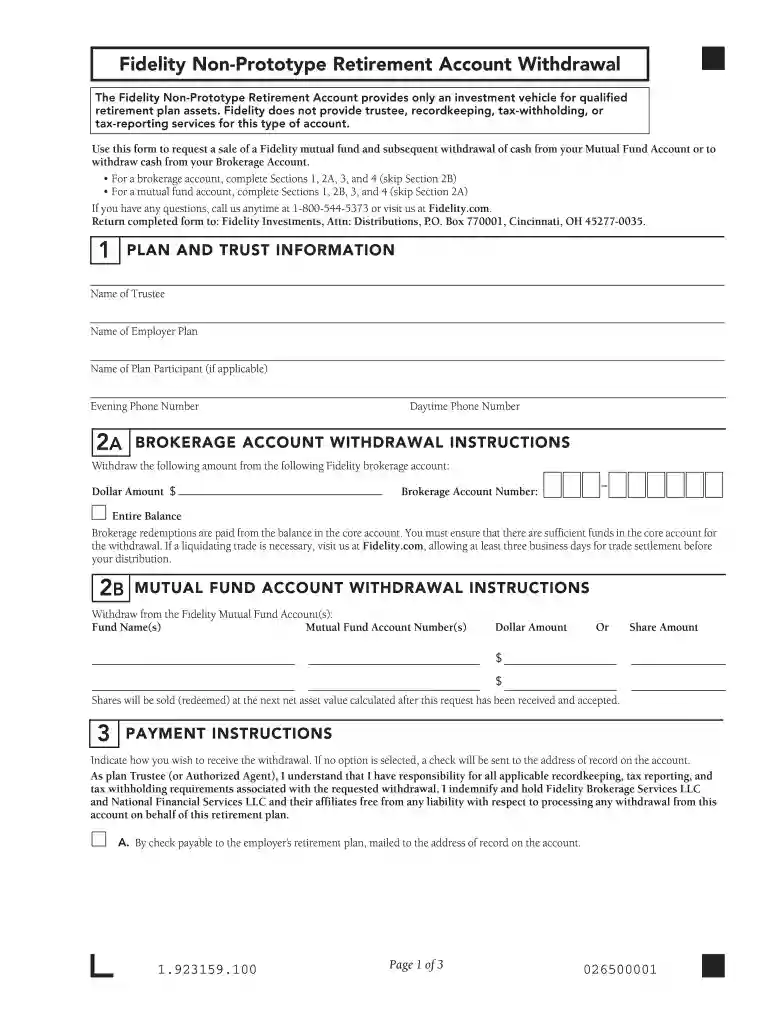
non prototype retirement account Preview on Page 1

Here's how it works

01. Edit your non prototype retirement account online
Type text, add images, blackout confidential details, add comments, highlights and more.

02. Sign it in a few clicks
Draw your signature, type it, upload its image, or use your mobile device as a signature pad.

03. Share your form with others
Send fidelity non prototype account application via email, link, or fax. You can also download it, export it or print it out.

How to use or fill out fidelity non prototype retirement account application with our platform

Form edit decoration
9.5
Ease of Setup
DocHub User Ratings on G2
9.0
Ease of Use
DocHub User Ratings on G2
  1. Click ‘Get Form’ to open the Fidelity Non-Prototype Retirement Account application in the editor.
  2. Begin by filling out Section 1, which includes essential information such as the Name of Trustee, Name of Employer Plan, and Name of Plan Participant. Ensure all details are accurate for proper processing.
  3. If you are withdrawing from a brokerage account, complete Sections 2A and 3. Specify the dollar amount you wish to withdraw and provide your Brokerage Account Number. If using a mutual fund account, fill out Section 2B instead.
  4. In Section 3, choose your payment instructions. Options include receiving a check or opting for a direct rollover. Make sure to select one to avoid delays in processing.
  5. Finally, complete Section 4 by signing and dating the form. Remember that a signature guarantee is required under certain conditions; ensure you meet these requirements before submission.

Start using our platform today to easily fill out your Fidelity Non-Prototype Retirement Account application for free!

See more fidelity non prototype retirement account application versions

We've got more versions of the fidelity non prototype retirement account application form. Select the right fidelity non prototype retirement account application version from the list and start editing it straight away!
Versions Form popularity Fillable & printable
2020 4.8 Satisfied (50 Votes)
2017 4.2 Satisfied (39 Votes)
2011 4.3 Satisfied (229 Votes)
be ready to get more

Complete this form in 5 minutes or less

Get form

Got questions?

We have answers to the most popular questions from our customers. If you can't find an answer to your question, please contact us.
Contact us
There are several ways to transfer money to Fidelity from an outside account, including electronically (EFT), via bank wire or check, and through servicers like Venmo or PayPal. You can see all of your options on our deposits page.
You can invest in Fidelity and non-Fidelity mutual funds through your Fidelity brokerage FundsNetwork offers you access to a wider universe of over 4,500 Fidelity and non-Fidelity mutual funds from many of Americas best-known fund companies.
Depositing money into an account Set up payroll direct to an eligible Fidelity account. Send money to or from a bank account with an electronic funds transfer (EFT). Wire money from a bank or third party account.* Deposit a check via mobile upload or mail a paper check.
Prototype plan. A qualified retirement plan sponsored by a financial institution. It may be adopted by executing a written agreement. A prototype is generally more flexible than the IRS Form 5305 or 5305-A and may have additional special features. Also called a master pension plan.
You may pay by check or by transferring assets (from your bank or another account). Simply check the appropriate box(es) to fund your account. Your account has a wide range of features to help you manage your plan. More information on each of these services is included in this section.

Security and compliance

At DocHub, your data security is our priority. We follow HIPAA, SOC2, GDPR, and other standards, so you can work on your documents with confidence.

Learn more
ccpa2
pci-dss
gdpr-compliance
hipaa
soc-compliance
be ready to get more

Complete this form in 5 minutes or less

Get form