Type text, add images, blackout confidential details, add comments, highlights and more.
02. Sign it in a few clicks
Draw your signature, type it, upload its image, or use your mobile device as a signature pad.
03. Share your form with others
Send it via email, link, or fax. You can also download it, export it or print it out.
How to use or fill out bill lading terms with our platform
Ease of Setup
DocHub User Ratings on G2
Ease of Use
DocHub User Ratings on G2
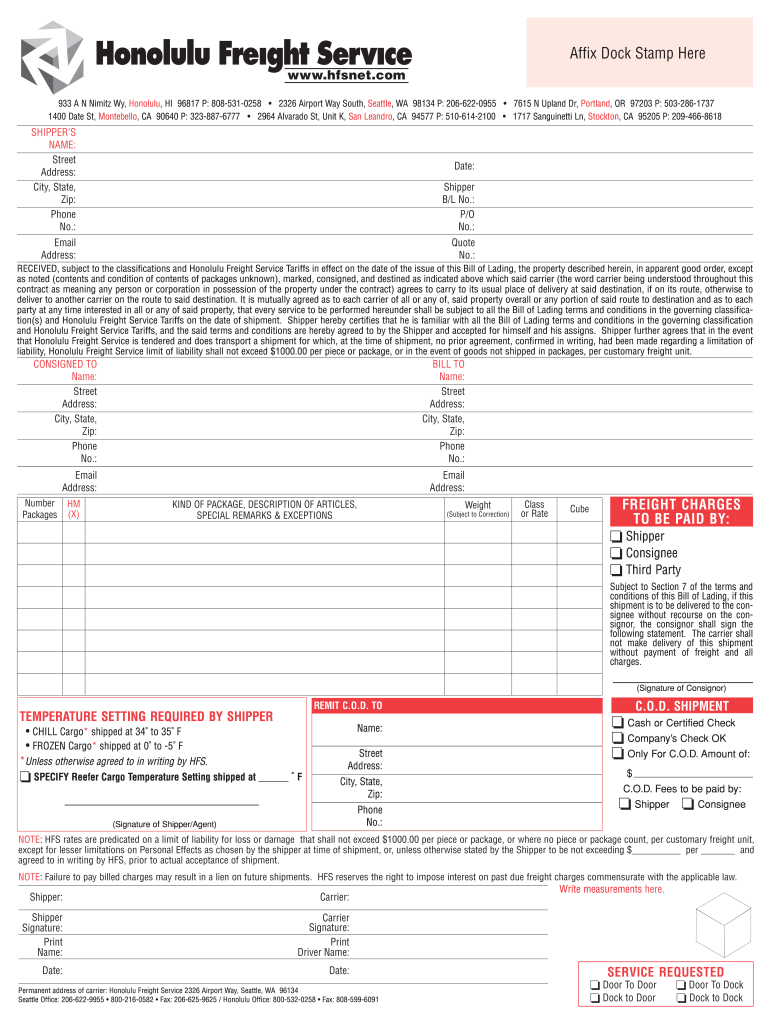
Click ‘Get Form’ to open the bill lading terms document in the editor.
Begin by filling in the 'Shipper’s Name' and 'Street Address' fields. Ensure that all contact information is accurate for seamless communication.
Next, complete the 'Consigned To' section with the recipient's details, including their name, address, and phone number.
In the 'Number of Packages' field, specify how many packages are being shipped. Follow this by detailing the 'Kind of Package' and providing a description of the articles being shipped.
Indicate any special remarks or exceptions regarding the shipment in the designated area to ensure clarity.
Finally, review all entries for accuracy before signing at the bottom of the form. This ensures that you agree to all terms outlined in the bill lading.
Start using our platform today to streamline your bill lading process for free!
Bill lading terms pdfBill lading terms templateBill lading terms sampleBill lading terms exampleBill of lading exampleWho issues bill of LadingBill of lading meaningTypes of bill of lading
Security and compliance
At DocHub, your data security is our priority. We follow HIPAA, SOC2, GDPR, and other standards, so you can work on your documents with confidence.
Sea Waybill: A Bill of Lading B/L is a document issued by the agent of a carrier to a shipper, signed by the captain, agent, or owner of a vessel, furnishingRead more
bill of lading | Wex | US Law | LII / Legal Information Institute
As per this act, bills of lading are either negotiable or nonnegotiable. Negotiable bills of lading are transferable to another party while non-negotiable billsRead more
Cookie consent notice
This site uses cookies to enhance site navigation and personalize your experience.
By using this site you agree to our use of cookies as described in our Privacy Notice.
You can modify your selections by visiting our Cookie and Advertising Notice.