Type text, add images, blackout confidential details, add comments, highlights and more.
02. Sign it in a few clicks
Draw your signature, type it, upload its image, or use your mobile device as a signature pad.
03. Share your form with others
Send ct cert 101 via email, link, or fax. You can also download it, export it or print it out.
How to use or fill out cert 101 with our platform
Ease of Setup
DocHub User Ratings on G2
Ease of Use
DocHub User Ratings on G2
Click ‘Get Form’ to open cert 101 in the editor.
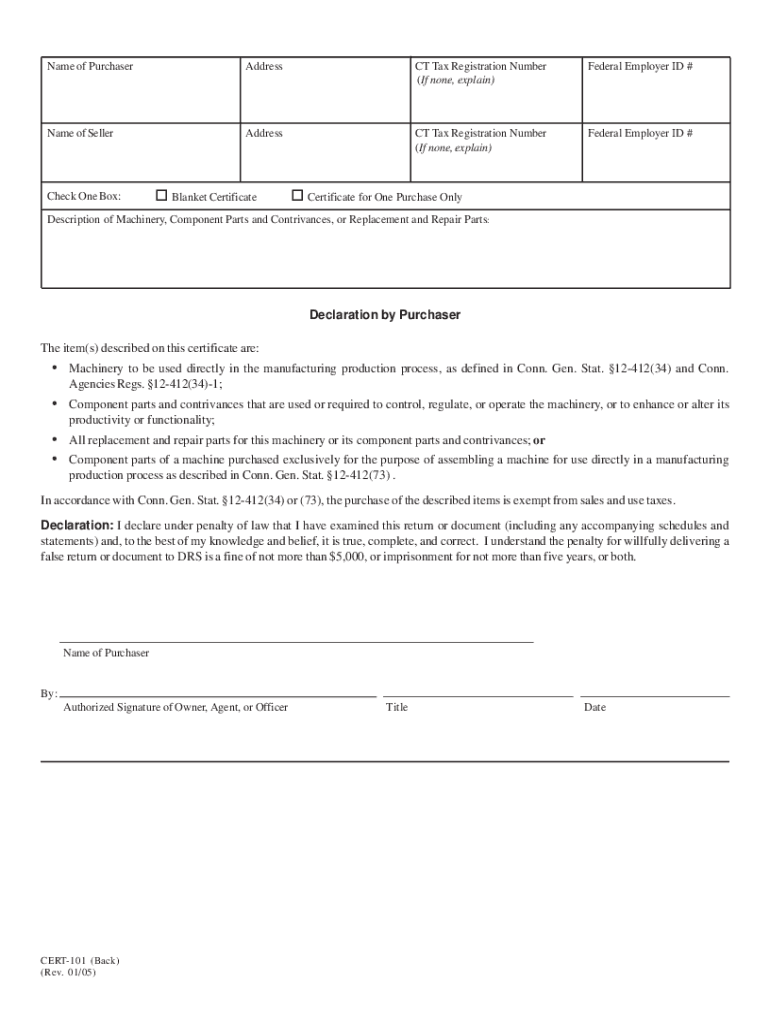
Begin by entering the 'Name of Purchaser' and 'Address' in the designated fields. Ensure that all information is accurate to avoid any issues.
Input your 'CT Tax Registration Number'. If you do not have one, provide an explanation in the space provided.
Fill in the 'Federal Employer ID #' if applicable. This helps identify your business for tax purposes.
Next, enter the 'Name of Seller' and their corresponding 'Address'. Again, accuracy is key here.
Select either ‘Blanket Certificate’ or ‘Certificate for One Purchase Only’ by checking the appropriate box based on your purchasing needs.
In the section for 'Description of Machinery, Component Parts and Contrivances, or Replacement and Repair Parts', provide a detailed description of what you are purchasing.
Finally, complete the declaration by signing as an authorized representative and entering the date. Review all entries before finalizing.
Start using our platform today to fill out cert 101 easily and efficiently!
CERT trains them in basic disaster response skills such as team organization, disaster medical operations, fire safety, and light search and rescue. Local CERTRead more
May 1, 2025 Page 101. failure code of assertion The schema for this type is defined by the cert-status-map rule in the following CDDL Definition:.Read more
Cookie consent notice
This site uses cookies to enhance site navigation and personalize your experience.
By using this site you agree to our use of cookies as described in our Privacy Notice.
You can modify your selections by visiting our Cookie and Advertising Notice.