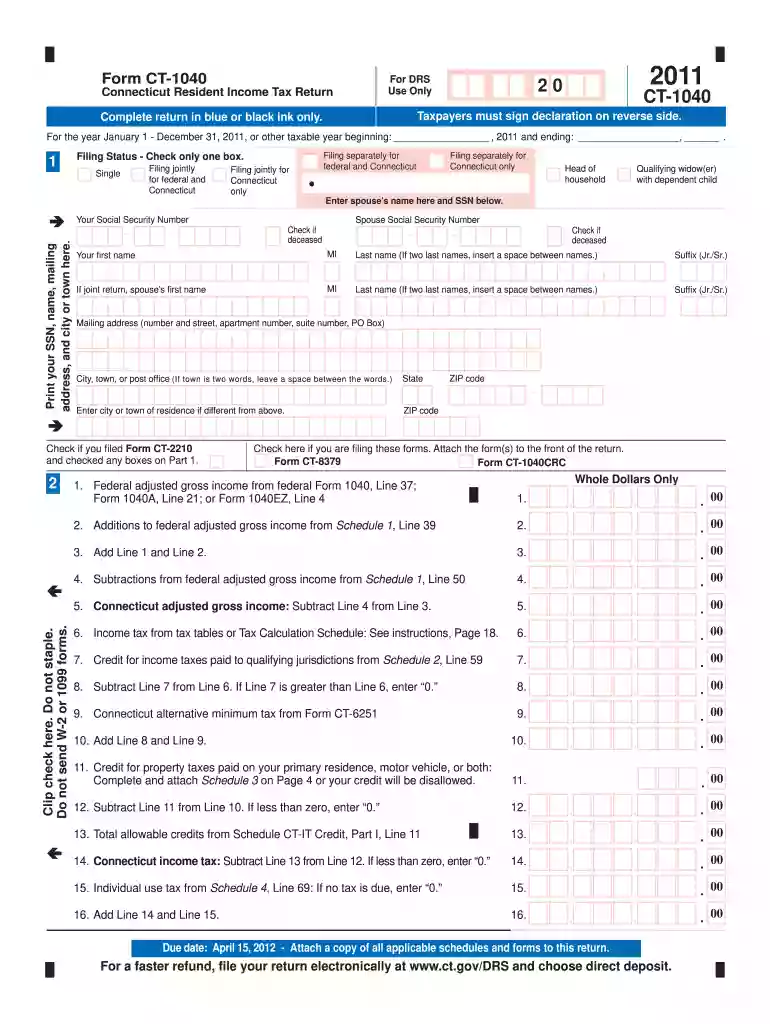
2011 connecticut form tax-2026

Get Form
2011 connecticut form tax Preview on Page 1

Here's how it works

01. Edit your form online
Type text, add images, blackout confidential details, add comments, highlights and more.

02. Sign it in a few clicks
Draw your signature, type it, upload its image, or use your mobile device as a signature pad.

03. Share your form with others
Send it via email, link, or fax. You can also download it, export it or print it out.

How to use or fill out 2011 Connecticut Form Tax with DocHub

Form edit decoration
9.5
Ease of Setup
DocHub User Ratings on G2
9.0
Ease of Use
DocHub User Ratings on G2
  1. Click ‘Get Form’ to open the 2011 Connecticut Form CT-1040 in our editor.
  2. Begin by selecting your filing status. Check the appropriate box for 'Single', 'Married Filing Jointly', or other statuses as applicable.
  3. Enter your personal information, including your Social Security Number, name, and mailing address. Ensure all details are accurate.
  4. Proceed to report your income. Fill in the federal adjusted gross income from your federal tax return and any additions or subtractions as specified in the form.
  5. Calculate your Connecticut adjusted gross income by subtracting any allowable deductions from your total income.
  6. Complete the tax calculation section by following the instructions for credits and taxes owed, ensuring you attach any necessary schedules.
  7. Finally, sign and date the form. If filing jointly, ensure both signatures are included before submitting.

Start using our platform today to easily complete your 2011 Connecticut Form Tax for free!

See more 2011 connecticut form tax versions

We've got more versions of the 2011 connecticut form tax form. Select the right 2011 connecticut form tax version from the list and start editing it straight away!
Versions Form popularity Fillable & printable
2023 4.7 Satisfied (31 Votes)
2022 4.1 Satisfied (51 Votes)
2021 4.2 Satisfied (49 Votes)
2020 4.8 Satisfied (91 Votes)
2020 4.4 Satisfied (226 Votes)
2019 4.3 Satisfied (195 Votes)
2018 4.4 Satisfied (75 Votes)
2017 4.1 Satisfied (48 Votes)
2016 4.3 Satisfied (51 Votes)
2015 4.2 Satisfied (47 Votes)
2014 4 Satisfied (40 Votes)
2013 4 Satisfied (37 Votes)
2012 4 Satisfied (48 Votes)
2011 4 Satisfied (44 Votes)
2010 4.2 Satisfied (43 Votes)
be ready to get more

Complete this form in 5 minutes or less

Get form

Got questions?

We have answers to the most popular questions from our customers. If you can't find an answer to your question, please contact us.
Contact us
There is no hard limit on how many years you can file back taxes. However, to be in good standing with the IRS, you should have filed tax returns for the last six years. If youre due a refund or tax credits, you must file the return within three years of the original due date to claim it.
Connecticut Resident Income Tax Return.
How to File a 2011 Return Today? You can complete and sign the 2011 IRS Tax Return Forms here on eFile.com. Then, download, print, and mail the 2011 IRS Forms to the address listed on them. For state returns, select your state(s) and download, complete, print, and sign your 2011 State Tax Return income forms.
File for prior years If you havent filed a past-due tax return, you can file a tax return for any prior year.
You can file back taxes for any past year, but the IRS usually considers you in good standing if you have filed the last six years of tax returns.
be ready to get more

Complete this form in 5 minutes or less

Get form

People also ask

HOW TO OBTAIN CONNECTICUT TAX FORMS Connecticut state tax forms can be downloaded at the Department of Revenue Services (DRS) website: .ct.gov/drs/ Connecticut tax forms and publications are available at any DRS offices, during tax filing season.
Get tax records from IRS Online Account The fastest and easiest way for taxpayers to view their tax records is by logging on to their IRS Online Account. There, they can: View, print or download their tax transcripts.

Related links