





RA Pre-Task Plan Form - Supplier.intel.com 2026

Get Form
pre task plan template Preview on Page 1

Here's how it works

01. Edit your pre task plan template online
Type text, add images, blackout confidential details, add comments, highlights and more.
02. Sign it in a few clicks
Draw your signature, type it, upload its image, or use your mobile device as a signature pad.
03. Share your form with others
Send pre task plan template free via email, link, or fax. You can also download it, export it or print it out.

How to use or fill out RA Pre-Task Plan Form - Supplier.intel.com with DocHub

Form edit decoration
9.5
Ease of Setup
DocHub User Ratings on G2
9.0
Ease of Use
DocHub User Ratings on G2
  1. Click ‘Get Form’ to open the RA Pre-Task Plan Form in our editor.
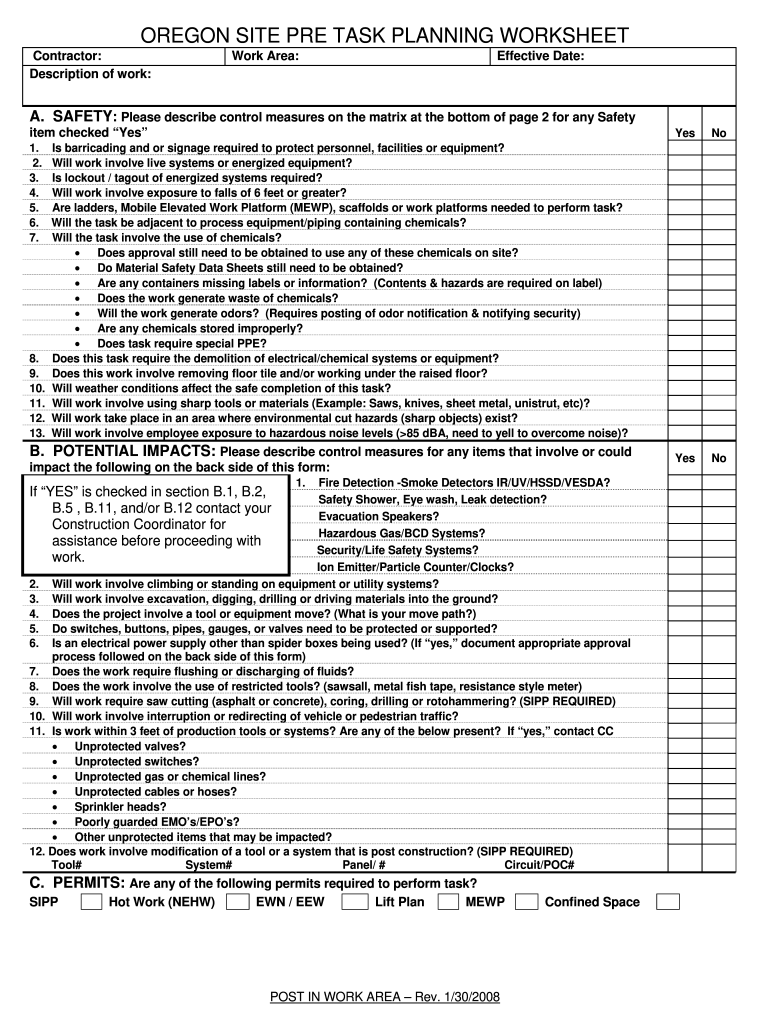
  2. Begin by filling in the contractor's name and a brief description of the work at the top of the form. This sets the context for your task.
  3. Specify the work area and effective date to ensure clarity on where and when the task will take place.
  4. In section A, carefully review each safety item. Check 'Yes' or 'No' as applicable, and provide detailed control measures for any items marked 'Yes'.
  5. Proceed to section B, where you will describe potential impacts. Address each question thoroughly, ensuring all necessary precautions are noted.
  6. Complete sections C through G by indicating required permits, PPE, musculoskeletal risk factors, emergency equipment locations, and general safety checks.
  7. Finally, ensure all signatures are collected at the bottom of the form to confirm completion and understanding of safety protocols.

Start using our platform today to streamline your document editing and form completion process for free!

See more RA Pre-Task Plan Form - Supplier.intel.com versions

We've got more versions of the RA Pre-Task Plan Form - Supplier.intel.com form. Select the right RA Pre-Task Plan Form - Supplier.intel.com version from the list and start editing it straight away!
Versions Form popularity Fillable & printable
2009 4.9 Satisfied (40 Votes)
2008 4 Satisfied (58 Votes)
be ready to get more

Complete this form in 5 minutes or less

Get form

Got questions?

We have answers to the most popular questions from our customers. If you can't find an answer to your question, please contact us.
Contact us

With DocHub, it’s pretty simple. The editor offers users an add-on called DocHub for Gmail, which you can locate in the Google Workspace Marketplace free of charge. Install it and give it access to your Google account. Open your email with your pre task plan attached and click on the add-on button in the right-side panel. Log in to your DocHub account, and upload the form to our editor, where you can fill it out and sign.

You need only an internet connection and a web browser to complete your pre task plan construction on an iOS phone. Open the DocHub website and authenticate. Then, add your file or select it from the list in your dashboard. Then use our editing tools to complete your form and save all your modifications. You may also send it to a specified recipient right away.

Often, tasks that fall outside of your typical job duties are included as well. Following are steps to a well-thought-out Pre-Task Plan. The purpose of these documents is not to create additional work, but to identify the steps to completing a task, and the associated hazards of each step.
Pre-Task Planning Basics: Everyone has input. Done in your work area by individual crews. Identify your task for the day. Identify what hazards you see with those hazards no matter how trivial they may seem.
A pre-task analysis occurs at the start of each day, prior to beginning any work, as well as any time the scope of work changes, and helps everyone involved to get on the same page before the day gets underway.

Security and compliance

At DocHub, your data security is our priority. We follow HIPAA, SOC2, GDPR, and other standards, so you can work on your documents with confidence.

Learn more
ccpa2
pci-dss
gdpr-compliance
hipaa
soc-compliance

People also ask

A good pre-task plan will include a scope of work, a list of all the steps required to perform the task(s), the area where the work is to be completed. Once the scope of work has been defined then each step of the task should be evaluated for risks and a definition of who may be exposed to those risks.
A pre-task analysis occurs at the start of each day, prior to beginning any work, as well as any time the scope of work changes, and helps everyone involved to get on the same page before the day gets underway.
It is important to educate management, supervisors, engineering and maintenance on when and how to implement a pre-task plan. A good pre-task plan will enhance your safety program, reduce risks that employees are exposed to and reduce the chance of injuries.
Pre-Task Planning Basics: Everyone has input. Done in your work area by individual crews. Identify your task for the day. Identify what hazards you see with those hazards no matter how trivial they may seem. Identify other trades working around you and ask the question \u201cCan I safely work around them?\u201d
A good pre-task plan will include a scope of work, a list of all the steps required to perform the task(s), the area where the work is to be completed. Once the scope of work has been defined then each step of the task should be evaluated for risks and a definition of who may be exposed to those risks.

pre task plan construction template

