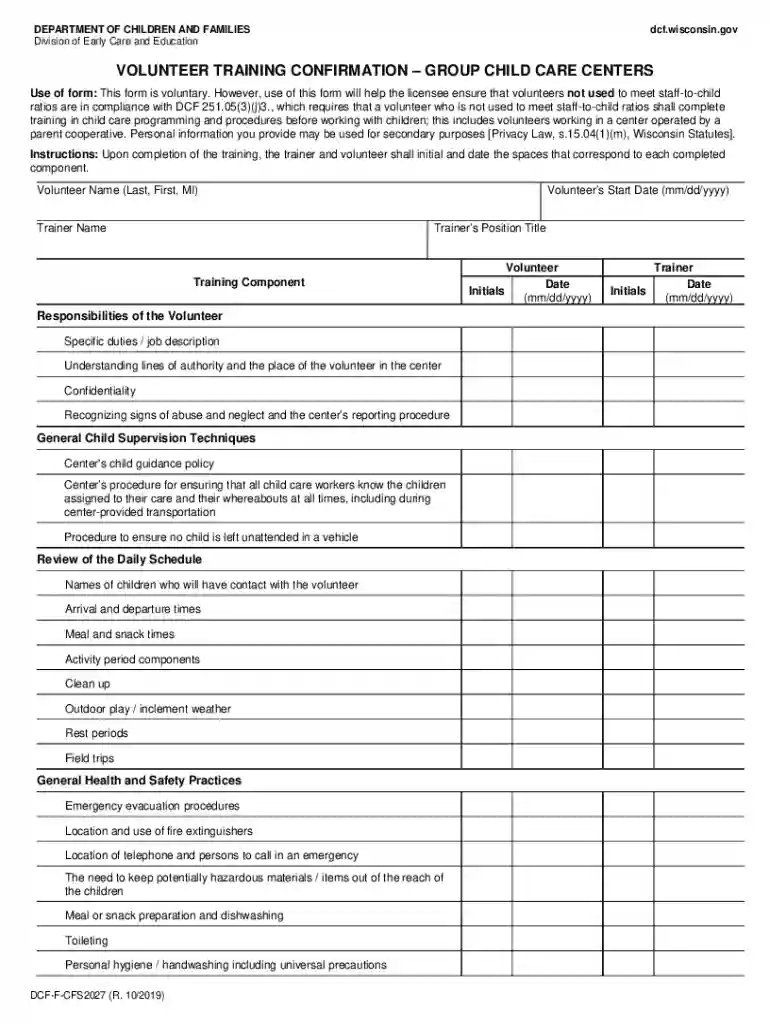
Volunteer Training Confirmation - Group Child Care Centers, DCF-F-CFS2027 form for web 2026

Get Form
dcf volunteer form Preview on Page 1

Here's how it works

01. Edit your dcf volunteer form online
Type text, add images, blackout confidential details, add comments, highlights and more.

02. Sign it in a few clicks
Draw your signature, type it, upload its image, or use your mobile device as a signature pad.

03. Share your form with others
Send it via email, link, or fax. You can also download it, export it or print it out.

How to use or fill out Volunteer Training Confirmation - Group Child Care Centers, DCF-F-CFS2027 form for web

Form edit decoration
9.5
Ease of Setup
DocHub User Ratings on G2
9.0
Ease of Use
DocHub User Ratings on G2
  1. Click ‘Get Form’ to open it in the editor.
  2. Begin by entering the volunteer's name in the designated field labeled 'Volunteer Name (Last, First, MI)'.
  3. Next, input the trainer's name in the 'Trainer Name' field.
  4. Fill in the 'Volunteer’s Start Date' using the mm/dd/yyyy format.
  5. Enter the trainer’s position title in the corresponding field.
  6. Review each training component listed and ensure that both the trainer and volunteer initial and date next to each completed section after training is conducted.
  7. Complete any additional notes regarding responsibilities, general health practices, and daily schedules as required.

Start using our platform today to effortlessly complete your Volunteer Training Confirmation form for free!

be ready to get more

Complete this form in 5 minutes or less

Get form

Got questions?

We have answers to the most popular questions from our customers. If you can't find an answer to your question, please contact us.
Contact us
Proving Volunteer Hours: What Counts and What Doesnt Signed paper logs. Screenshots from apps. Supervisor reference letters. Photos with timestamps. Geotagged check-ins. Email confirmations from event organizers.
The basics Details about your organization, including your address and the name and contact details of your volunteer manager. Name of applicant. Preferred pronoun (he, she, they) Date of birth. Contact information (including email, home and mobile phone numbers) Home address.
Just as organizations have purpose statements, individual volunteers often carry a personal mission. A sample statement might be: I volunteer because I believe every child deserves a safe and inspiring place to learn. I want to use my skills to make a difference in their lives.
Volunteer Application Template: Best Practices What To Include Personal and Contact Information. Availability and Schedule Preferences. Areas of Interest. Skills and Experience. Background Information and Legal Disclosures. Waivers, Agreements, and Policies. References. Signature and Date.
You may also contact the Child Care Background Unit Call Center at 608-422-7400 or by emailing DCFPlicBECRCBU@wisconsin.gov .

Security and compliance

At DocHub, your data security is our priority. We follow HIPAA, SOC2, GDPR, and other standards, so you can work on your documents with confidence.

Learn more
ccpa2
pci-dss
gdpr-compliance
hipaa
soc-compliance