




Here's how it works

01. Edit your retirement savings statement rrsp income online
Type text, add images, blackout confidential details, add comments, highlights and more.

02. Sign it in a few clicks
Draw your signature, type it, upload its image, or use your mobile device as a signature pad.

03. Share your form with others
Send agency retirement t4rsp via email, link, or fax. You can also download it, export it or print it out.
How to use or fill out UK Tax on a Canadian RRSP - the HMRC Community Forums

- Click ‘Get Form’ to open it in the editor.
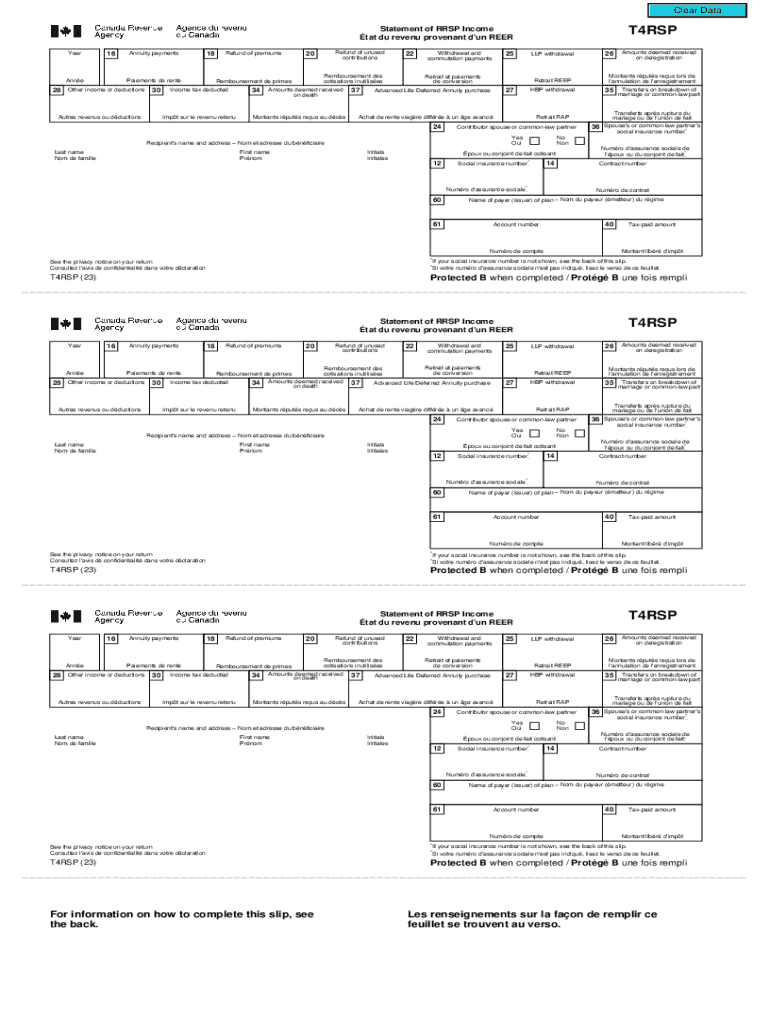
- Begin by entering the year of income at the top of the form. This is crucial for accurate tax reporting.
- Fill in Box 16 with the total amount of annuity payments received during the year. This figure should be reported on line 12900 of your tax return.
- In Box 20, enter any refunds of unused contributions. Attach Form T3012A if applicable, and report this on line 12900.
- For withdrawals, complete Box 22 with the amount withdrawn from your RRSP. If not previously deducted, you may claim an offsetting amount on line 23200.
- Ensure to fill out Boxes related to spouse contributions (Boxes 24 and 36) if applicable, as these can affect taxable income.
- Review all entries for accuracy before saving your completed form using our platform's features for easy editing and signing.
Start using our platform today to simplify your document editing and ensure a smooth filing process!
Fill out UK Tax on a Canadian RRSP - the HMRC Community Forums online
It's free
It's free
See more UK Tax on a Canadian RRSP - the HMRC Community Forums versions
We've got more versions of the UK Tax on a Canadian RRSP - the HMRC Community Forums form. Select the right UK Tax on a Canadian RRSP - the HMRC Community Forums version from the list and start editing it straight away!
Security and compliance
At DocHub, your data security is our priority. We follow HIPAA, SOC2, GDPR, and other standards, so you can work on your documents with confidence.
Learn more


