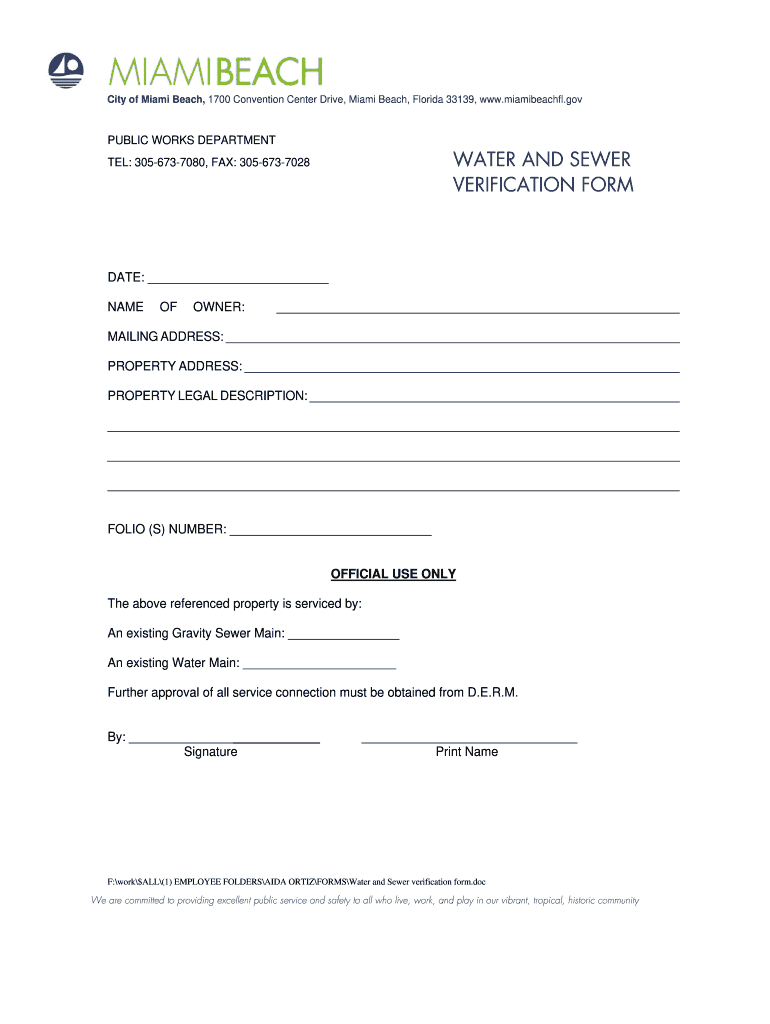
Verification form miami beach 2026

Get Form
notice of sewer availability miami fl Preview on Page 1

Here's how it works

01. Edit your notice of sewer availability miami fl online
Type text, add images, blackout confidential details, add comments, highlights and more.
02. Sign it in a few clicks
Draw your signature, type it, upload its image, or use your mobile device as a signature pad.
03. Share your form with others
Send notice of sewer availability florida via email, link, or fax. You can also download it, export it or print it out.

How to use or fill out verification form miami beach with DocHub

Form edit decoration
9.5
Ease of Setup
DocHub User Ratings on G2
9.0
Ease of Use
DocHub User Ratings on G2
  1. Click ‘Get Form’ to open the verification form in our platform's editor.
  2. Begin by entering the date at the top of the form. This is essential for record-keeping.
  3. Fill in the 'Name of Owner' section with the property owner's full name. Ensure accuracy for proper identification.
  4. Provide the 'Mailing Address' where correspondence should be sent. This should be complete and up-to-date.
  5. Next, enter the 'Property Address' where services are requested. This helps in locating the property accurately.
  6. Complete the 'Property Legal Description' field with detailed information about the property boundaries and specifics.
  7. Input the 'Folio(s) Number', which is crucial for identifying your property within municipal records.
  8. In the official use section, indicate whether there is an existing Gravity Sewer Main or Water Main by checking the appropriate boxes.
  9. Finally, ensure that a signature and printed name are provided at the bottom for validation purposes.

Start using our platform today to fill out your verification form miami beach easily and for free!

be ready to get more

Complete this form in 5 minutes or less

Get form

Got questions?

We have answers to the most popular questions from our customers. If you can't find an answer to your question, please contact us.
Contact us

Most eSignature services require users to have a paid subscription. With DocHub, there are two ways for you to add an electronic signature to your water and sewer verification form free of charge:

  • You can do it during a 7-day trial period;
  • You can sign up for a free plan.

The second option, however, has limitations on the number of signatures, sign requests, emails, and documents for adjusting available per month. You can check for full details here.

If you store your papers in Google Drive, there is no need to download your water sewer verification form on the computer and upload it back to our editor. A significantly simpler way is to set up a browser extension created by DocHub to streamline this flow. The extension allows editing PDFs right in your internet browser. Alternatively, you can integrate your DocHub and Gmail accounts for more efficient editing.

Security and compliance

At DocHub, your data security is our priority. We follow HIPAA, SOC2, GDPR, and other standards, so you can work on your documents with confidence.

Learn more
ccpa2
pci-dss
gdpr-compliance
hipaa
soc-compliance
be ready to get more

Complete this form in 5 minutes or less

Get form