




Here's how it works



How to use or fill out Neuromuscular Clinical Laboratory with our platform

- Click ‘Get Form’ to open the Neuromuscular Clinical Laboratory form in the editor.
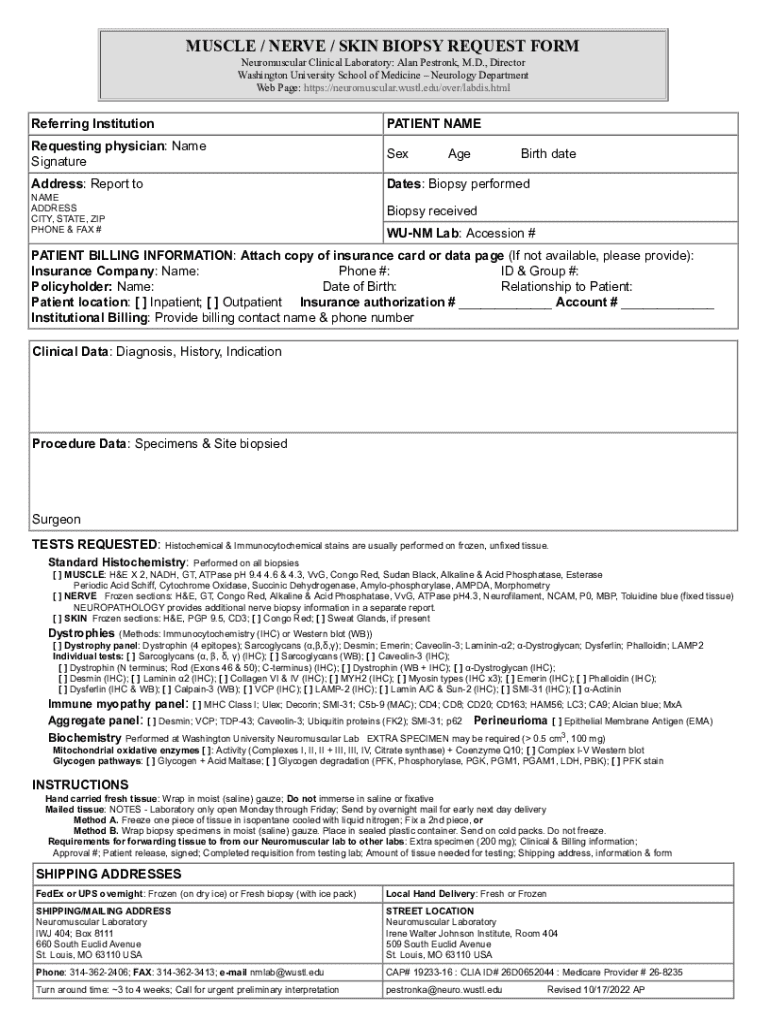
- Begin by filling in the 'Referring Institution' and 'Patient Name' fields. Ensure that all information is accurate to avoid any processing delays.
- Next, provide details for the 'Requesting Physician,' including their name and signature. This section is crucial for authorization.
- Complete the 'Patient Billing Information' section by attaching a copy of the insurance card or providing necessary details if not available.
- In the 'Clinical Data' section, enter relevant diagnosis, history, and indication for the biopsy. Be as detailed as possible to assist in accurate testing.
- Select the tests requested from the options provided. Make sure to check all applicable boxes for histochemical and immunocytochemical stains.
- Finally, review all entered information for accuracy before submitting your form through our platform.
Start using our platform today to streamline your document editing and submission process for free!
It's free
See more Neuromuscular Clinical Laboratory versions
Got questions?
Is it secure to sign my muscle nerve biopsy request form electronically?
You should use only reliable software solutions with strong data protection compliance to sign your paperwork electronically. DocHub is just the type of service you need! It stores data on Amazon Web Servers and complies with all required security standards and eSignature laws, so it’s a reliable way to electronically sign your muscle nerve biopsy request form or other forms using this tool.
How do you complete nerve skin biopsy request form on Android?
It is a no-brainer on a computer or via a mobile device to fill out a nerve skin biopsy request form with DocHub. All you need to do is open any installed browser on your smartphone and proceed to the DocHub site. Once authenticated, add your file and open it in editing mode. Use our toolbar to make your edits and save adjustments. Optionally, keep your file in your files or send it to a recipient immediately.
Security and compliance
At DocHub, your data security is our priority. We follow HIPAA, SOC2, GDPR, and other standards, so you can work on your documents with confidence.
Learn more


