



KNOW YOUR CUSTOMER (KYC) 2026

Get Form
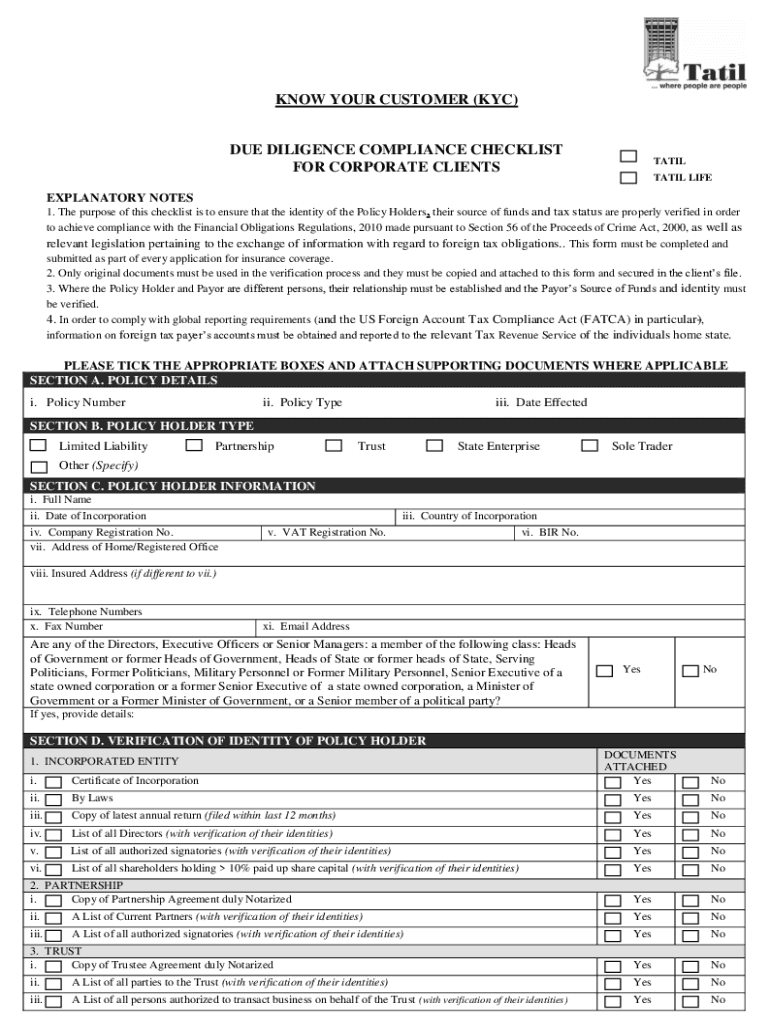
KNOW YOUR CUSTOMER (KYC) Preview on Page 1

Here's how it works

01. Edit your form online
Type text, add images, blackout confidential details, add comments, highlights and more.

02. Sign it in a few clicks
Draw your signature, type it, upload its image, or use your mobile device as a signature pad.

03. Share your form with others
Send it via email, link, or fax. You can also download it, export it or print it out.

How to use or fill out KNOW YOUR CUSTOMER (KYC) with our platform

Form edit decoration
9.5
Ease of Setup
DocHub User Ratings on G2
9.0
Ease of Use
DocHub User Ratings on G2
  1. Click ‘Get Form’ to open the KYC document in the editor.
  2. Begin with SECTION A, entering your Policy Number, Policy Type, and Date Effected. Ensure accuracy as these details are crucial for identification.
  3. In SECTION B, select the appropriate Policy Holder Type by ticking the relevant box. This helps categorize your entity correctly.
  4. Proceed to SECTION C and fill in all required Policy Holder Information including Full Name, Date of Incorporation, and Company Registration No. Attach any necessary supporting documents.
  5. For SECTION D, verify the identity of the Policy Holder by checking off the attached documents such as Certificate of Incorporation or Partnership Agreement as applicable.
  6. Complete SECTION E by indicating if any Shareholders have more than 10% participation and provide required documentation for Foreign INDICIA if necessary.
  7. In SECTION G, specify the Source of Funds by providing Annual Turnover details and attaching relevant financial statements.
  8. Finally, ensure that all signatures are completed in SECTION H before submitting your form for processing.

Start using our platform today to streamline your KYC process effortlessly!

See more KNOW YOUR CUSTOMER (KYC) versions

We've got more versions of the KNOW YOUR CUSTOMER (KYC) form. Select the right KNOW YOUR CUSTOMER (KYC) version from the list and start editing it straight away!
Versions Form popularity Fillable & printable
2017 4.7 Satisfied (46 Votes)
2013 4.7 Satisfied (25 Votes)
be ready to get more

Complete this form in 5 minutes or less

Get form

Got questions?

We have answers to the most popular questions from our customers. If you can't find an answer to your question, please contact us.
Contact us
Steps to check your KYC Status: Visit any Mutual Funds or Registrar Transfer Agents (RTA) Website where you have an investment. Check for KYC Status link, if available. Enter your 10-digit PAN and Captcha and click on Submit. Your KYC Status will be displayed as KYC Validated / KYC Registered / KYC On-Hold.
KYC means Know Your Customer and sometimes Know Your Client. KYC or KYC check is the mandatory process of identifying and verifying the clients identity when opening an account and periodically over time. In other words, banks must ensure that their clients are genuinely who they claim to be.
The KYC process entails the examination of identification documents, pictures, and files that use biometrics and service charges as confirmation of residency. To minimise fraud, banks must comply with the Know Your Customer or KYC process flow. If they dont comply, they may face severe penalties.
A CIP is concerned with identifying a businesss customers and ensuring those identities are unique and valid. CDD and EDD, in contrast, are about investigating a customers identity and background to understand their behavioral patterns and assess the risks they represent.
KYC or KYC check is the mandatory process of identifying and verifying the clients identity when opening an account and periodically over time. In other words, banks must ensure that their clients are genuinely who they claim to be.

Security and compliance

At DocHub, your data security is our priority. We follow HIPAA, SOC2, GDPR, and other standards, so you can work on your documents with confidence.

Learn more
ccpa2
pci-dss
gdpr-compliance
hipaa
soc-compliance
be ready to get more

Complete this form in 5 minutes or less

Get form

People also ask

Step 1: Download the KYC form from your banks official website or collect it from your nearest branch. Step 2: Fill in the required details, including your Aadhaar, PAN, and personal information. Step 3: Visit your nearest branch of the bank.

Related links

